6901-002114<01>
10
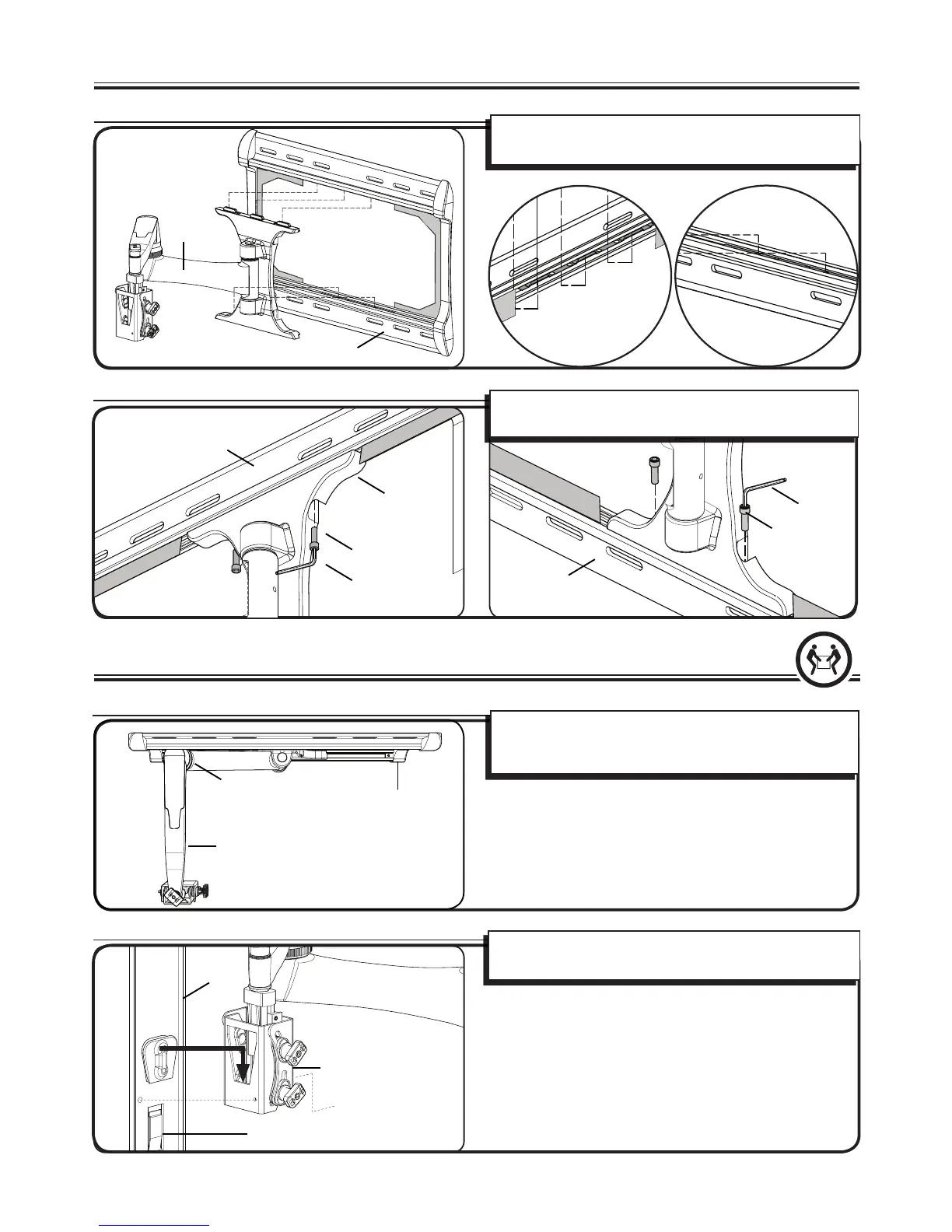
3 Attach Arm to Wall Plate
002542.eps
LF228 - screw arm in place
[01]
[28]
[03]
[01]
[31]
[32]
[28]
3-1 Align the holes
3-2 Secure the arm
Align the holes at the top and bottom of the arm [03] to the
holes in the wall plate [01].
Secure the arm assembly [03] to the wall plate [01] using bolt
[28]. Tighten with allen key [32].
4 Attach your TV to the Arm
[03]
(T)
[01]
002921.eps
SLF2 - Monitor to arm
[02]
[03]
(L)
[03]
4-1 Position the arm
Position arm [03] so the elbow is pressed against the wall.
Tighten the tension adjustment (T) to prevent the arms from
moving while installing the TV bracket.
4-2 Attach the bracket
Attach the TV bracket [02] to the arm assembly [03]. There is an
audible click when the parts are correctly assembled.
[01]


 To Next Page