9
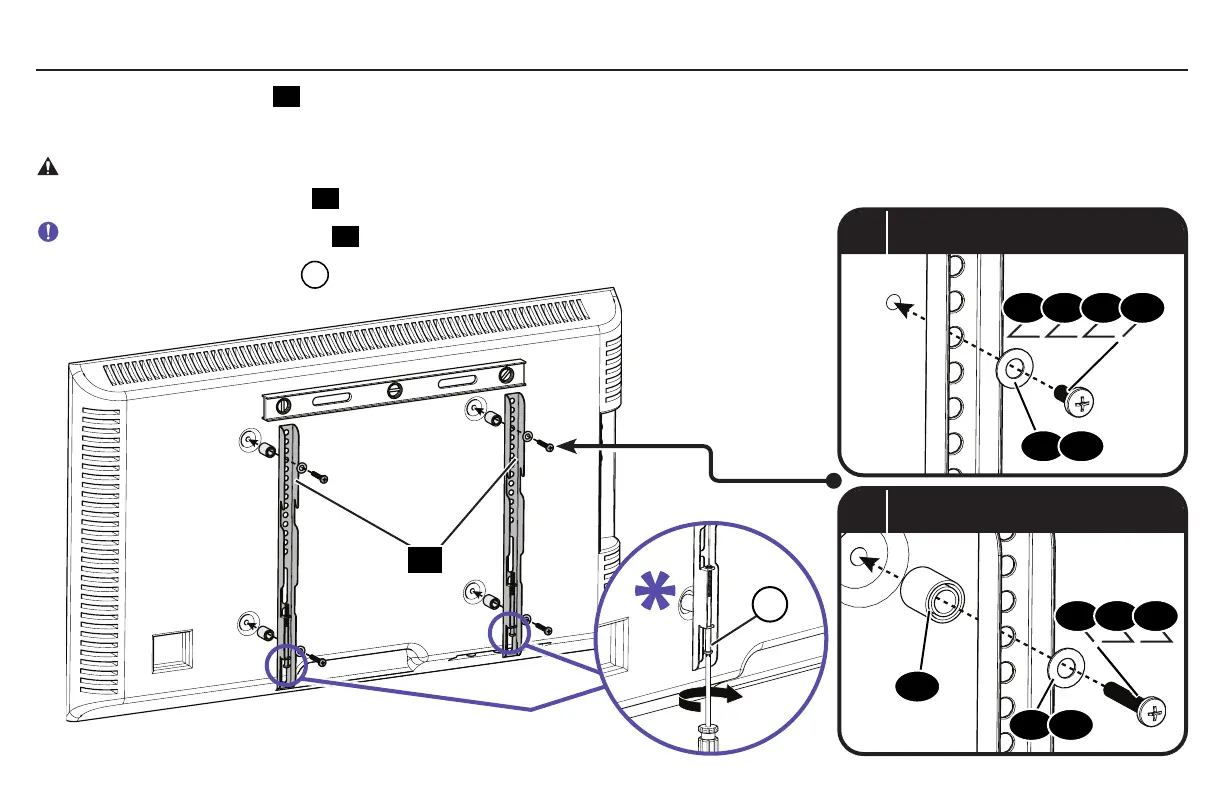
2.3 Attach Vertical TV Brackets
a
Flat Back
b
Round Back / Extra Space
Ensure that your TV brackets
07
are level and centered on the back of the TV.
Install using the TV screw/washer/spacer configuration you selected for your TV.
CAUTION: Avoid potential personal injuries and property damage! DO NOT use power tools for this step. Tighten the TV screws only
enough to secure the TV brackets
07
to the TV. DO NOT overtighten the TV screws.
IMPORTANT: Ensure TV brackets
07
are securely fastened before moving on to the next step.
*
NOTE: Back off locking screws
L
enough to give clearance when mounting to plate.
08 09 10 11
15 16
07
15 16
12 13 14
17
L


 To Next Page