EasyManua.ls Logo

Sanyo JA 224 - Adjustment and Block Diagrams; Adjustment of Bias Conditions; IC Block Diagram

Sanyo JA 224
7 pages
Print Icon
To Next Page IconTo Next Page
To Previous Page IconTo Previous Page
Loading...
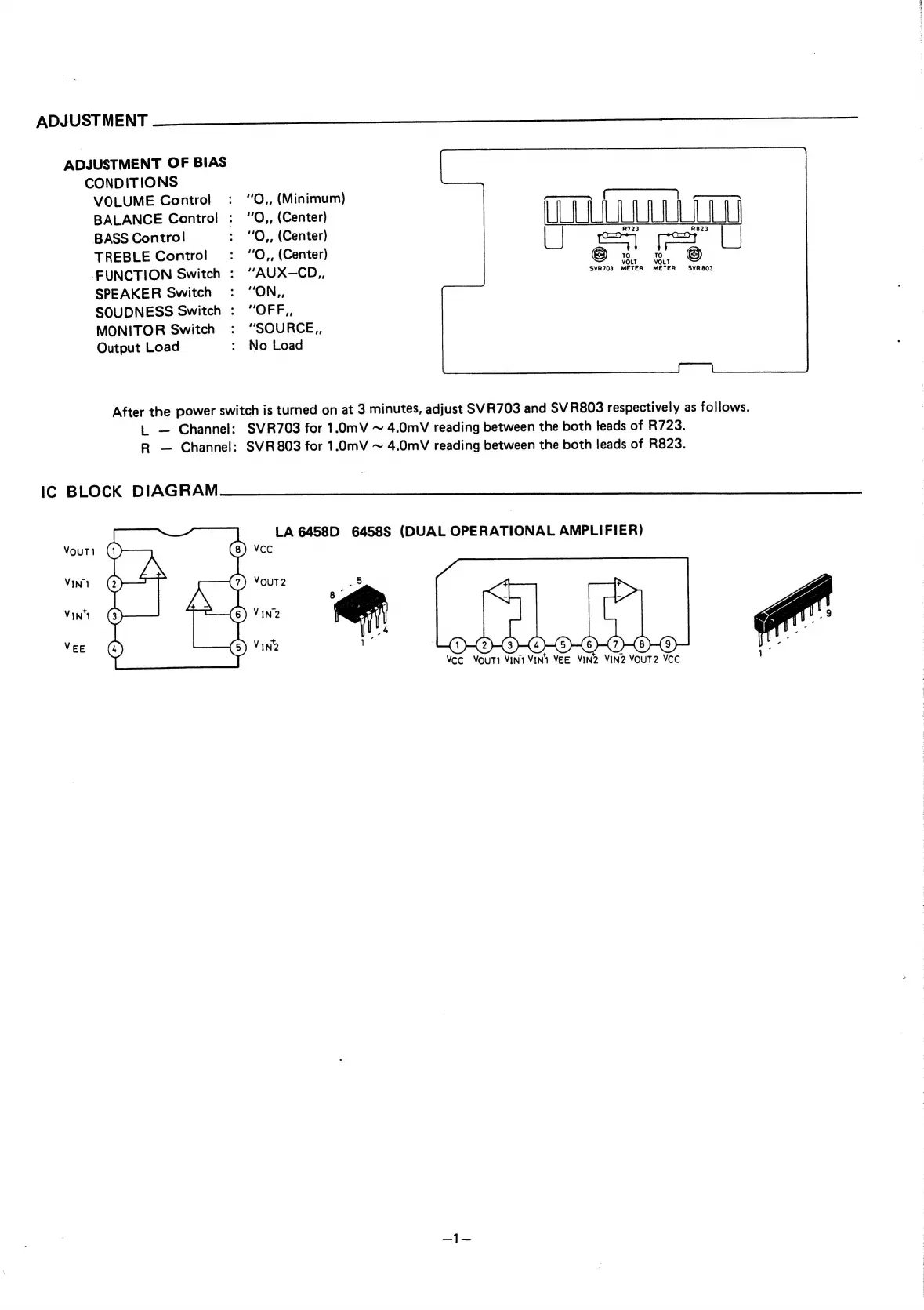
ADJUSTMENT
ADJUSTMENT
OF
BIAS
CONDITIONS
VOLUME
Control
:
“O,,
(Minimum)
BALANCE
Control
:
“O,,
(Center)
fF
|
——_
BASS
Control
:
“O,,
(Center)
R723
Re23
TREBLE
Control
:
“O,,
(Center)
LJ
6
2
@
|
FUNCTION
Switch
:
““AUX-—CD,,
SVR703
METER
METER
SVR803
SPEAKER
Switch
:
“ON,,
SOUDNESS
Switch
:
“OFF,,
MONITOR
Switch
:
“SOURCE,,
Output
Load
:
No
Load
After
the
power
switch
is
turned
on
at
3
minutes,
adjust
SVR703
and
SVR803
respectively
as
follows.
tL
Channel:
SVR703
for
1.0mV
~
4.0mV
reading
between
the
both
teads
of
R723.
R
Channel:
SVR803
for
1.0mV
~
4.0mV
reading
between
the
both
leads
of
R823.
IC
BLOCK
DIAGRAM
LA
6458D
6458S
(DUAL
OPERATIONAL
AMPLIFIER)
VCC
Vout
VIN1
VIN
VEE
VIN2
VIN2
VouT2
VCC
:

Related product manuals