EasyManua.ls Logo

Sanyo M9998LU - Page 2

Sanyo M9998LU
27 pages
Print Icon
To Next Page IconTo Next Page
To Previous Page IconTo Previous Page
Loading...
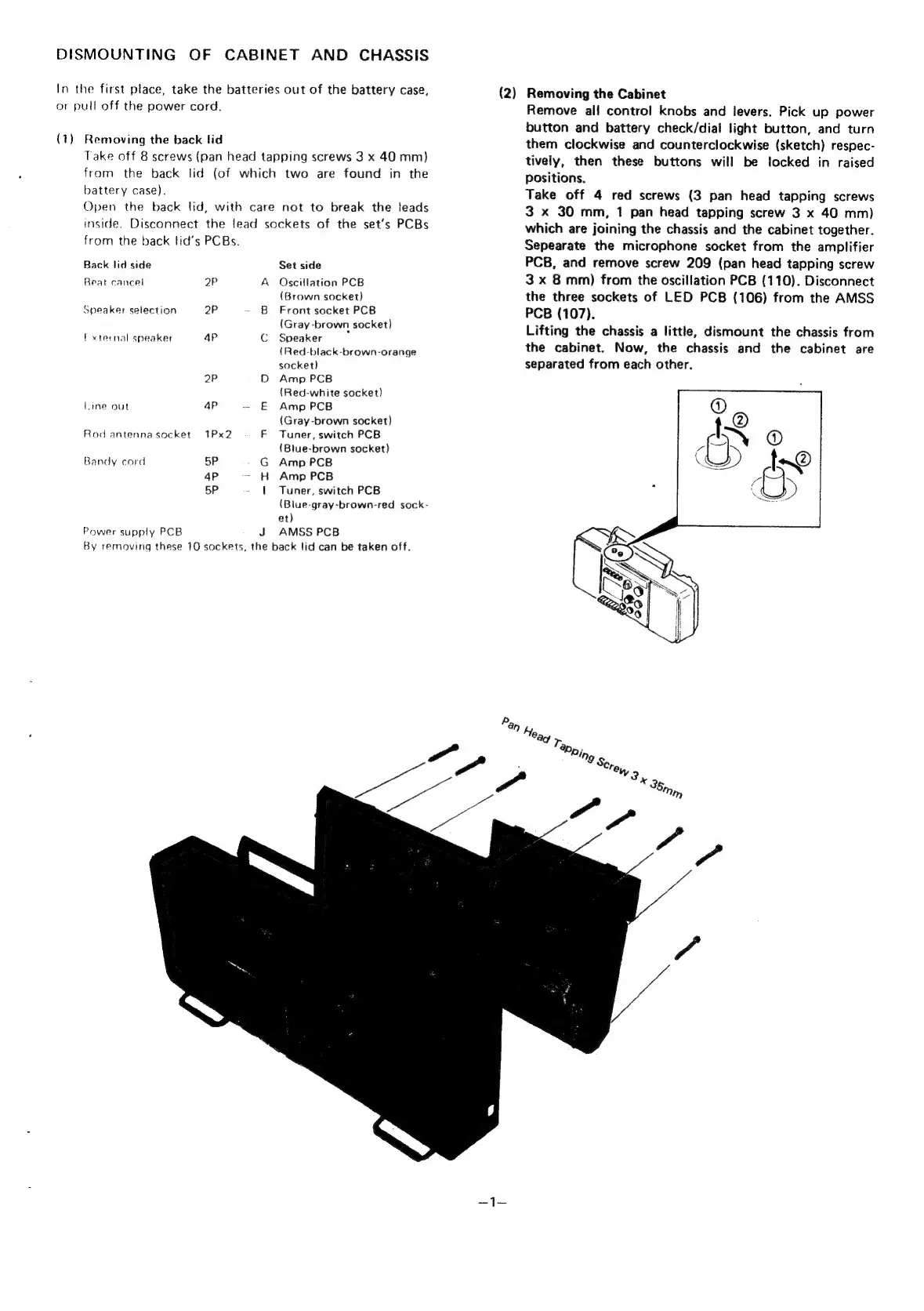
DISMOUNTING
OF
CABINET
AND
CHASSIS
In
the
first
place,
take
the
batteries
out
of
the
battery
case,
or
pull
off
the
power
cord.
(7)
Removing
the
back
lid
Take
off
8
screws
(pan
head
tapping
screws
3
x
40
mm)
from
the
back
lid
(of
which
two
are
found
in
the
battery
case).
Open
the
back
tid,
with
care
not
to
break
the
leads
inside.
Disconnect
the
lead
sockets
of
the
set’s
PCBs
from
the
back
lid’s
PCBs.
Back
lid
side
Set
side
Beat
cancel
2P
A
Oscillation
PCB
(Brown
socket)
Speaker
selection
2P
-
B
Front
socket
PCB
(Gray
-brown
socket)
f
xternal
speaker
4p
C
Speaker
.
(Red-black-brown-orange
socket)
2P
D
Amp
PCB
(Red-white
socket)
Line
out
4p
~-
E
Amp
PCB
(Gray-brown
socket)
Rod
antenna
socket
1Px2
F
Tuner,
switch
PCB
(Blue-brown
socket}
Bandy
cord
5P
G
Amp
PCB
4P
-
H
Amp
PCB
5P
|
Tuner,
switch
PCB
(Blue-gray-brown-red
sock-
et)
Power
supply
PCB
J
AMSS
PCB
By
removing
these
10
sockets,
the
back
lid
can
be
taken
off.
(2)
Removing
the
Cabinet
Remove
ali
control
knobs
and
levers.
Pick
up
power
button
and
battery
check/dial
light
button,
and
turn
them
clockwise
and
counterclockwise
(sketch)
respec-
tively,
then
these
buttons
will
be
locked
in
raised
positions,
Take
off
4
red
screws
(3
pan
head
tapping
screws
3
x
30
mm,
1
pan
head
tapping
screw
3
x
40
mm)
which
are
joining
the
chassis
and
the
cabinet
together.
Sepearate
the
microphone
socket
from
the
amplifier
PCB,
and
remove
screw
209
(pan
head
tapping
screw
3
x
8
mm)
from
the
oscillation
PCB
(110).
Disconnect
the
three
sockets
of
LED
PCB
(106)
from
the
AMSS
PCB
(107).
Lifting
the
chassis
a
little,
dismount
the
chassis
from
the
cabinet.
Now,
the
chassis
and
the
cabinet
are
separated
from
each
other.

Related product manuals