EasyManua.ls Logo

Sanyo M9998LU - Page 6

Sanyo M9998LU
27 pages
Print Icon
To Next Page IconTo Next Page
To Previous Page IconTo Previous Page
Loading...
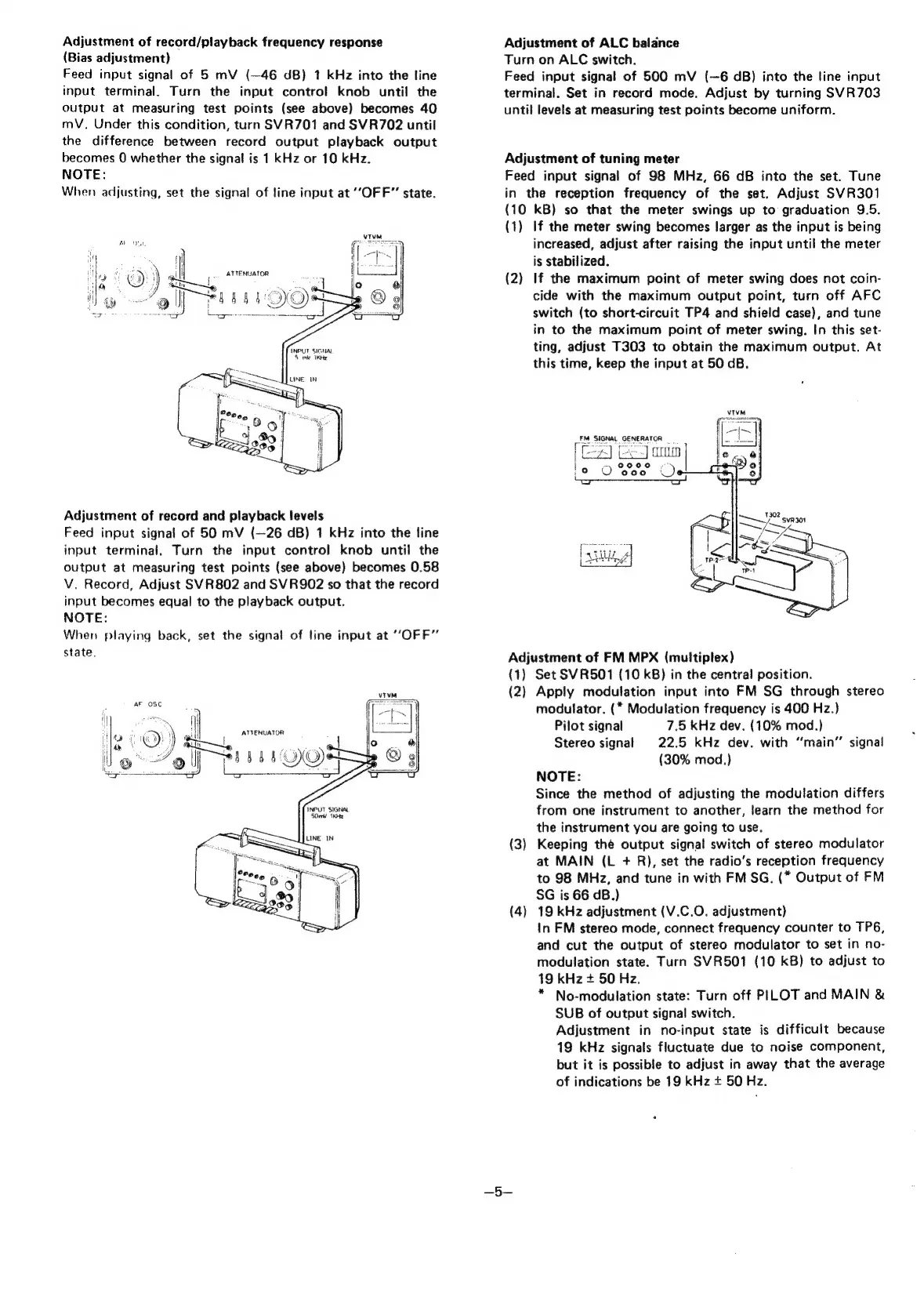
Adjustment
of
record/playback
frequency
response
(Bias
adjustment)
Feed
input
signal
of
5
mV
(—46
dB)
1
kHz
into
the
line
input
terminal.
Turn
the
input
control
knob
until
the
output
at
measuring
test
points
(see
above)
becomes
40
mV.
Under
this
condition,
turn
SVR701
and
SVR702
until
the
difference
between
record
output
playback
output
becomes
0
whether
the
signal
is
1
kHz
or
10
kHz.
NOTE:
When
adjusting,
set
the
signal
of
line
input
at
“OFF”
state.
ARO
OGL
Wf
i
ATTENUATOR
a)
)
Ss
4
=
;
gi
Adjustment
of
record
and
playback
levels
Feed
input
signal
of
50
mV
(—26
dB)
1
kHz
into
the
line
input
terminal.
Turn
the
input
control
knob
until
the
output
at
measuring
test
points
(see
above)
becomes
0.58
V.
Record,
Adjust
SVR802
and
SVR902
so
that
the
record
input
becomes
equal
to
the
playback
output.
NOTE:
When
playing
back,
set
the
signal
of
line
input
at
“OFF”
state.
|
~
|
~\\
i
ATTENUATOR
Jo
cH)
ad
Hl
-
<
oe
ol
BBS
QO
-
Adjustment
of
ALC
balance
Turn
on
ALC
switch.
Feed
input
signal
of
500
mV
(—6
dB)
into
the
tine
input
terminal.
Set
in
record
mode.
Adjust
by
turning
SVR703
until
levels
at
measuring
test
points
become
uniform.
Adjustment
of
tuning
meter
Feed
input
signal
of
98
MHz,
66
dB
into
the
set.
Tune
in
the
reception
frequency
of
the
set.
Adjust
SVR301
(10
kB)
so
that
the
meter
swings
up
to
graduation
9.5.
(1)
If
the
meter
swing
becomes
larger
as
the
input
is
being
increased,
adjust
after
raising
the
input
until
the
meter
is
stabilized.
(2)
If
the
maximum
point
of
meter
swing
does
not
coin-
cide
with
the
maximum
output
point,
turn
off
AFC
switch
(to
short-circuit
TP4
and
shield
case),
and
tune
in
to
the
maximum
point
of
meter
swing.
In
this
set-
ting,
adjust
T303
to
obtain
the
maximum
output.
At
this
time,
keep
the
input
at
50
dB,
Adjustment
of
FM
MPX
(multiplex)
(1)
Set
SVR501
(10
kB)
in
the
central
position.
(2)
Apply
modulation
input
into
FM
SG
through
stereo
modulator.
(*
Modulation
frequency
is
400
Hz.)
Pilot
signal
7.5
kHz
dev.
(10%
mod.)
Stereo
signal
22.5
kHz
dev.
with
“‘main’’
signal
(30%
mod.}
NOTE:
Since
the
method
of
adjusting
the
modulation
differs
from
one
instrument
to
another,
learn
the
method
for
the
instrument
you
are
going
to
use.
(3)
Keeping
thé
output
signal
switch
of
stereo
modulator
at
MAIN
(L
+
R),
set
the
radio’s
reception
frequency
to
98
MHz,
and
tune
in
with
FM
SG.
(*
Output
of
FM
SG
is
66
dB.)
(4)
19
kHz
adjustment
(V.C.O.
adjustment)
in
FM
stereo
mode,
connect
frequency
counter
to
TP6,
and
cut
the
output
of
stereo
modulator
to
set
in
no-
modulation
state.
Turn
SVR501
(10
kB)
to
adjust
to
19
kHz
+
50
Hz.
*
No-modulation
state:
Turn
off
PILOT
and
MAIN
&
SUB
of
output
signal
switch.
Adjustment
in
no-input
state
is
difficult
because
19
kHz
signals
fluctuate
due
to
noise
component,
but
it
is
possible
to
adjust
in
away
that
the
average
of
indications
be
19
kHz
+
50
Hz.

Related product manuals