EasyManua.ls Logo

Sanyo TP20 - Page 2

Sanyo TP20
9 pages
Print Icon
To Next Page IconTo Next Page
To Previous Page IconTo Previous Page
Loading...
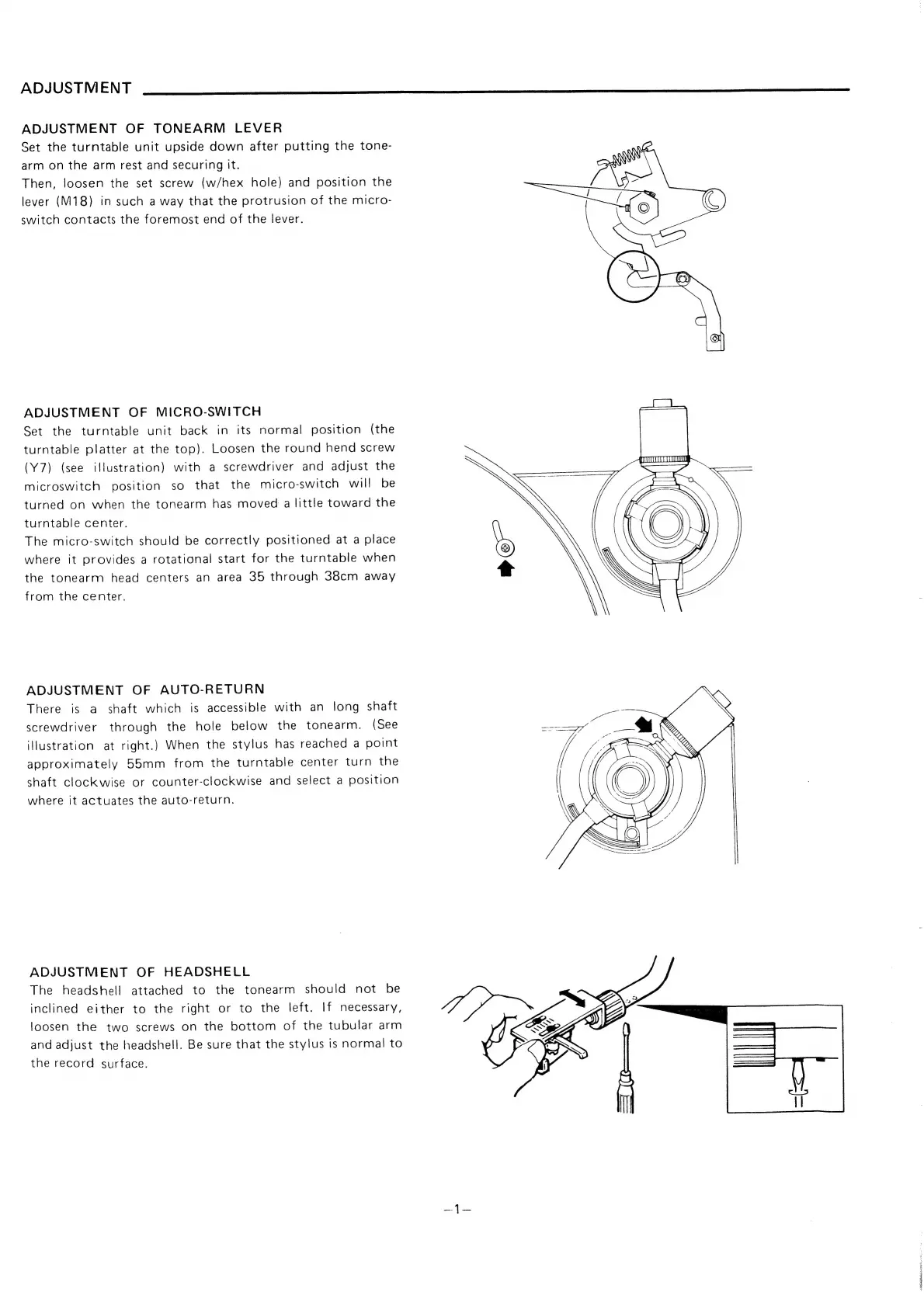
ADJUSTMENT
ADJUSTMENT
OF
TONEARM
LEVER
Set
the
turntable
unit
upside
down
after
putting
the
tone-
arm
on
the
arm
rest
and
securing
it.
Then,
loosen
the
set
screw
(w/hex
hole)
and
position
the
lever
(M18)
in
such
a
way
that
the
protrusion
of
the
micro-
switch
contacts
the
foremost
end
of
the
lever.
ADJUSTMENT
OF
MICRO-SWITCH
Set
the
turntable
unit
back
in
its
normal
position
(the
turntable
platter
at
the
top).
Loosen
the
round
hend
screw
(Y7)
(see
illustration)
with
a
screwdriver
and
adjust
the
microswitch
position
so
that
the
micro-switch
will
be
turned
on
when
the
tonearm
has
moved
a
little
toward
the
turntable
center.
The
micro-switch
should
be
correctly
positioned
at
a
place
where
it
provides
a
rotational
start
for
the
turntable
when
the
tonearm
head
centers
an
area
35
through
38cm
away
from
the
center.
ADJUSTMENT
OF
AUTO-RETURN
There
is
a
shaft
which
is
accessible
with
an
long
shaft
screwdriver
through
the
hole
below
the
tonearm.
(See
illustration
at
right.)
When
the
stylus
has
reached
a
point
approximately
55mm
from
the
turntable
center
turn
the
shaft
clockwise
or
counter-clockwise
and
select
a
position
where
it
actuates
the
auto-return.
ADJUSTMENT
OF
HEADSHELL
The
headshell
attached
to
the
tonearm
should
not
be
inclined
either
to
the
right
or
to
the
left.
If
necessary,
loosen
the
two
screws
on
the
bottom
of
the
tubular
arm
and
adjust
the
headshell.
Be
sure
that
the
stylus
is
normal
to
the
record
surface.

Related product manuals