41
The Sapling Company, Inc.
670 Louis Drive
Warminster, PA 18974
USA
P. (+1) 215.322.6063
F. (+1) 215.322.8498
www.sapling-inc.com
sbdconfig Installation
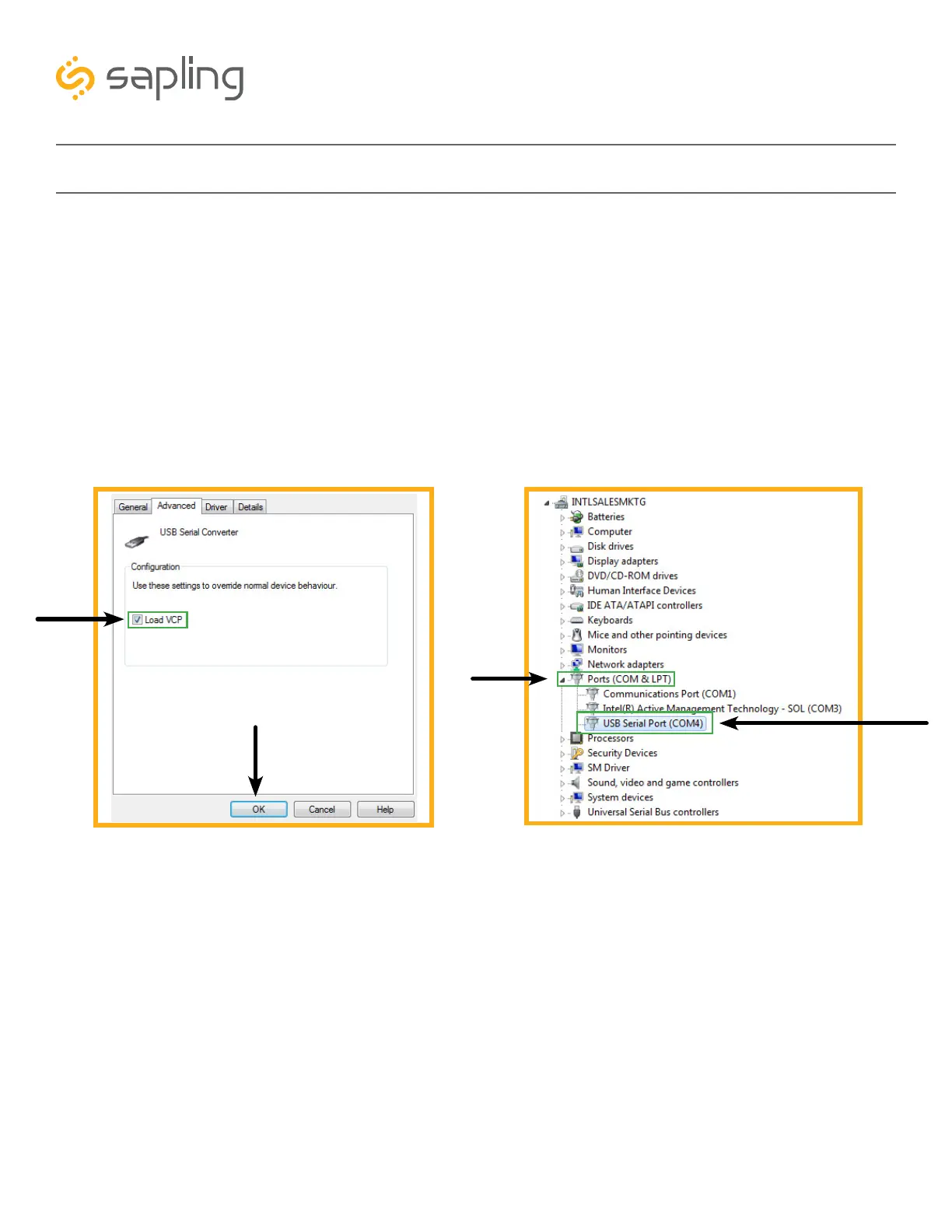
m. Open the “USB Serial Converter” by double clicking it, and a new window should appear.
n. Navigate to the “Advanced” tab, check the box next to “Load VCP,” then click OK (as shown
in Image F). The “Advanced” tab may not appear initially. If so, there is a need to exit out of the
“Device Manager,” and then re-open it.
o. Remove the USB Programming Cable from the USB port, wait 5 seconds, and plug it back in.
p. Open the “Device Manager” and scroll to “Ports.” Make note of which port the USB Serial Port
is assigned to as shown in Image G. For example: (COM 4). The “Ports” tab may not appear
initially. If so, there is a need to uninstall the drivers and restart from Step One.
Image F Image G



 To Next Page