LOST/NEW TELEPHONE
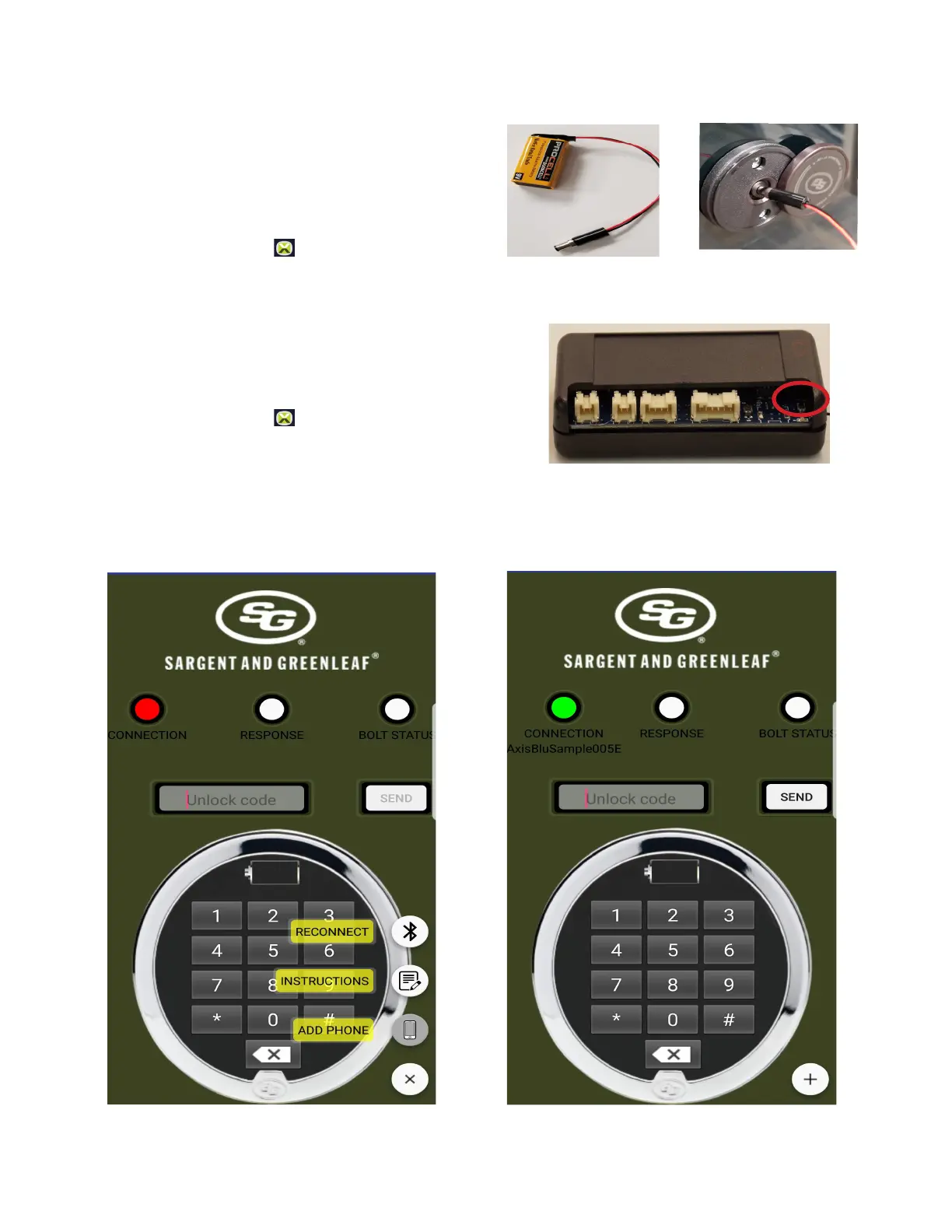
1. Plugina9Voltbatteryintotheconnector.
2. Openthemedalliononthefrontofthesafeexposingthebackup
batteryconnection.
3. Insertthebatterplugintothemedallionplug.
4. Removetheplugafter3seconds.
5. NavigatetotheAxisBlu™Icon andselecttheapplicationicon.
6. Use“CONNECTINGTOAxisBlu™“topair/repairyourdevice.
7. Openyourlockusingthelastknowvalidcombination.
SuppliedwithyourAxisBlu™Medallioninstallationisabackupbatteryconnection.Usingthebackupbatteryconnection,youcanresettheblue
toothmoduleandconnectwithyournewphone.
LOST/NEW TELEPHONE KEYPAD
1. OpenthesafedoorandgainaccesstotheBluetoothmodule.
2. Pressanholdtheresetbuttonlocatednexttotheoutsideofthecase.
3. NavigatetotheAxisBlu™Icon andselecttheapplicationicon.
4. Use“CONNECTINGTOAxisBlu™“topair/repairyourdevice



 To Next Page