8 1-800-810-WIRE • www.sargentlock.com • A8151D
Copyright © 2015, Sargent Manufacturing Company, an ASSA ABLOY Group company. All rights reserved.
Reproductions in whole or in part without express written permission of Sargent Manufacturing Company is prohibited.
3/31/15
IN120 Mortise Lock
Inside of Door
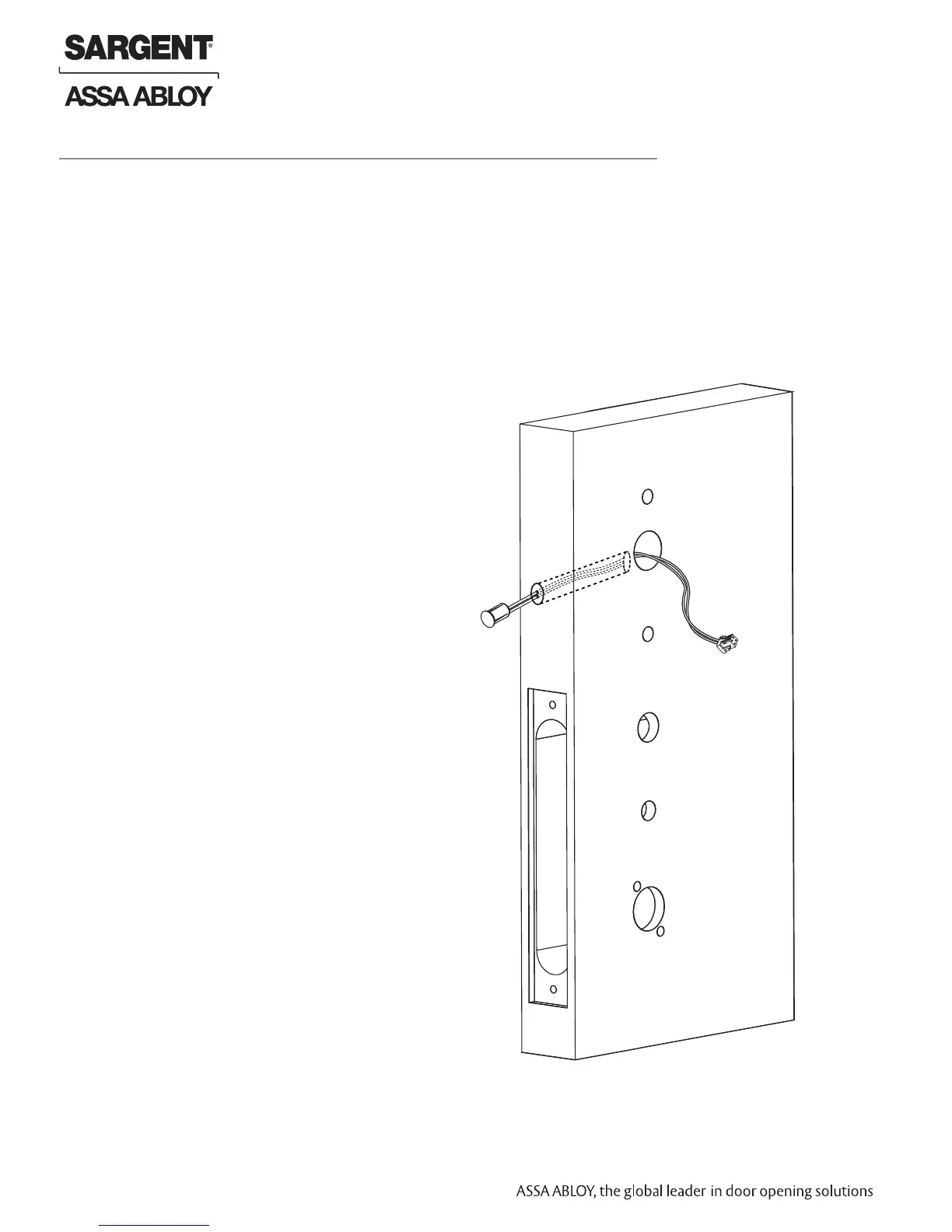
3 Install Door Position Switch (DPS)
1. Push wires through raceway toward lock prep.
2. Push DPS firmly into place by hand.
Note: DO NOT TAP SWITCH WITH ANY TOOL.
3. Install magnet into door frame. Push firmly into place by hand.
See instruction A7983A.
Fig. 3
Door Position
Switch (DPS)
CAUTION: if DPS is not installed or is installed
improperly, door status monitoring features will
not function.
Note: Do not pull the lock into the pocket using the harness alone.
Ensure that the wire harness is not pinched between the lock and the mortise pocket.
* Only required with the 7900 lock body - 8200 has an integrated DPS


 To Next Page