2
Intended Use
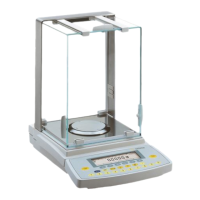
The Master
pro
Series from Sartorius
offers precision balances for mass
(weight) determination. The balances
in this series have capacities ranging
from 0.1 mg to 34 kg.
A broad range of special performance
features make the Master
pro
balances ideal for use as measuring
and test equipment in ISO or GLP
quality management systems.
These features include:
– The fully automatic self-calibrating
and adjustment function, isoCAL
(time- and temperature-dependent)
– reproTEST for quick determination
of the standard deviation to check
the reproducibility of results
– ISO/GLP-compliant recording
capability for printouts
– Password-protected menu lock
Master
pro
balances meet the highest
requirements on the accuracy and
reliability of weighing results through
the following features:
– Efficient filtering-out of vibration
– Stable and reproducible results
– Excellent readability under any
lighting conditions
– Rugged, durable weighing system
Master
pro
balances save work and
speed up simple routine applications
through:
– Ultrafast response times
– Built-in application programs,
including
Application 1:
– Toggling between two
weight units
– Counting
– Weighing in percent
– Animal weighing
– Recalculation
– Calculation
– Density determination
Application 2:
– Checkweighing
– Time-controlled functions
Application 3:
– Totalizing
– Formulation
– Statistics
with the following additional
functions:
– Second tare memory
– Identification Codes
– Product data memory
– Manual data storage
in Application 3
– Automatic initialization when
you switch on the balance
– Easy input of alphanumeric
sample, lot and balance IDs
– Flexible, easy-to-use display
and control unit
– Connectivity for control through
an on-line computer
Contents
Intended Use ................................2
Safety Precautions ........................3
Operating Design ........................3
Getting Started ............................7
Configuring the Balance
Setting the Language ..............12
Entering User Data (Input) ........13
Entering Date and Time ........15
Application Menu Settings ...... 17
Balance Operating Menu ...... 28
Configuring the Printout .......... 33
Displaying ”Info“ ....................36
Operating the Balance
Basic Weighing Function..........37
Calibration/Adjustment ..........40
Application Programs
Toggle between
Two Weight Units .............. 48
Counting .......................... 50
Weighing in Percent .......... 53
Animal Weighing .............. 57
Recalculation .................... 61
Calculation ...................... 66
Density Determination .......... 69
Checkweighing ..................78
Time-controlled Functions .... 83
Totalizing ........................ 86
Formulation ...................... 90
Statistics .......................... 94
Additional Functions
(App. Menu) ........................ 98
Second Tare Memory ........ 98
Individual Identification Codes
100
Saving Values Manually ....104
Product Data Memory ......105
Basic Settings ......................108
”FlexPrint“ Printout Function......109
Additional Functions
(Balance Menu) ..................111
Combining Applications ........113
Examples of Application
Combinations ......................114
Data Output Functions .......... 120
Pin Assignment Chart ........ 133
MP8 Interface Emulation ......135
Error Codes and Messages ......136
Care and Maintenance ............138
Instructions for Recycling ..........139
Overview
General Views......................140
Description of the Keys ..........144
Specifications ......................145
Accessories (Options) ............152
Declaration of Conformity ......154
EC Type Approval ................157
Plates and Markings ..............160
Index ................................161
Appendix
Entering the User Password



 To Next Page