3
Operating Design
Keys
Your Master
pro
balance is operated
either by using the keys on the display
and control unit or via a connected
PC. Operation by means of
the balance keys is described in
the following.
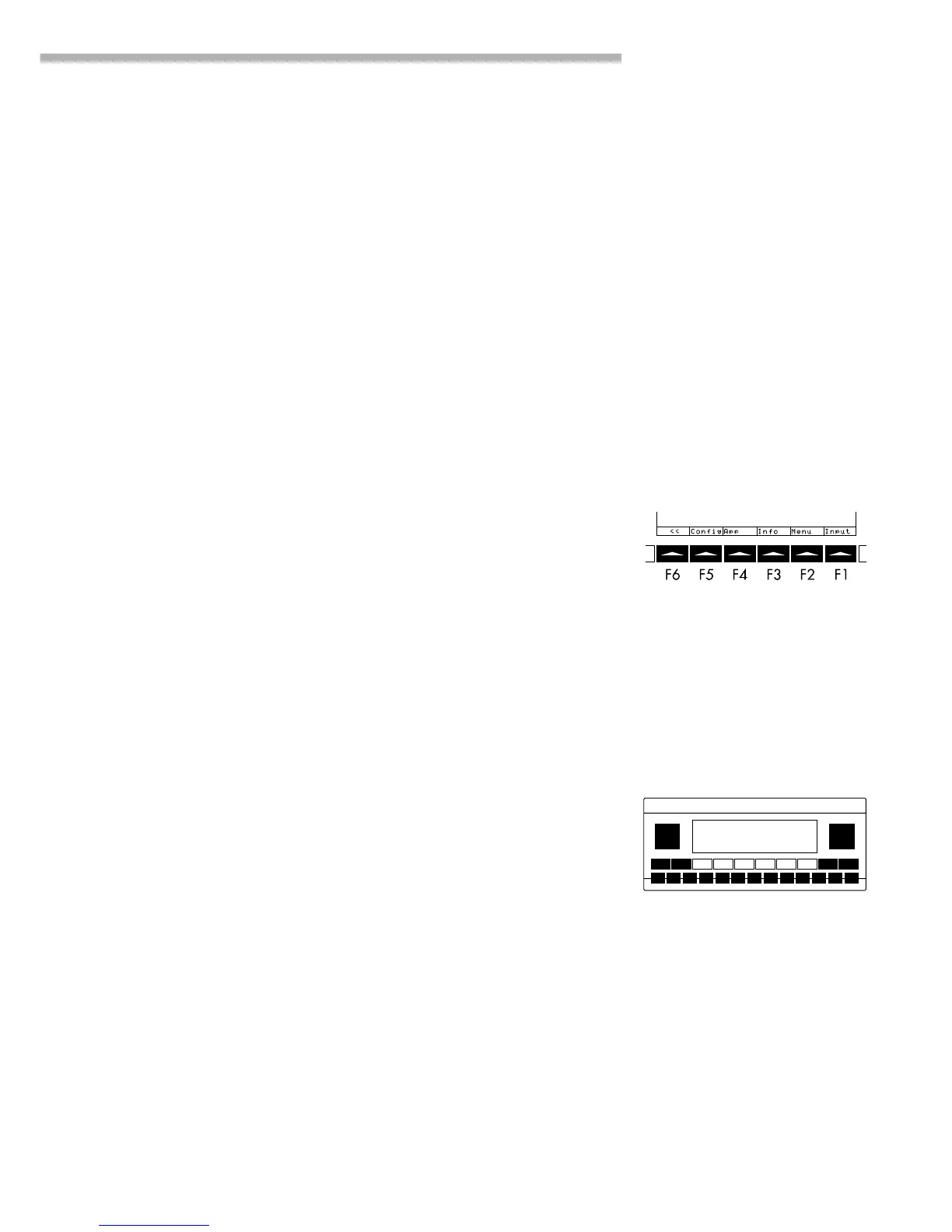
Function Keys (Soft Keys)
The current function of a soft key
is indicated in the bottom line
of the display. In the example
shown below,
oo: Exit the setup menu
Config: Printout
App: Application menu
Info: Balance data
Menu: Balance operating menu
Input: Input all user data
The function keys are numbered F1
through F6, from right to left.
Labeled Keys
These keys always have the function
indicated, but are not available at
all times. Availability of these
functions depends on the current
operating status and menu settings.
Operating Design
The balances in the Master
pro
Series
consist of a weighing cell and a
display and control unit. In addition
to the choice of power supply (via
AC adapter or external rechargeable
battery pack), your balance also has
an interface port for connecting a
printer, computer or universal remote
control switch.
The display and control unit and the
weighing cell can be set up
separately. Operation of Master
pro
balances follows a uniform
“philosophy” which is described in
this manual.
Where not expressly indicated
otherwise, the uses described in
this manual apply to verified and
verifiable balance versions
(indicated by the suffix “-0CE”
in the model number), as well
as the standard version.
Combination of Several Applications
You can combine the use of various
application programs to meet your
more complicated requirements.
To select application programs
one after the other, press D
(toggle function).
Safety Precautions
This balance has been constructed
in accordance with the European
Directives as well as international
regulations and standards for
operation of electrical equipment,
electromagnetic compatibility, and
stipulated safety requirements.
Improper use or handling, however,
can result in damage and/or injury.
Read these operating instructions
thoroughly before using your
balance to prevent damage to the
equipment. Keep these instructions
in a safe place.
Follow the instructions below
to ensure safe and trouble-free
operation of your balance:
!Do not use this balance in
a hazardous area/location
!Make sure that the voltage rating
printed on the AC adapter is
identical to your local line voltage
– The only way to switch the power
off completely is to disconnect
the AC adapter
– The balance housing is IP54-
protected against dust deposits
and water splashes – the housing
is not completely dust-tight,
however.
– Protect the AC adapter from
contact with liquid.
– Connect only Sartorius accessories
and options, as these are
optimally designed for use with
your Master
pro
balance.
When cleaning your balance, make
sure that no liquid enters the balance
housing; use only a slightly moistened
cloth to clean the balance.
Do not open the balance housing.
If the seal is broken, this will result in
forfeiture of all claims under the
manufacturer’s warranty.
In case you have any problems with
your balance:
$ contact your local Sartorius office,
dealer or service center



 To Next Page