EasyManua.ls Logo

Saswell SAS6000UTK-7-WIFI - OPERATING YOUR THERMOSTAT; Fan and System Mode Selection

Saswell SAS6000UTK-7-WIFI
42 pages
Print Icon
To Next Page IconTo Next Page
To Previous Page IconTo Previous Page
Loading...
26
OPERATING YOUR THERMOSTAT
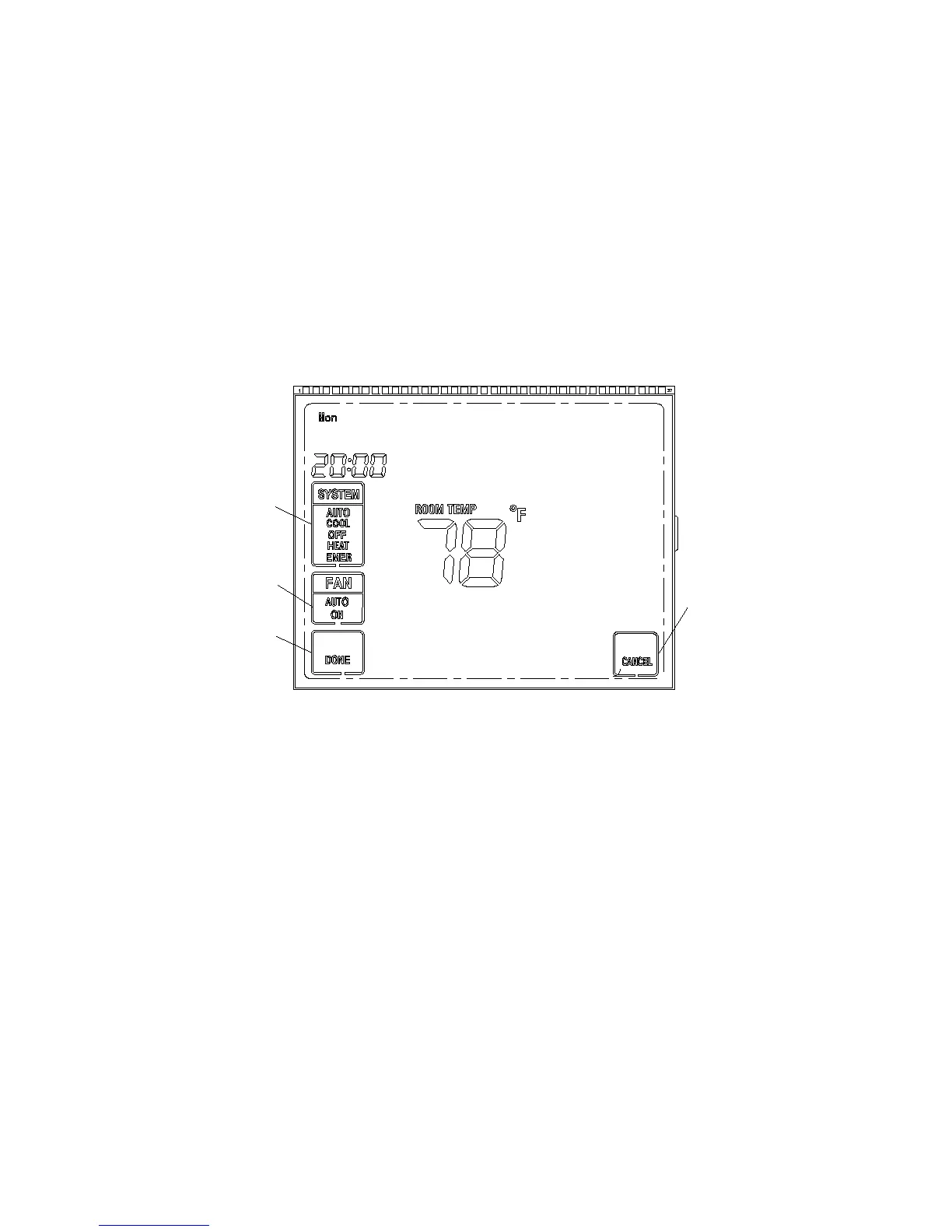
Choose the Fan Setting (Auto or On)
Fan Auto is the most commonly selected setting and runs the fan only when the heating or cooling system is on.
Fan On selection runs the fan continuously for increased air circulation or to allow additional air cleaning
Choose the System Setting (Cool, Off, Heat, Emer, Auto)
Press the SYSTEM button to select:
Heat: Thermostat controls only the heating system
Cool: Thermostat controls only the cooling system
Press SYSTEM option
to your requirement
Press FAN option
to your requirement
Press DONE to save
and exit
Press CANCEL to
disregard current
setting and exit

Other manuals for Saswell SAS6000UTK-7-WIFI

Related product manuals