© SATEL 2017 3/4 | SATEL • Budowlanych 66, 80-298 Gdansk, Poland • tel. +48 58 320 94 00 • www.satel.eu
2. Check the COM port location
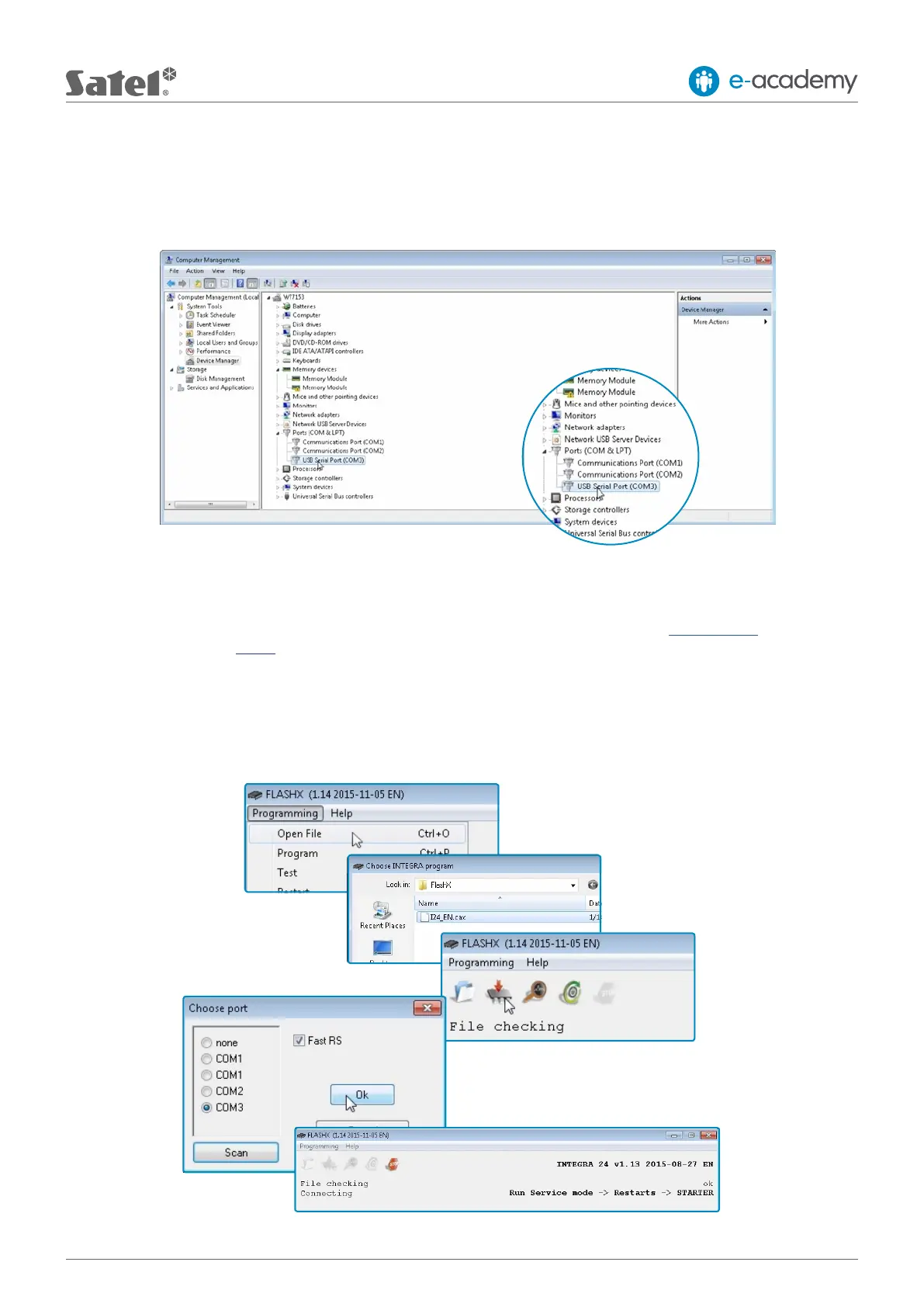
Having connected the control panel to the computer, determine on which port the USB-RS converter is installed.
Todothis, open the CONTROL PANEL, then the DEVICE MANAGER, and the COM and LPT ports in it. Here you can
verify which COM port number has been assigned to the converter. Remember or note this information.
3. Downloadtherequiredrmware
Check whether you have the required software: the latest FLASHX and the correct rmware intended for your model
of INTEGRA control panel. If not, download the latest software free of charge from the www.satel.eu website or use
the direct links given above.
4. Run the FLASHX program
Run the FLASHX program on your computer, select the OPEN FILE tab and open the le with the latest version of
rmware for your control panel. Then select the PROGRAM tab. In the window that will open, select the correct port,
whose number was checked in Step 2. Click “OK” to conrm your selection.











 To Next Page