© SATEL 2017 4/4 | SATEL • Budowlanych 66, 80-298 Gdansk, Poland • tel. +48 58 320 94 00 • www.satel.eu
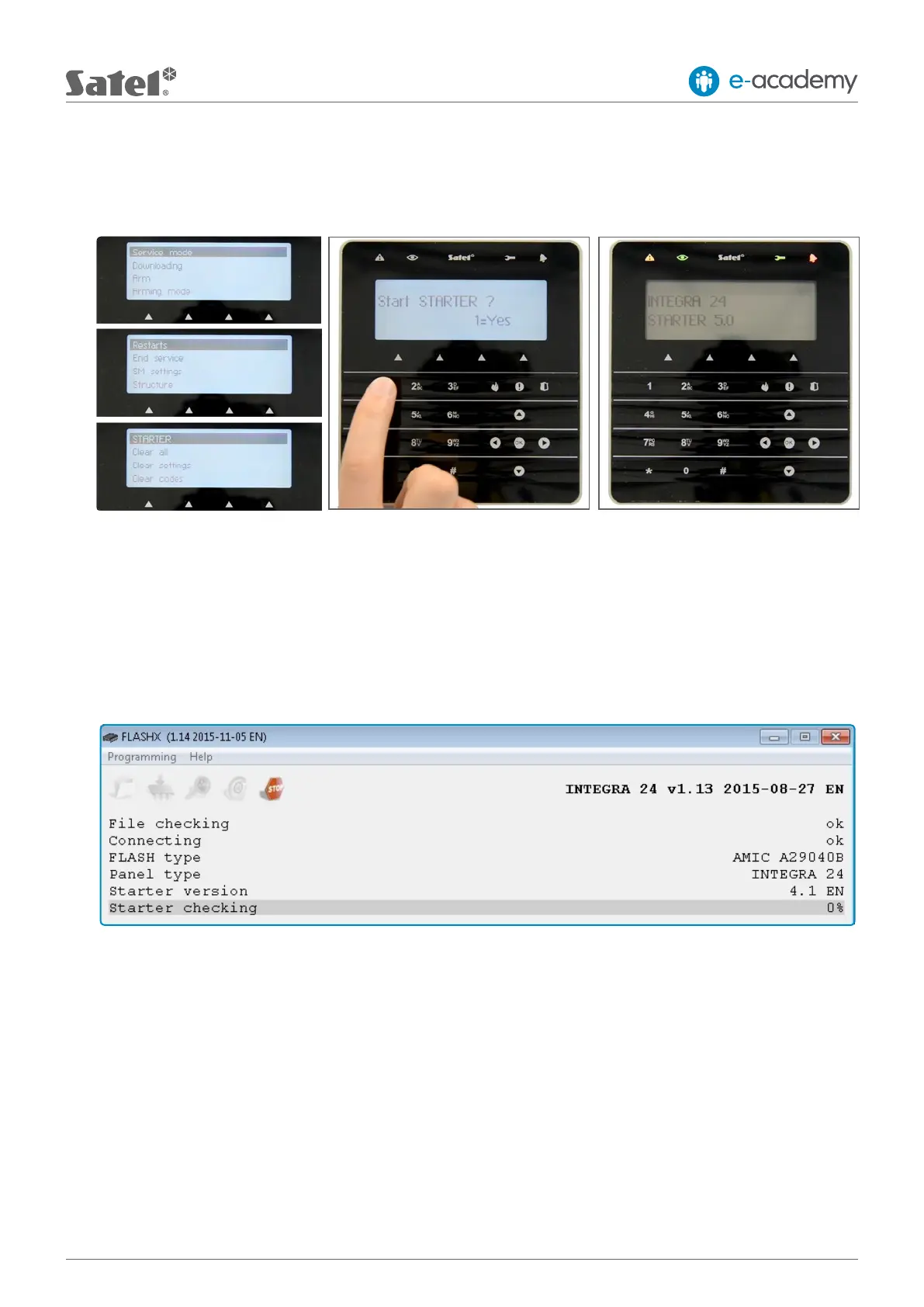
5. Run the STARTER in control panel
Enter the control panel service mode. To do this, you must enter the service code. Having conrmed it with
the “*” (asterisk) button, select RESTARTS, and then STARTER and conrm it’s activation by pressing the “1” button.
If the activation is done properly, all 4 keypad LEDs will be blinking simultaneously.
6. Programming procedure
To start programming, you must run the FLASHX program again. It will compare the installed rmware version with
that you want to install, and then will prompt you for conrmation to continue. The acceptance will result in removing
the old rmware version and programming the FLASHX memory. After completion of this process, verication of
thechanges introduced and restart of the control panel will follow.
7. Testing
After completion of the programming process, it is advisable to ensure that it has been carried out correctly. To do
this, re-check the software version of the panel as described in the introduction to Section III.
The process of control panel programming is nished when the nal conrmation message is displayed by the FLASHX
program. The last step is to use the “OK” conrmation command to exit the control panel service mode.











 To Previous Page