SATEL 3
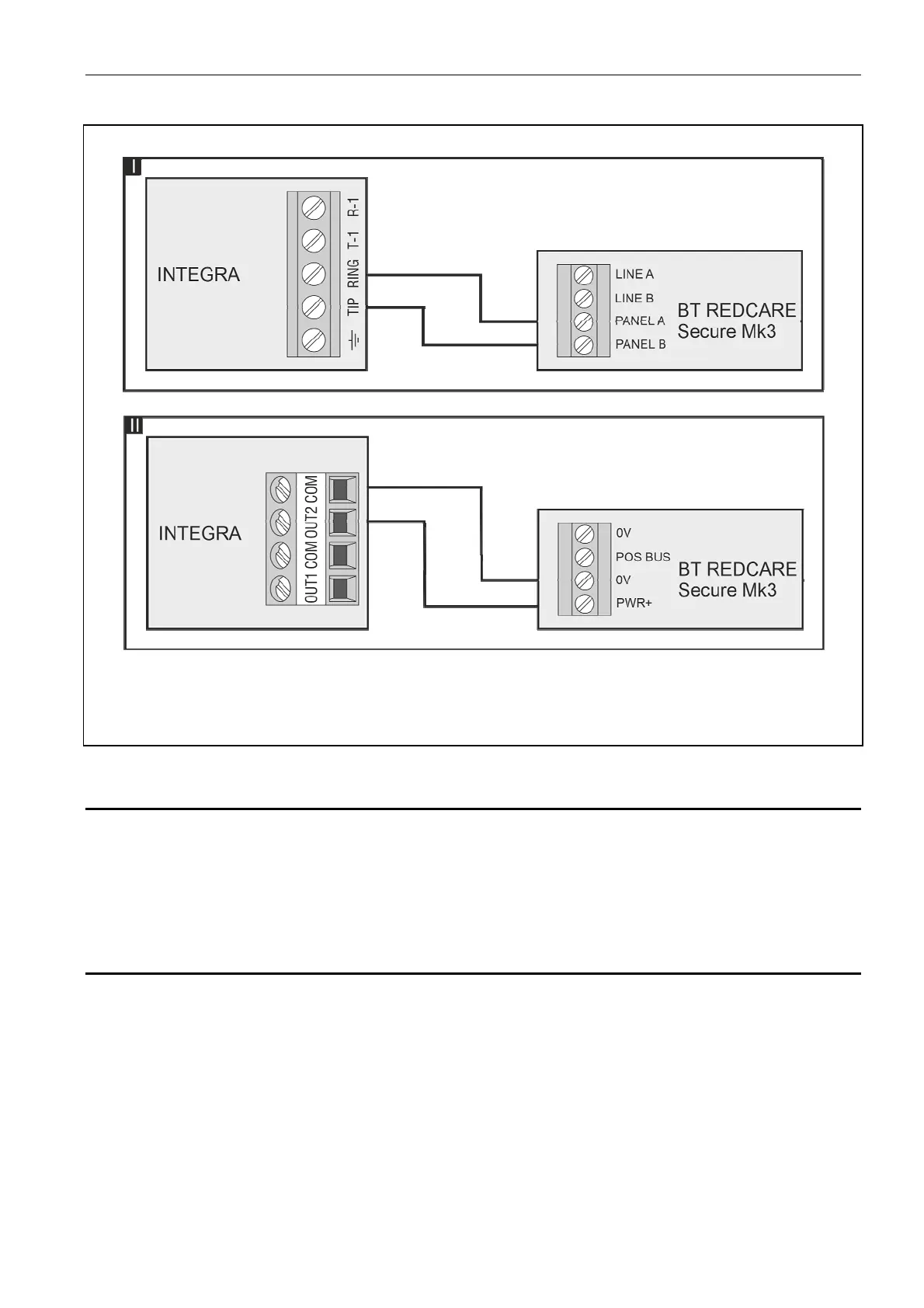
Fig. 1. The way to connect BT Redcare Secure Mk3 to an INTEGRA panel.
I – Dial capture module connected to PSTN dialer.
II – High current output connected to Redcare power input.
3. System programming
Connect your computer to an INTEGRA panel for programming using:
DLOADX software (available from Satel website)
PC computer running Windows
USB-RS programming cable
3.1 Programming communication with BT Redcare Secure Mk3 unit
1. Navigate to “Data → Reporting → Monitoring stations” in DLOADX.
2. Click the tick box next to “Reporting – TELEPHONE”.
3. Select “Station 1 only”.
4. Select “Reporting Format: Contact ID (full)”.
5. Enter “29” in “Tel. Number”.
6. Enter the last 4 digits of the Redcare TAID as the identifier. Enter this in both “Identifiers
1” and “Identifiers Sys.”.
7. Navigate to “Data → Outputs”.
8. Program the Output 2 function to “41: Power supply”.
9. Write the changes to the panel.











 To Next Page