22 / 37
Ö General: The General text boxes enable the name of the operator and the place of
measurement to be recorded.
Ö Commentaries: The Commentaries text boxes enable additional information to be
entered.
Ö Recall current configuration: this button enables information on the dosimeter to
be reread at any moment.
Ö Apply new configuration: this button enables the entered information to be
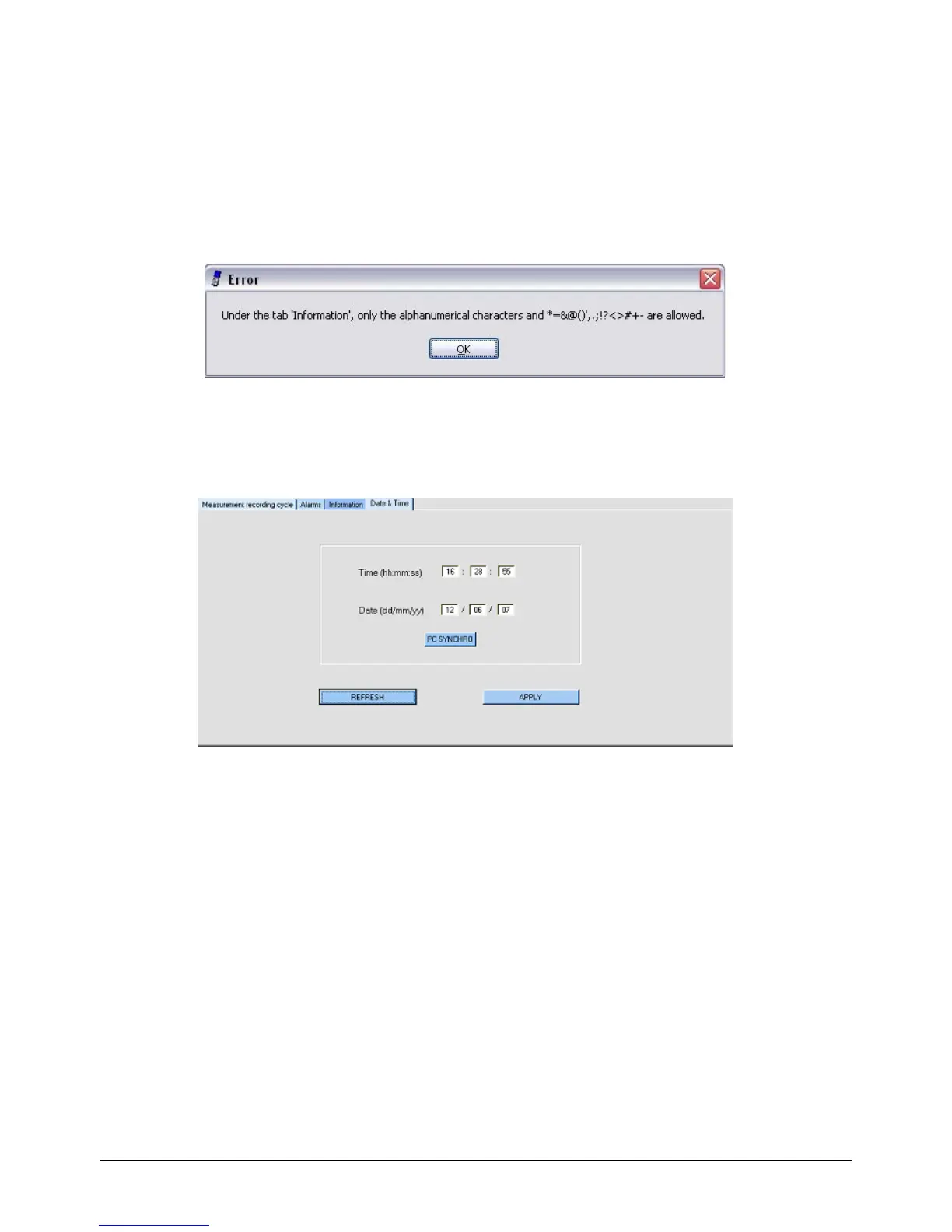
validated and the new parameters to be transferred to the dosimeter. An error message
appears if the format of the entered information is incorrect. The (*) character indicates
that the field is invalid.
Figure 17 : Invalid characters entered
3.3.4 Configurating Date and Time
The Date & Time tab enables the date and time of the device.
Figure 18 : Date and Time configuration screen of the dosimeter
Ö Time (hh:mm:ss): this field enables the time of the dosimeter to be updated in the
format Hours:Minutes:Seconds
Ö Date (dd/mm/yy): this field enables the date of the dosimeter to be updated in the
format Day/Month/Year.
Ö PC Synchro: this button enables the dosimeter to be configured with the date and
time of the PC on which the software is installed.
Ö Refresh: This button enables the current date and time of the dosimeter to be reread
at any moment.
Ö Apply: this button enables the modifications to be validated and transferred to the
dosimeter.


 To Next Page