ENGLISH - 7
3. How to assemble dish (reector)
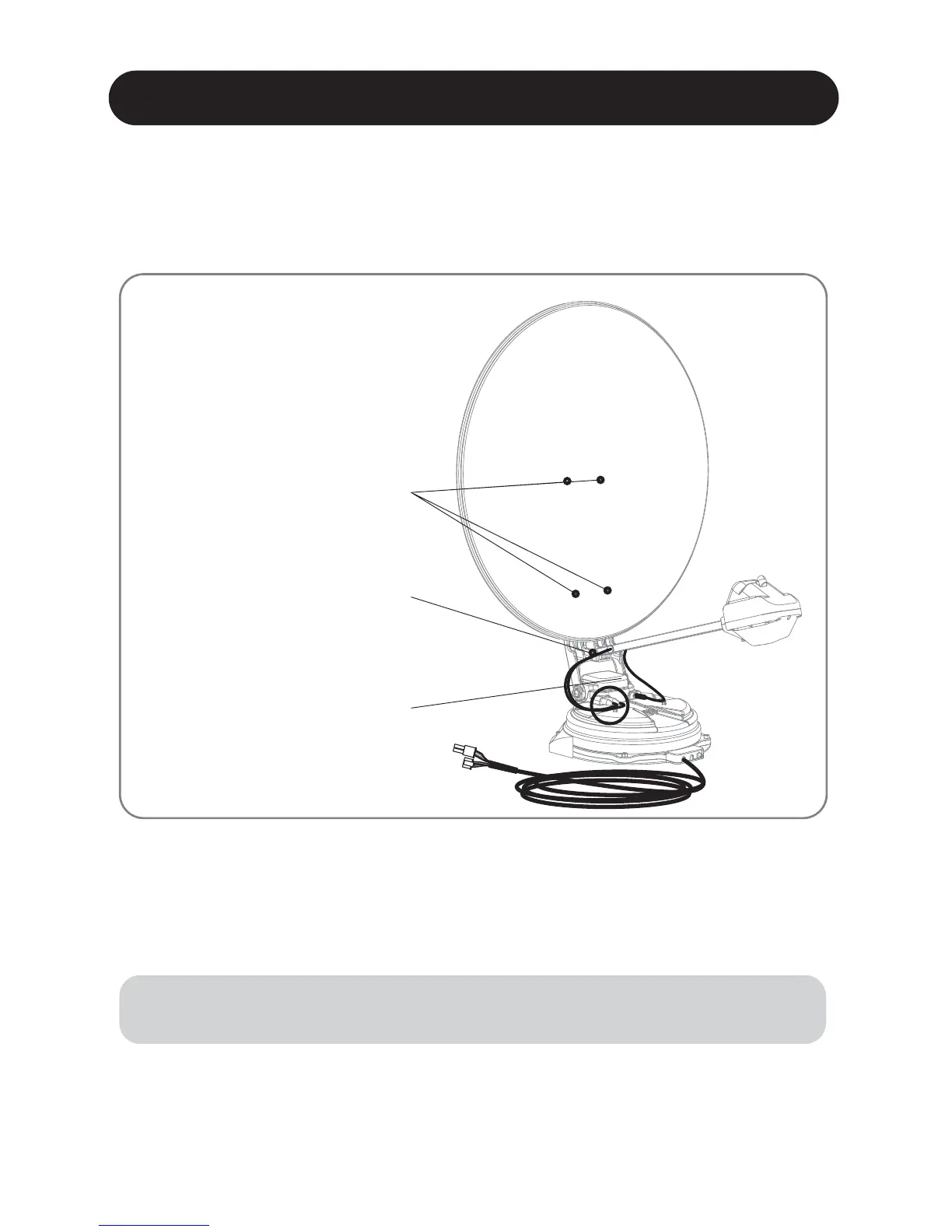
To avoid cable damage, x LNB cable and auto skew cable as enlarged image
on following page.
※
Step 1 :
Step 2 :
Step 3 :
Press POWER button on the controller to turn on the unit and press OK button on
any satellite
When reector bracket is lifted up to vertical direction(about 90 degrees), turn
the unit o
Connect the reector to the reector bracket
Step 4 :
Step 5 :
Step 6 :
Combine LNB arm with reector bracket
Connect LNB cables and auto skew cable to the connector on the body, and cover
the connectors on both sides with waterproof cap for protection
Align LNB cables on the body using cable clamps
Step 7 : Power on and check the installation is completed by selecting HOME position
Connect LNB cable to body
and align using cable clamp.
Reector bracket is connected to
the reector
LNB arm is connected to
reector bracket


 To Next Page