EasyManua.ls Logo

SawStop JSS - Understanding Status Lights; Normal Operation Status; Bypass Mode Status; Paddle Out Status

SawStop JSS
29 pages
Print Icon
To Next Page IconTo Next Page
To Previous Page IconTo Previous Page
Loading...
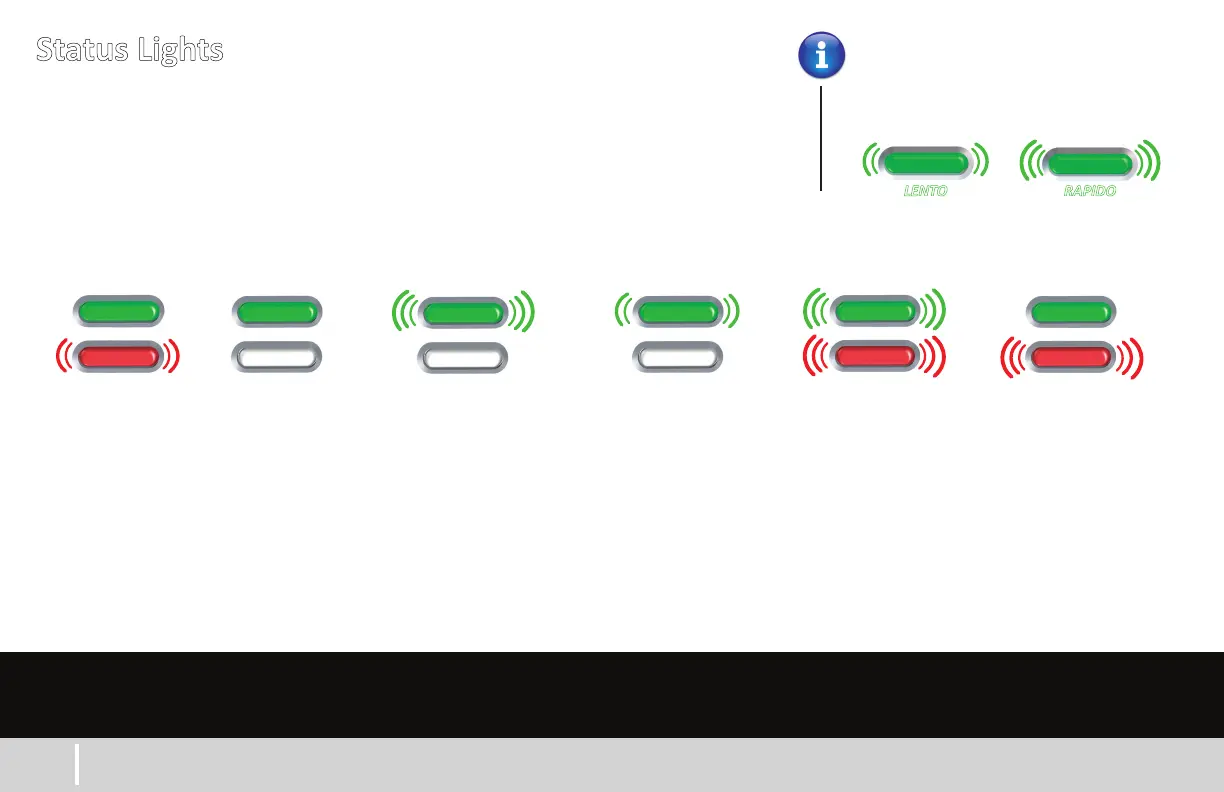
Status Lights
SLOW
SOLID
Starng up.
Allow 10 secs
to complete.
Se está
encendiendo.
Permita 10
segundos para
que se complete
el arranque.
OFF
SOLID
Saw is ready
or motor is
running.
La sierra está
lista o el motor
está girando.
SOLID
FAST
Contact detected
while blade was
stopped. Wait 5 secs
to clear.
Se detectó un contacto
con la hoja mientras
estaba parada. Espere 5
segundos para que se
despeje.
OFF
FAST
Blade is coasng
down. Do not touch
blade or brake will
acvate.
La hoja se está parando.
No toque la hoja; de lo
contrario, se acvará el
freno.
OFF
SLOW
Saw is in
bypass mode.
La sierra está en
modo de bypass.
FAST
FAST
Start/stop paddle
is out. Push in to
clear.
La palanca de
arranque/parada
está hacia afuera.
Empújela para
despejar.
Luces de estado
The green and red lights under the power switch indicate the status of the saw.
Las luces verde y rojas debajo del interruptor de energía indican el estado de la sierra.
Lights can flash slow or fast.
Las luces pueden destellar lento o rápido.
Startup
Ready -
Running
Coasng
Down
Bypass
Mode On
Paddle Out
Blade Contact
While Stopped
7
www.sawstop.com
FAST
SLOW
LENTO RAPIDO

Other manuals for SawStop JSS

Related product manuals