Hardware manual PCD1.M2220-C15 │ Document 27-640 – Version ENG03 │ 2020-03-25
Saia-Burgess Controls AG
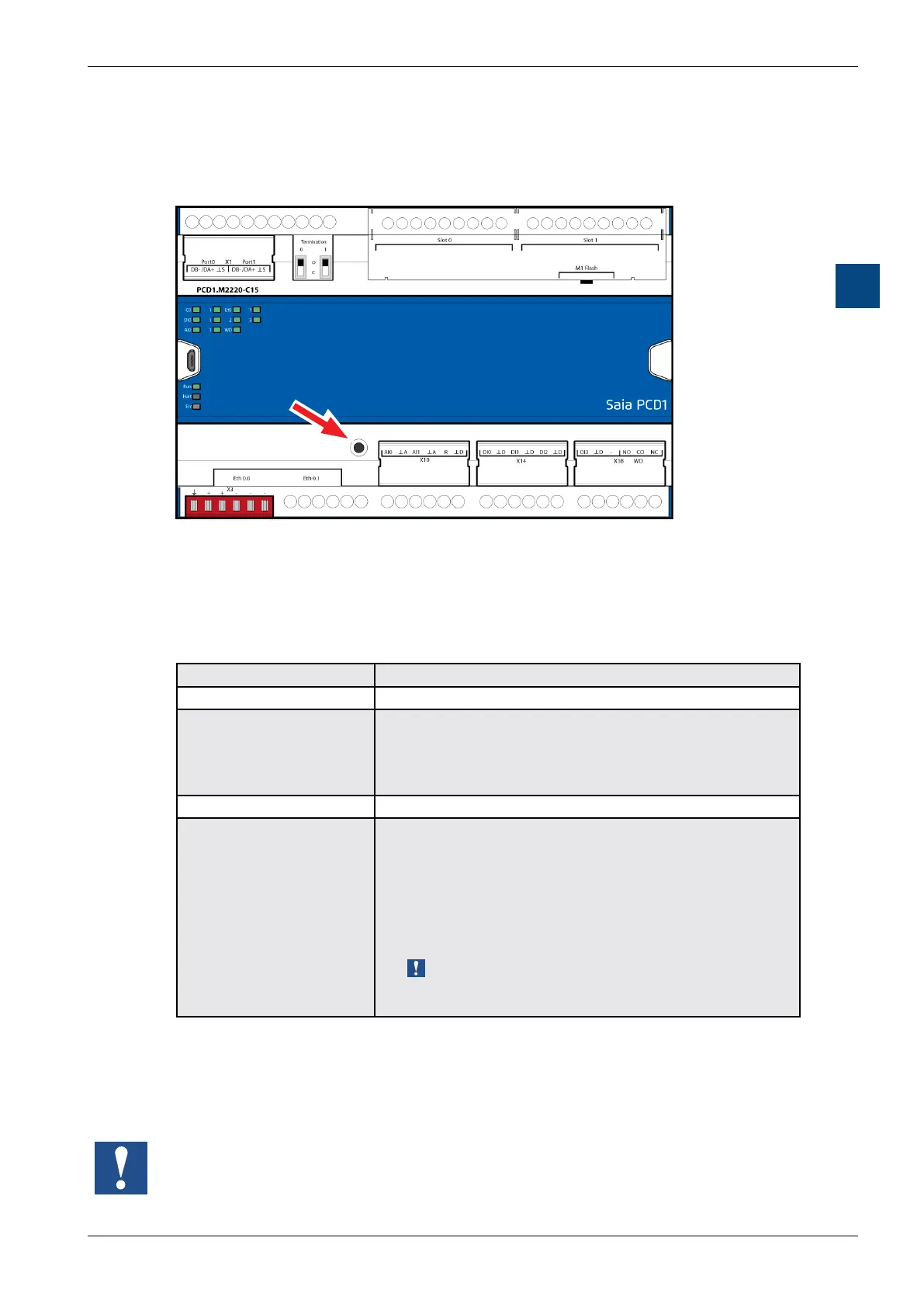
Run/Stop button
CPU/processor unit
3-12
3
3.8 Run/Stop button
The operating mode can be changed during operation or when switching on:
WhenswitchingonthePCD1:
if the Run/Stop button is pressed while the PCD switches on and then released
during one of the subsequently described sequences, one of the following actions
can be triggered:
LED sequence Action
Green, ashing (1 Hz) Changes to the “Boot” status and waits for FW download.
Red, with quick ashes (4 Hz) Media/resources (ash, register, ag, etc.) is deleted.
The clock is set to 00:00:00 01.01.1990.
The user program is retained (content of the µSD card).
CPU goes to “RUN”.
Red, ashes slowly (2 Hz) The user program does not start, CPU goes to “Stop”
Red/green, ashing (2 Hz) Saved data is deleted:
- User program
- Hardware settings
- Media/resources (ash, register, ag, etc.)
- On the internal µSD card or
the card in the slot “M1 ash”
(selection using PG5 -> Device Congurator -> Backup
location).
When using a plug-in ash memory extension (M1 ash),
the user program is not copied on the µSD card (see Chapter
“3.5.4 System memory structure”).
WhenoperatingthePCD1:
if the button is pressed in Run mode for longer than 0.5 seconds and less than 3
seconds, the controller changes to stop mode and vice versa.
If the button is pressed for longer than 3 seconds, the last user program saved is
loaded from the plug-in ash memory extension (M1 ash).


 To Next Page