11
14 13
15
118 1097
6
5
4
3
2
1
lb
12
lb
...
A B C D E F G H I J K L M N O P Q R S T U V W X Y Z
A B C D E F G H I J K L M N o P Q R S T U V W X Y Z
0 1 2 3 4 5 6 7 8 9
0 1 2 3 4 5 6 7 8 9
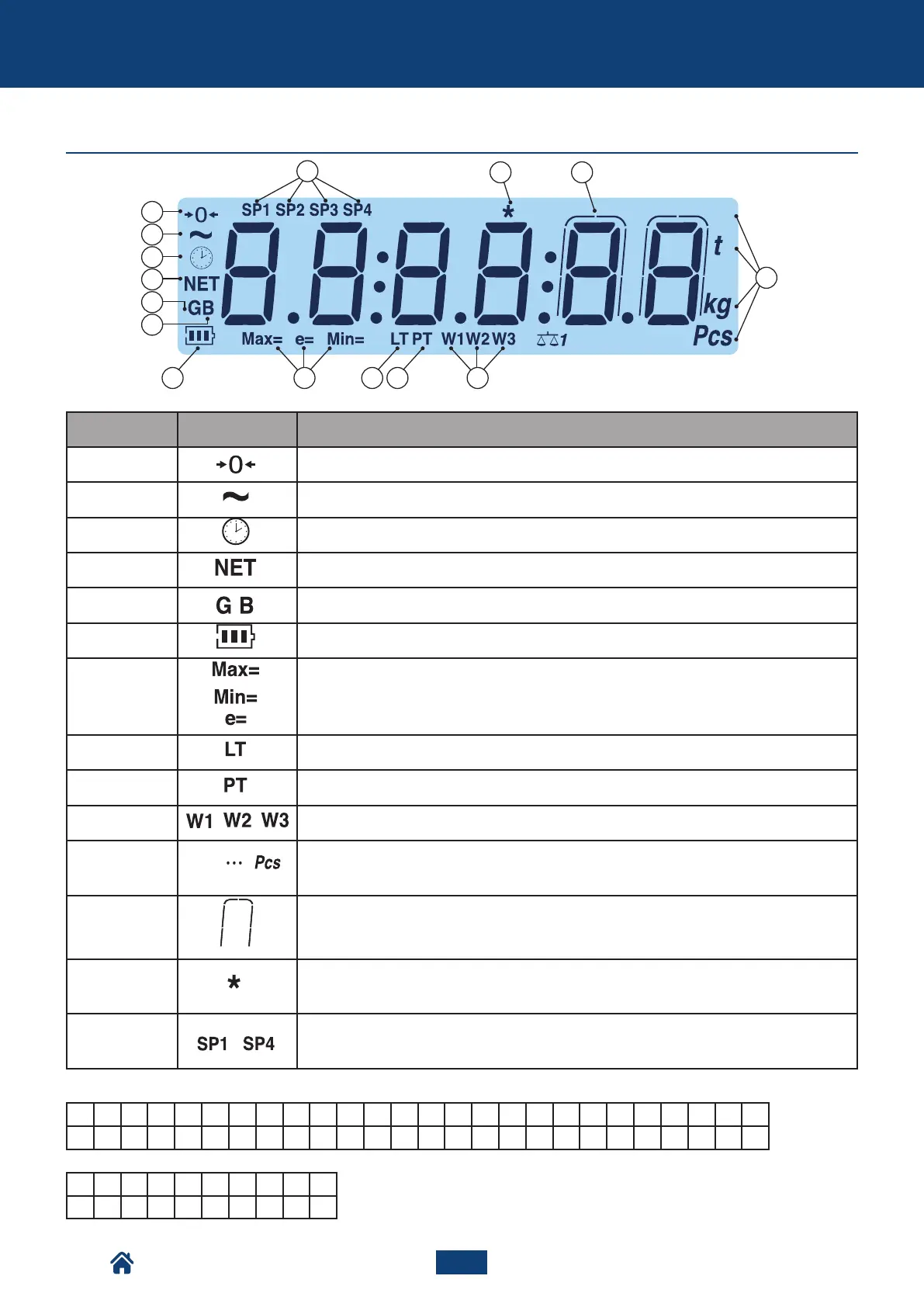
THE DISPLAY
LETTERS:
NUMBERS:
Main features of the scale
Number Symbol Description
(1) The scale is unloaded and at zero (gross).
(2) The weight is unstable.
(3) The time is being shown on the display.
(4) The weight displayed is net. There is a saved tare.
(5,6) The weight displayed is gross.
(7) Battery level.
(8) Metrics are being displayed.
(9) A locked tare is active.
(10) A manual tare is active.
(11) Indicate the range of active weighing.
(12)
Units of measurement - Pounds (lb), tonnes (t), kilograms (kg), grams (g), number of pie-
ces (Pcs).
(13) The weight is being displayed in high resolution.
(14)
Indicates a key is pressed.
In some operating modes, it indicates that a specific function is active.
(15) Indicate the active relay ports (only with the optional board).
NU2-IPC20_50-E-0918



 To Next Page