25
5 sec.
HI.RES
HoLD
PerC
net.Gro
a. b. c.
0.0 0 0
0.0 0 0
funCt
MODE
total
formul
Count
CheCk
Conver
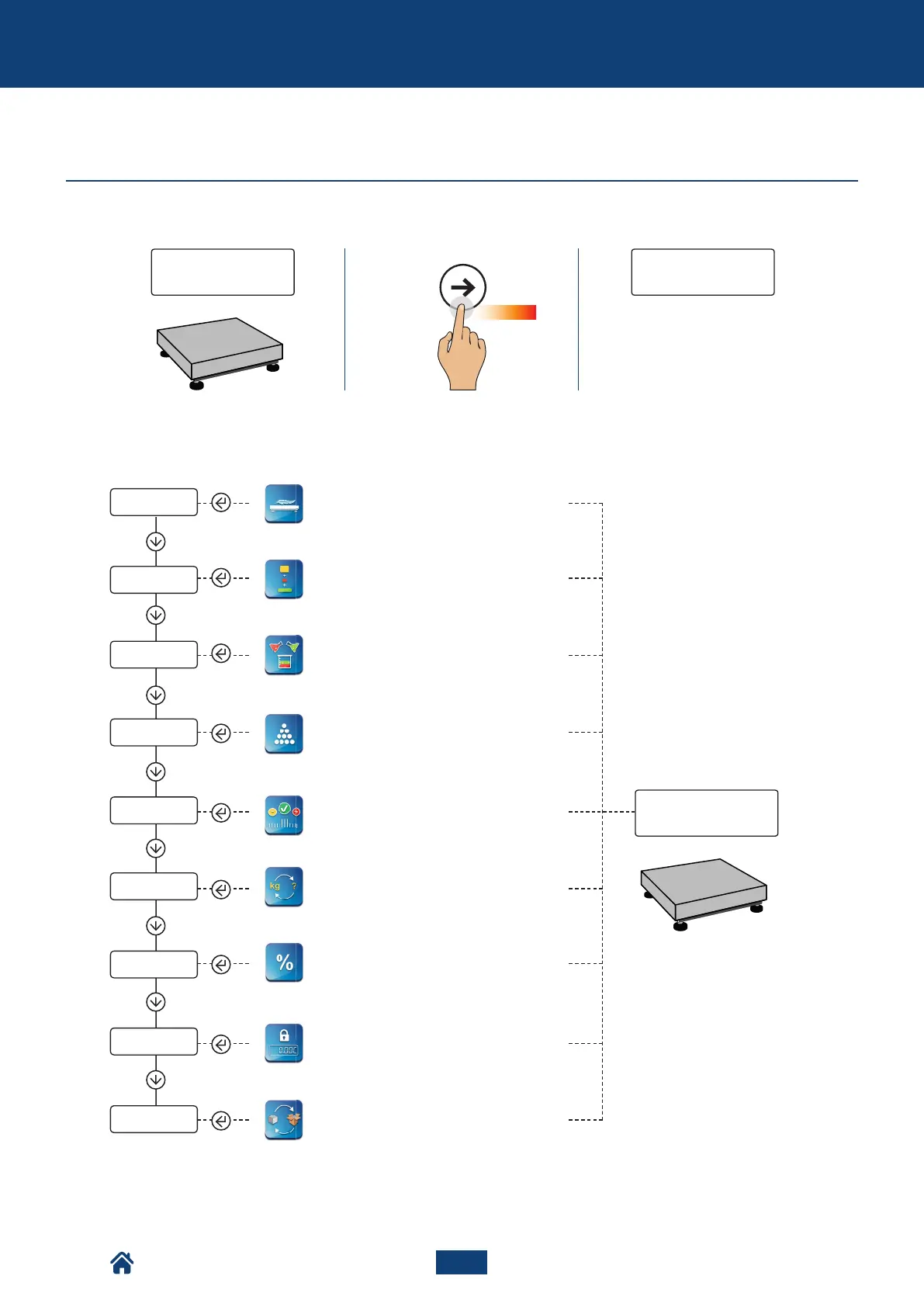
d. Select the function
Weighing with high resolution display
(for in-factory use)
See page 26
See page 28
See page 30
See page 32
See page 43
See page 35
The indicator is in the function
menu: the currently active function
appears.
Once you have selected the
function, the scale goes back to
weighing mode.
Horizontal accumulation: sum of the
weight of several objects to obtain the
total weight
Vertical formulation or accumulation:
mixing several components
Counting
Net weight - gross weight exchange
Weight check compared to a reference
sample.
HOW TO ACCESS THE FUNCTION MENU AND SELECT THE DESIRED ONE
See page 42
Holding weight on the display
See page 39
Weighing in % compared to a
reference sample
See page 38
Unit of measure conversion
Advanced functions of the scale
NU2-IPC20_50-E-0918



 To Next Page