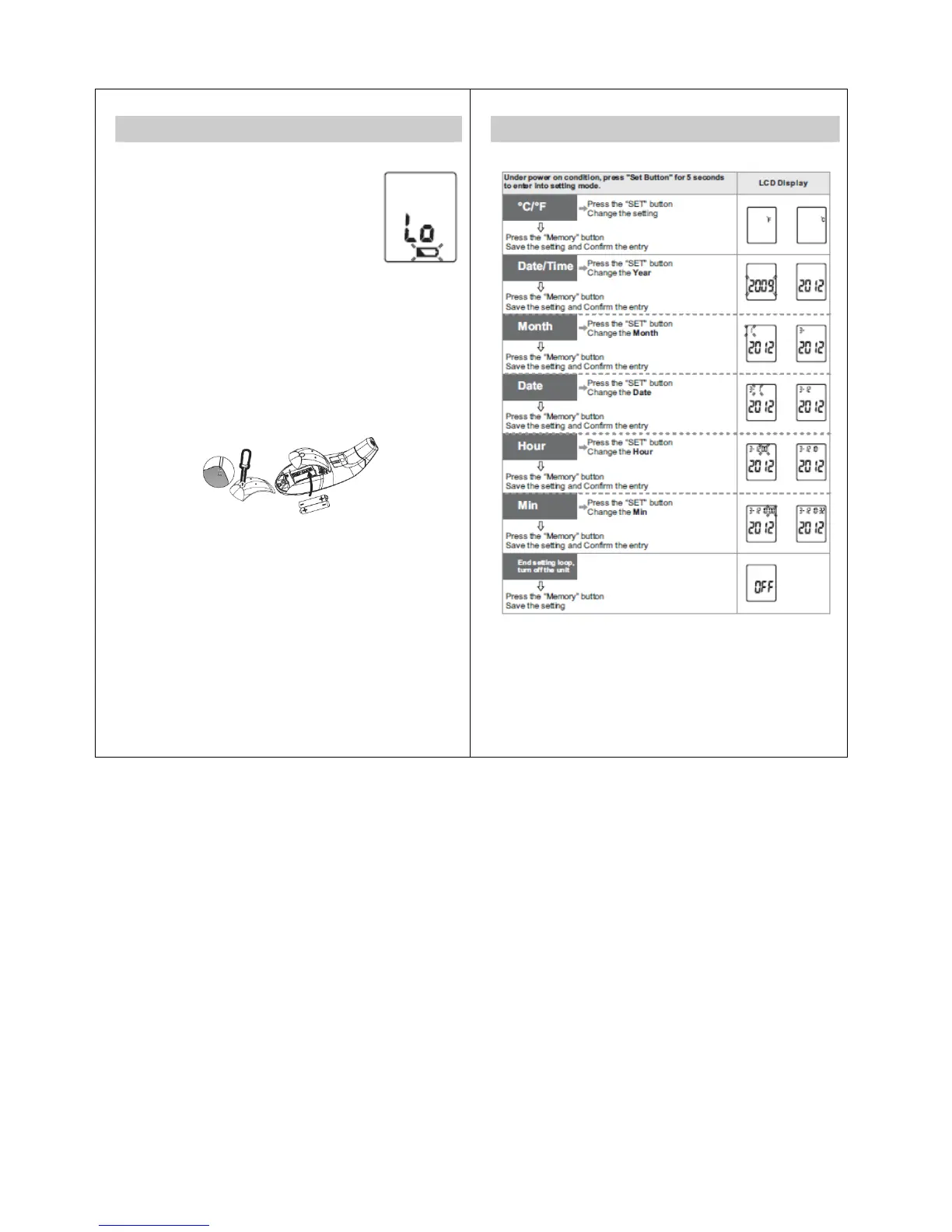
Battery Installation
Low battery warning:
When the battery power becomes low, the
low battery symbol will appear on the
display. The thermometer can still be used
during this time, but the batteries should be
replaced as soon as possible. If the
batteries run out completely, “Lo” will be
displayed along with the low battery symbol.
In this case, the batteries will need to be replaced before
using the thermometer again.
Replacing the Battery:
1. Use a Phillips head screwdriver to loosen battery cover
screw. Remove the battery cover.
2. Insert or replace 2 x 1.5 V AAA alkaline batteries into the
battery compartment, ensuring to match the indicated
polarity symbols. Always use new batteries.
3. Place the battery cover on the thermometer and tighten
the screw to secure it in place.
NOTE: Battery-operated
1. Please properly dispose of the batteries away from small
children and heat.
2. It is recommended to remove the batteries if the unit will
not be used for an extended period of time.
3. For long durations of non-operation, please remove all
batteries from the device.
4. Batteries must be disposed of in accordance with local
environmental and institutional policies.
5. Dispose of used batteries in accordance with the
applicable legal regulations. Never dispose of batteries
in the normal household waste.
5
Setting °C/°F and Date/Time
6


 To Next Page