7.2.2. Set as Slave
When MAM controller serves as slave, it is only necessary to set COM MODE as SEQ. Set COM ADD from 2 – 16
with sequence according to the quantity of compressors, and SEQ STATE as SLAVE.
7.3 Start, Stop Sequence Control:
Make sure sequence cables connect correctly and the parameter of compressors in net set correctly. Activate
master, master controls the compressors in net automatically according to the air pressure detected. Sequence
control stops at the same time when manually stop the master. So, master will no longer send command to
compressor in net.
7.4 Sequence Communication Receiving and Sending Message:
The message received and sent by RS485 can be displayed by the corresponding indication screen which is
convenient for customer to make sure if they have received and feedback data in SEQ MODE or COM MODE.
The method to switch to communication menu is as below:
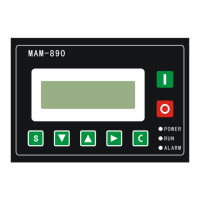
Press or in main menu and select “RUN PARAMETER” and move down the cursor to communication
menu. Press to switch to the menu below:
When controller receives data, RX “—“ and “*” display alternately. When sends data, TX “—“ and “*” display
alternately. When controller is in SEQ mode or communicates with monitoring center, user can confirm the
establishment of communication through this menu.
AIR T: 78°C ◊
AIR P: 0.53MPa
NORMAL STOP 0S
C16 REMOTE
◊:


 To Next Page