Need help?
Do you have a question about the Schiit Fulla 2 and is the answer not in the manual?
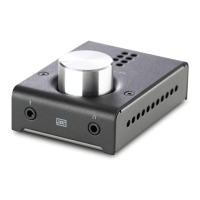
Control for adjusting audio output volume. Turn up until you smile, but not until your ears bleed.
Line-level input for connecting phones, tablets, or other audio sources via 1/8" TRS or RCA cables.
Standard 1/4" output for connecting headphones. An adapter may be needed for 1/8" plugs.
Output for connecting to powered monitors or power amps using 1/8" TRS to dual RCA cables.
Output for using the Fulla as a DAC, connecting to integrated or headphone amps via 1/8" TRS to RCA.
Connect to a 5V DC, 500mA+ source via micro USB for power if issues arise.
Connect to computer or USB source using the provided or a compatible high-quality micro USB cable.
Lists the main device included in the package.
Lists the included 3' USB Micro Cable for power and data.
Lists the included stick-on feet for device placement.
 General
| Inputs | USB |
|---|---|
| Frequency Response | 20Hz-20kHz, +/-0.1dB |
| DAC | AKM AK4490 |
| Bit Depth | 16/24 |
| Sample Rate | 192kHz |
| Weight | 0.5 lbs |
| Type | Headphone Amplifier and DAC |
| Outputs | 1/4" Headphone Jack |
| USB Receiver | CM6631A |
| Sample Rates Supported | 44.1kHz, 48kHz, 88.2kHz, 96kHz, 176.4kHz, 192kHz |
| USB Input | Type B |
| Dimensions | 3.5" x 2.5" x 1.25" |

 To Next Page