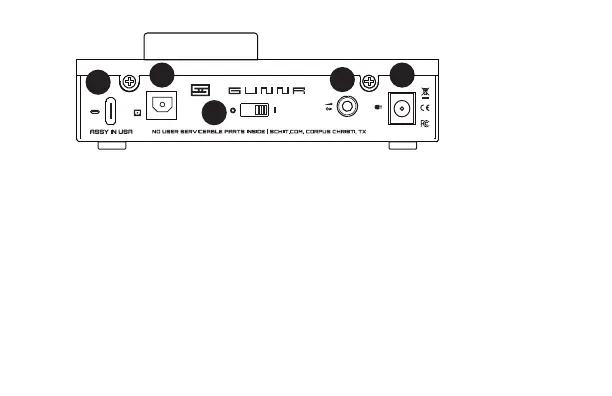
5 Linear Override. Plug
in the included wall-
wart here to provide
additional power or
for sources that need
a 0mA USB device
(like iOS, iPadOS). The
1 USB Input. Connect to your USB source using
a good-quality USB cable.
2 Optical Input.Connect to a smart TV or other
device with an optical output. Some smart TVs
need to be set to “Stereo” or “2-Channel PCM”.
3 Power Switch. From the front, left is on, right
is off. You’ll need to turn on your Gunnr to have it
recognized by your USB source.
4 Preamp Output. Plug this in to your powered
monitors (or a power amp) using a 1/8” TRS to
dual RCA cable (not supplied).
1
2
3
4
5
WELCOME TO GUNNR
output gain increases 10dB with the wall-wart
connected.
6 Headphone Output. Plug your headphones
in here. If you are using headphones with a
microphone, plug the green plug from the
Y-adapter here. You may also need the supplied
1/4” to 1/8” adapter.
7 Microphone Input. If you’re using a headset
microphone, connect it using the pink plug on
the Y-adapter included with your headphones.


 To Next Page