6
Have you read and understood the Operating Instructions, in particular Chap-
ter 1 “Basic Safety Notices”? You are not permitted to operate the device be-
fore doing so. Before working with the device you must put on your personal
protective clothing, if necessary. For example, eye protectors, gloves, etc.
The ID plate with the serial number is provided on the back side of the instru-
ment and the CE mark as well.
3 Initial Setup and Operating Procedure
3.0 Notices Before Starting Measurement
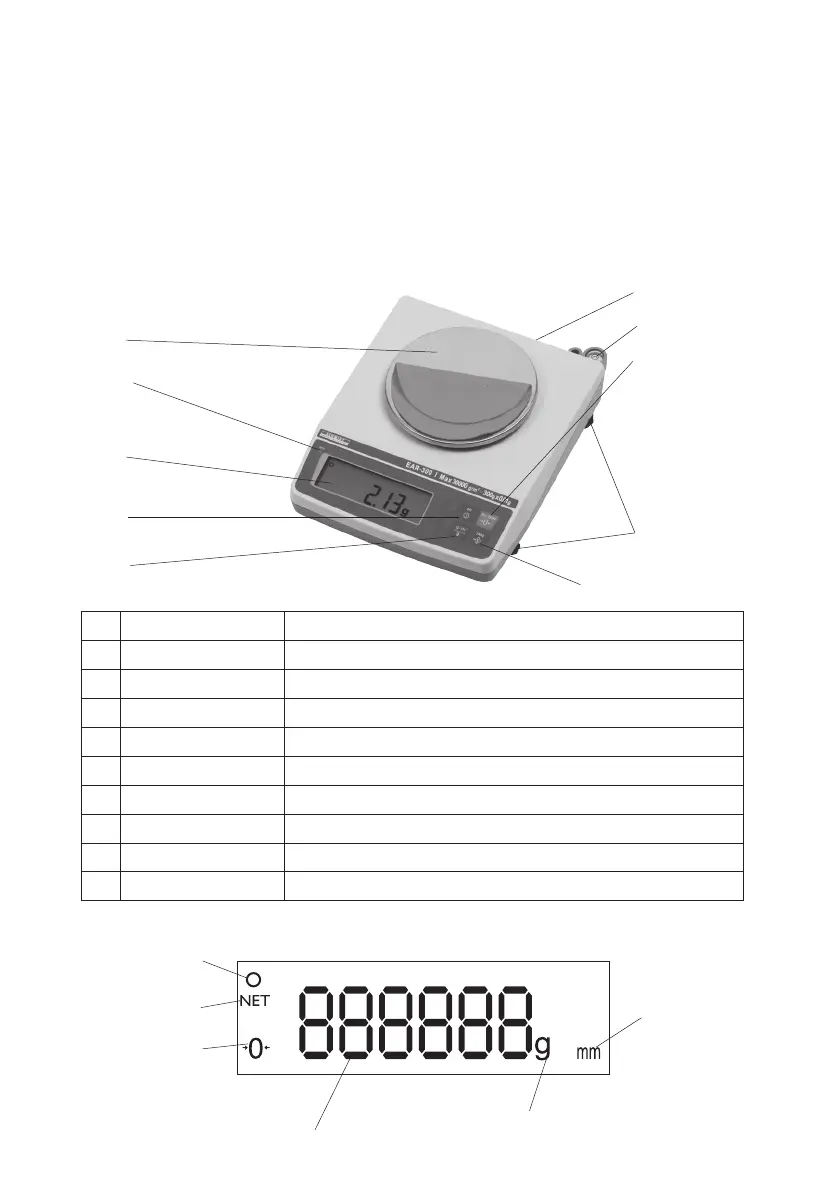
3.1.1 Display Details
Reading
ready symbol
Zero symbol
NET symbol
reading in g
reading in g/m²
3.1 Operating Elements
1 Platform Sample measuring plate
2 Charge LED Lights up while charging
3 Display See Chapter 3.1.1
4 Off button Switches the balance On
5 Mode button Toggles between “g” and “g/m²”
6 Tare key For determining the net weight with the packaging on
7 Base feet 4 adjustable feet at the bottom of the instrument
8 On/Zero key For switching on and zero setting of the balance
9 Bubbel level For horizontal alignment of the balance
10 Connector For connecting the AC adapter
fig. 3.1
1
2
3
4
5
6
7
8
9
10
fig. 3.1.1



 To Next Page