8
3.3 Settings
General information:
The settings for:
- Zero setting (auto zero)
- Timeout
- Display backlight
- Calibration weight
of the balance can be changed in the following way.
Requirement:
Instrument switched off as described in Chapter 3.2.2.
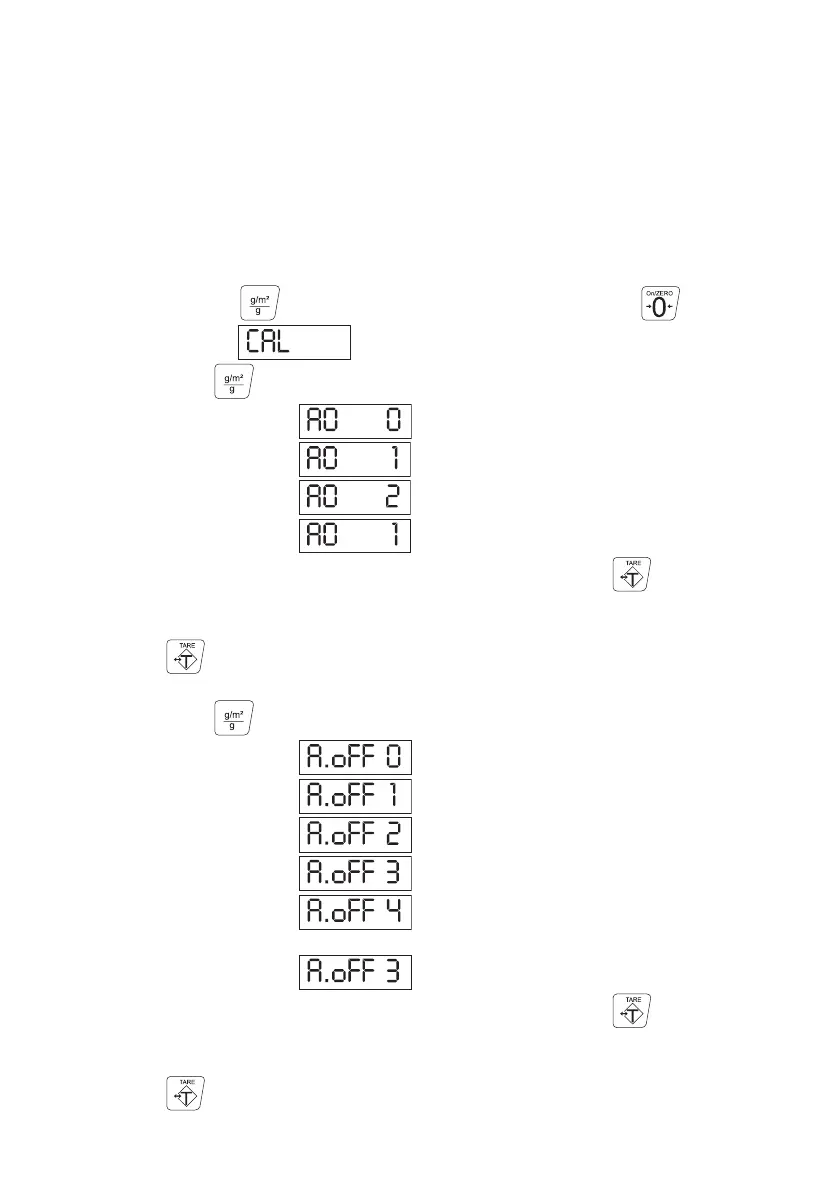
Zero setting:
- Press and hold the button and switch on the instrument with the button.
The display shows .
- By pressing the button, you can now choose between
Manual zero setting
Automatic zero setting
No function .
The default setting is automatic zero setting.
- You can now either return to the measuring mode by pressing the button
five times
or
Press the button once to set the
Timeout:
- By pressing the button, you can now choose between
No power off
Power off after 5 min.
Power off after 10 min.
Power off after 20 min.
Power off after 30 min.
of non-use.
The default setting is power off after 20 min.
- You can now either return to the measuring mode by pressing the button
four times
or
Press the button once to set the
3.3.1 Function Settings



 To Next Page