EasyManua.ls Logo

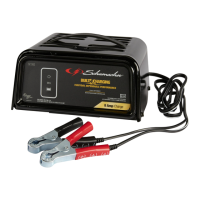
Schumacher SC2 - User Manual

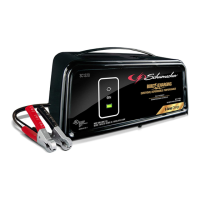
Schumacher SC2
28 pages
Print Icon
To Next Page IconTo Next Page
Loading...
MODEL / MODELO:
SC2
Automatic
Battery Charger/Maintainer
Cargador de batería
automático / Mantenedor
OWNERS MANUAL
MANUAL DEL USUARIO
PLEASE SAVE THIS OWNERS MANUAL AND READ BEFORE EACH USE.
This manual will explain how to use the charger safely and effectively. Please read
and follow these instructions and precautions carefully.
POR FAVOR CONSERVE ESTE MANUAL DEL USUARIO Y LEALO ANTES
DE CADA USO. En este manual le explica cómo utilizar el cargador de manera
segura y conable. Por favor, lea y siga las siguientes instrucciones y precauciones.
0099001569-00

Questions and Answers

  • S
    Stephanie PhillipsAug 11, 2025
    Why is the red BAD BATTERY LED lit and the yellow/orange LED flashing on my Schumacher Battery Charger?
    • D
      David ClarkAug 11, 2025
      If the red BAD BATTERY LED is lit and the yellow/orange LED is flashing, it indicates that the battery voltage is still below 10V (for a 12V battery) or 5V (for a 6V battery) after 2 hours of charging, or in maintain mode, the output current is more than 1.5A for 12 hours, meaning desulfation was unsuccessful. The battery may be defective. Make sure there are no loads on the battery. If there are, remove them. If there are none, have the battery checked or replaced.
  • J
    James FletcherAug 21, 2025
    What to do if the green POWER LED does not light when my Schumacher Battery Charger is properly connected?
    • J
      Jessica WilsonAug 21, 2025
      If the green POWER LED doesn't light up when the charger is properly connected, it could be due to a dead AC outlet or a poor electrical connection. Check for an open fuse or circuit breaker supplying the AC outlet. Also, inspect the power cord and any extension cords for a loose-fitting plug.
  • S
    Stephen FergusonNov 1, 2025
    What to do if the red BAD BATTERY LED is lit on my Schumacher SC2?
    • S
      savannahchandlerNov 1, 2025
      If the red BAD BATTERY LED is lit, it could mean several things: * The battery is sulfated, and the charger is in desulfation mode. In this case, continue charging for several hours. If desulfation is unsuccessful, have the battery checked. * The battery may be overheated, allow the battery to cool. * The battery may be too large or have a short circuit. Have battery checked or replaced. * The battery capacity is too low, or the battery is too old. Have it checked or replaced. * The battery won’t hold a charge, which may be caused by a drain on the battery or the battery could be bad. Make sure there are no loads on the battery. If there are remove them. If there are none, have the battery checked or replaced. The battery voltage is below 14.2V (for a 12V battery) or 7.1V (for ...

Summary

Important Safety Instructions

General Safety Precautions

Covers general safety rules for operating the charger and handling batteries, including electrical safety and equipment care.

Explosive Gas Warning

Highlights the danger of explosive gases from lead-acid batteries and emphasizes following instructions.

California Proposition 65 Warning

Informs about chemicals known to cause cancer and birth defects, advising hand washing.

Personal Safety Precautions

Working Safely with Batteries

Guidelines for personal safety, including protective gear, handling acid, avoiding sparks, and removing metal items.

Battery Compatibility and Usage

Specifies compatible battery types (6V/12V Lead-Acid, GEL, AGM) and limitations for use.

Preparing the Battery for Charging

Pre-Charge Procedures

Steps before charging, including battery removal, ventilation, cleaning terminals, adding water, and setting voltage.

Charger Location Guidelines

Optimal Charger Placement

Guidelines for positioning the charger away from the battery and ensuring adequate ventilation.

DC Connection Precautions

DC Connection Safety

Precautions for connecting and disconnecting DC clips, ensuring switches are off and clips don't touch.

Connecting to Battery in Vehicle

Step-by-Step Connection Guide

Instructions for connecting the charger to a battery within a vehicle, including polarity and grounding considerations.

Connecting to Battery Outside Vehicle

Battery Connection Procedure

Procedure for connecting the charger to a battery removed from the vehicle, including cable attachment and safety steps.

AC Power and Extension Cords

AC Power and Grounding

Details on connecting to a grounded 120V outlet, the importance of proper grounding, and dangers of altering the cord.

Extension Cord Guidelines

Recommendations and requirements for using extension cords, including plug compatibility and wire gauge.

Charger Features and Controls

Product Features Overview

Identifies key components of the charger, including hook, LEDs, and cable connectors.

Control Panel Indicators

Explains the meaning of the Power, Charging, and Clamps Reversed LEDs for status indication.

Operating Instructions

Charging a Battery in the Vehicle

Step-by-step guide for charging a battery while it remains installed in the vehicle.

Charging a Battery Outside the Vehicle

Procedure for charging a battery that has been removed from the vehicle.

Using Quick-Connect Cable Connectors

Instructions for connecting the charger using quick-connect cable leads.

Using Ring Connectors

Steps for permanently attaching ring connectors to battery terminals for charging.

Battery Charging Times

Charging Time Estimates

Provides estimated charging times for different battery applications and sizes.

Charging Modes and Troubleshooting

Automatic and Maintain Modes

Details the automatic charging process and maintain mode for keeping batteries at full charge.

Aborted and Desulfation Modes

Explains reasons for charging abortion and the desulfation process, including error indicators.

Maintenance and Care

Charger Care and Storage

Instructions for cleaning, maintaining, and storing the battery charger to ensure longevity.

Troubleshooting Guide

Common Charger Issues

Addresses common problems like LEDs not lighting or voltage selection issues, with possible causes and solutions.

Battery-Related Problems

Diagnoses issues indicated by BAD BATTERY LED, such as sulfation, overheating, or low capacity.

Specifications and Warranty

Product Specifications

Lists the technical specifications of the charger, including input/output voltage and current ratings.

Replacement Parts

Provides part numbers for replacement ring connectors and battery clamps.

Limited Warranty Information

Details the terms and conditions of the manufacturer's limited two-year warranty for the charger.

Schumacher SC2 Specifications

General IconGeneral
Input Voltage120VAC
Output Current2A
Charge Rate2A
Battery Types SupportedAGM, Standard, Gel
Charging ModesAutomatic
Cable Length36 inches

Related product manuals