15
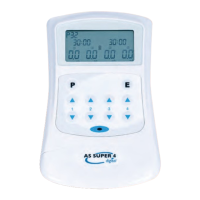
2.2.2 Keypad
The TENStem eco basic has seven buttons:
to switch the TENStem eco basic on and o
P to select the programme
E “Edit” mode
to increase the intensity (left for channel 1, right for channel 2)
to reduce the intensity (left for channel 1, right for channel 2)
Note: It is not possible to increase the intensity of both channels at the same time.
2.3 Preparation for stimulation
2.3.1 Insert batteries
Before putting the TENStem eco basic into service, the batteries supplied are to be insert-
ed into the battery compartment (see also section “Changing the batteries”). Please ensure
the correct polarity when inserting the batteries.
2.3.2 Connecting the cables and electrodes
The TENStem eco basic has two channels, the intensity of which you can set independently
of one another. You can also choose to use only one of the two channels. First, connect one
of the supplied cables to two electrodes per channel. It does not matter to which electrode
(pad) you connect the red or white plugs. Plug the other end of the cable into one of the two
output sockets at the top of the TENStem eco basic.
Now position the electrodes on the skin. In the chapter “Electrode placement”, you can nd
illustrations as examples of where the electrodes can be positioned on the skin. The elec-
trodes are usually attached in the immediate vicinity of the painful area.
The TENStem eco basic automatically detects when the electrodes are not correctly axed
to the skin and then cannot be set to a high intensity for safety reasons; it automatically
switches o above an intensity of 10 mA. Always ensure that you only switch the device on
when you have correctly positioned the electrodes!



 To Next Page