22
Console Features
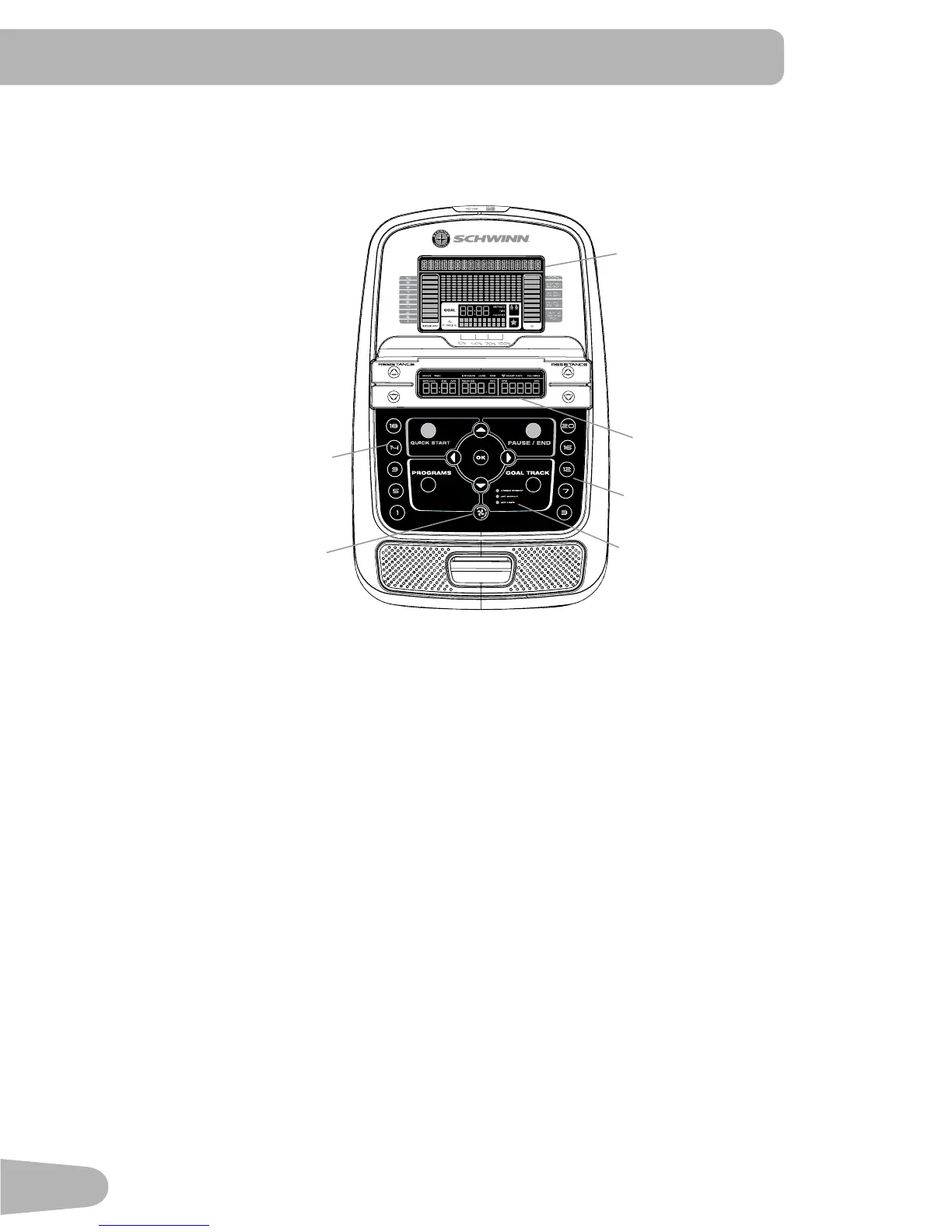
The Console provides important information about your workout and lets you control the resistance levels while you exercise.
The Console features the Schwinn Dual Track
™
display with touch control buttons to navigate you through the exercise
programs.
Hr
Upper Display
Lower Display
Resistance Level Quick Buttons
Resistance Level Quick Buttons
Achievement Indicator Lights
Fan
Keypad Functions
Resistance Increase () button- Increases the workout resistance level
Resistance Decrease () button- Decreases the workout resistance level
QUICK START button- Begins a Quick Start workout
PROGRAMS button- Selects a category and workout program
PAUSE / END button- Pauses an active workout, ends a paused workout, or goes back to the previous screen
GOAL TRACK button-Displays the Workout Totals and Achievements for the selected User Profile
Increase () button- Increases a value (age, time, distance, or calories) or moves through options
Left () button- Displays different workout values during a workout, and moves through options
OK button- Starts a Program workout, confirms information, or resumes a paused workout.
Right () button- Displays different workout values during a workout, and moves through options
Decrease () button- Decreases a value (age, time, distance, or calories) or moves through options
FAN button- Controls 3-speed fan




 To Next Page