54
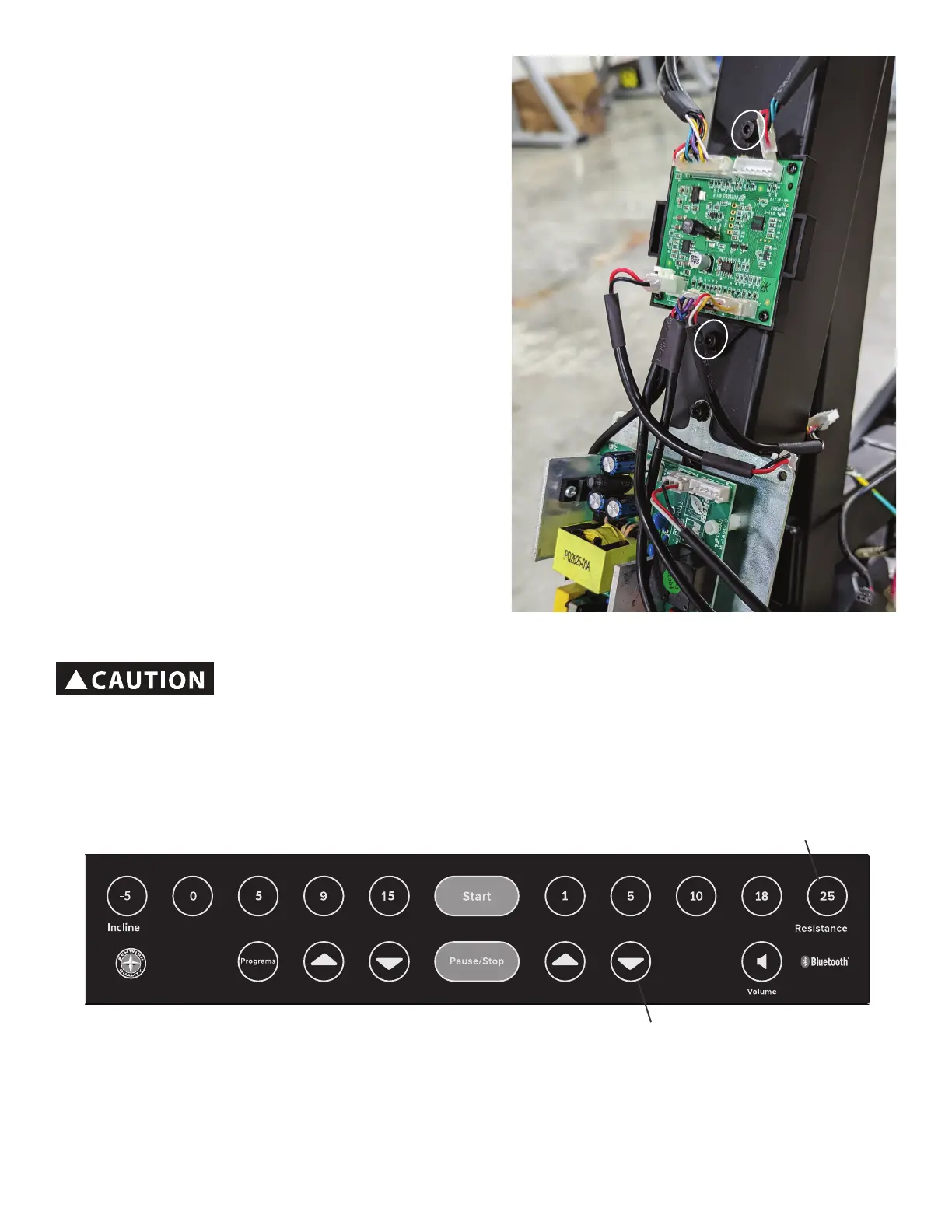
5. Usinga6mmhexwrench,removethe2screws
(indicated by ovals) that attach the Sensor Hub to the
Frame.
6. Remove the old Sensor Hub, and install the new
Sensor Hub. Connect all the cables to the Sensor Hub in
their proper locations. Be sure not to crimp any cables.
7. Re-install all remaining parts that were removed in
reverse order.
8. Plug the power cord into the machine and wall outlet,
andipthepowerswitchtoon.
9. Push the Programs button and hold for 3 seconds while
in the Power-Up Mode to go into the Console Setup Mode
(System Menu).
Note: ToexittheSystem Menu and return to the Power-
Up Mode screen, push the Pause/Stop button.
Resistance Level Quick 25 button
™
Resistance Down button
Calibrating the Resistance:
!
Do not use the Console Resistance Quick Keys to set resistance until the calibration
process is complete and calibration saved.
Note: During the calibration process no one should be pedaling the machine. Standing on the pedals is okay during the
calibration process.


 To Next Page