EasyManua.ls Logo

SCORPION ST55 - User Manual

SCORPION ST55
11 pages
Print Icon
To Next Page IconTo Next Page
Loading...
ScorpionTrack 5
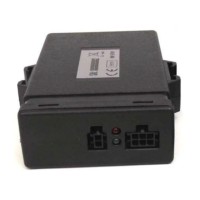
ST55 Installation Guide
.
ScorpionTrack 5 (ST55) can only be installed by
Scorpion trained and approved installers who have
attended a Scorpion Category 5 training course
Scorpion Automotive Ltd
Drumhead Road, Chorley North Business Park, Chorley, Lancashire, PR6 7DE, UK.
t: +44 (0)1257 249928 f. +44 (0)1257 249 938
w. www.scorpionauto.com w. www.scorpiontrack.com
Question and Answer IconNeed help?

Do you have a question about the SCORPION ST55 and is the answer not in the manual?

Summary

Driver Cards

Installation Guidelines

Unit Install

Unit placement to avoid shielding and interference with radio frequency.

GPS Antenna

Mounting the GPS antenna for optimal sky view, avoiding dashboard solar glass.

Permanent Ground Connection

Connect black wire to a new ground point, avoiding corrosion.

Permanent Power Supply

Connect red wire to a constant 12/24V supply through an inline fuse.

Ignition Supply

Connect orange wire to a stable 12/24V ignition supply constant during cranking.

Crank Inhibit

Cut starter circuit wire, connect black/blue wires to prevent starting.

Check for RF Interference

Test for RF interference by checking radio reception before and after connections.

Commissioning and LED Status

Connect unit for configuration, ensuring clear sky view and ignition ON.

LED Status Indication

Interpreting red and green LED flashes for signal and system status.

Commissioning Texts

Programming Driver Cards

Troubleshooting Guide

SCORPION ST55 Specifications

General IconGeneral
BrandSCORPION
ModelST55
CategoryGPS
LanguageEnglish

Related product manuals