EasyManua.ls Logo

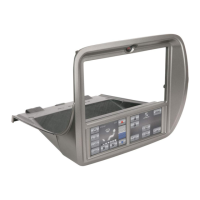
Scosche ITCGM01AB - User Manual

Scosche ITCGM01AB
16 pages
Print Icon
To Next Page IconTo Next Page
Loading...
1·
ITCGM01AB
   
2010-14 CHEVROLET CAMARO

 
 







4
5
2
NOTICE:
nc
 
  

INTRODUCTION/PRELIMINA
 
 
              

CAUTION
       
           
 

         

NOTES
 
 
IMPORTANT!
DO NOT RETURN PRODUCT TO THE REILER
IF YOU NEED ASSISNCE OR REPLACEMENT PARTS CALL US TOLL FREE 
  
LIABILITY DISCLAIMER

   


1-800-363-4490 x1
 
 
Question and Answer IconNeed help?

Do you have a question about the Scosche ITCGM01AB and is the answer not in the manual?

Summary

Introduction and Preliminary Information

Important Safety Caution

Warning about disconnecting the battery and avoiding airbag wiring to prevent damage.

General Installation Notes

Advice for installation including checking vehicle instructions and stereo manuals.

Liability Disclaimer

Factory Stereo Removal Procedure

Dash Modification Requirements

Details the required cutting of the dash cavity for installation.

Stereo Assembly and Mounting

Single DIN ISO Installation

Instructions for mounting a single DIN aftermarket stereo into the kit.

Double DIN ISO Installation

Instructions for mounting a double DIN aftermarket stereo into the kit.

Steering Wheel Controls Operation

ITCGM01 AB Wiring Diagram

Wire Color Codes

Explains the color coding for the wiring harness connections.

Navigation Connections

Details optional connections for navigation features.

Vehicle Startup Connection

Connection and Initialization Procedure

Steps for connecting and initializing the system properly.

Vehicle Startup ITC Configuration

Installer Menu Access

How to access and use the installer menu for setup.

Screen Calibration

Procedure for calibrating the touchscreen display.

ITC Vehicle Door Locks

About the ITC System

Overview of the ITC Touch Screen Interface and its purpose.

Climate and Convenience Controls

Air Conditioning Operation

How to operate the air conditioning system via the touch screen.

Fan Speed Control

Adjusting fan speed using the touch screen controls.

Temperature Control

Adjusting the vehicle's interior temperature.

Air Flow and Vent Control

Selecting and adjusting air vent modes.

Power Door Lock Control

Using the touch screen to lock/unlock vehicle doors.

Heated Seats Operation

Operating the heated seat function via the touch screen.

Defog and Defrost Control

Activating front and rear defogger functions.

Settings and Menu Access

How to access vehicle settings and menus.

Gauge Mode Operation

Zone 1 Gauge Display

Displays two gauges selected in ITC Settings.

Zone 2 Gauge Display

Displays gauge selected in ITC Settings.

Zone 3 Gauge Display

Displays gauge selected in ITC Settings.

Performance Mode Operation

Complete Performance Screen List

Lists available performance screen examples like acceleration and braking.

Rollout Setting

Explains the Rollout setting for performance measurements.

Calibrate Wheel Size

Calibration Process

Step-by-step guide to calibrate the wheel size for accurate measurements.

Menu Navigation

Menu Settings Legend

Explains navigation symbols and actions within the menu.

Sub-menu Settings Legend

Legend for navigating sub-menu screens.

Configure Options Legend

Legend for configuring specific options within menus.

Vehicle Settings Chart

Installer Menu Settings Chart

ITC Settings Chart

Picture Settings

Controls for display brightness and theme.

Preferences Settings

Settings for OnStar, volume, gauges, and rollout.

Radio Type Selection

Selects aftermarket radio type for steering wheel control.

Language Selection Settings Chart

Version Setting Chart

Vehicle Feature Settings

ITC Feature Setting Details

Detailed explanation of ITC interface features like brightness and radio type.

Summary

Introduction and Preliminary Information

Important Safety Caution

Warning about disconnecting the battery and avoiding airbag wiring to prevent damage.

General Installation Notes

Advice for installation including checking vehicle instructions and stereo manuals.

Liability Disclaimer

Factory Stereo Removal Procedure

Dash Modification Requirements

Details the required cutting of the dash cavity for installation.

Stereo Assembly and Mounting

Single DIN ISO Installation

Instructions for mounting a single DIN aftermarket stereo into the kit.

Double DIN ISO Installation

Instructions for mounting a double DIN aftermarket stereo into the kit.

Steering Wheel Controls Operation

ITCGM01 AB Wiring Diagram

Wire Color Codes

Explains the color coding for the wiring harness connections.

Navigation Connections

Details optional connections for navigation features.

Vehicle Startup Connection

Connection and Initialization Procedure

Steps for connecting and initializing the system properly.

Vehicle Startup ITC Configuration

Installer Menu Access

How to access and use the installer menu for setup.

Screen Calibration

Procedure for calibrating the touchscreen display.

ITC Vehicle Door Locks

About the ITC System

Overview of the ITC Touch Screen Interface and its purpose.

Climate and Convenience Controls

Air Conditioning Operation

How to operate the air conditioning system via the touch screen.

Fan Speed Control

Adjusting fan speed using the touch screen controls.

Temperature Control

Adjusting the vehicle's interior temperature.

Air Flow and Vent Control

Selecting and adjusting air vent modes.

Power Door Lock Control

Using the touch screen to lock/unlock vehicle doors.

Heated Seats Operation

Operating the heated seat function via the touch screen.

Defog and Defrost Control

Activating front and rear defogger functions.

Settings and Menu Access

How to access vehicle settings and menus.

Gauge Mode Operation

Zone 1 Gauge Display

Displays two gauges selected in ITC Settings.

Zone 2 Gauge Display

Displays gauge selected in ITC Settings.

Zone 3 Gauge Display

Displays gauge selected in ITC Settings.

Performance Mode Operation

Complete Performance Screen List

Lists available performance screen examples like acceleration and braking.

Rollout Setting

Explains the Rollout setting for performance measurements.

Calibrate Wheel Size

Calibration Process

Step-by-step guide to calibrate the wheel size for accurate measurements.

Menu Navigation

Menu Settings Legend

Explains navigation symbols and actions within the menu.

Sub-menu Settings Legend

Legend for navigating sub-menu screens.

Configure Options Legend

Legend for configuring specific options within menus.

Vehicle Settings Chart

Installer Menu Settings Chart

ITC Settings Chart

Picture Settings

Controls for display brightness and theme.

Preferences Settings

Settings for OnStar, volume, gauges, and rollout.

Radio Type Selection

Selects aftermarket radio type for steering wheel control.

Language Selection Settings Chart

Version Setting Chart

Vehicle Feature Settings

ITC Feature Setting Details

Detailed explanation of ITC interface features like brightness and radio type.

Scosche ITCGM01AB Specifications

General IconGeneral
BrandScosche
ModelITCGM01AB
Product TypeCar Charger
MaterialPlastic
ColorBlack
Input Voltage12V DC
Output Voltage5V
PortsUSB

Related product manuals