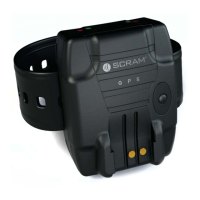
SCRAM GPS
Quick Reference Guide
13
2. Select the receiving account in the Move Devices To
drop-down list.
3. Click the Move button.
The transferred SCRAM GPS equipment will now
appear in the receiving account.
RETURN EQUIPMENT
Contact AMS Customer Services at 303.785.7879 to
request an RMA so the GPS equipment can be shipped and
replaced.
E-mail: gpssupport@scramsystems.com
ALERT/EVENT DEFINITIONS
BRACELET ALERTS/EVENTS
Critical Alerts Description
Exclusion Zone
Violation
Generated when an offender enters an exclusion zone
and the system determines that one or more location
points are inside the zone.
Exclusion Zone
Violation Clear
Generated when the offender exits the exclusion zone.
Device Tamper Generated when an offender separates or damages the
back plate that secures the bracelet to the offender.
User clears this alert from Dashboard page after
entering note.
Strap Tamper Generated when an offender cuts, damages, or removes
the strap from the bracelet.
User clears this alert from Dashboard page after
entering note.
Serious Alerts Description
Battery Critical Generated when the bracelet battery reaches a pre-
defi ned low point, which is approximately 30 minutes of
battery life left.


 To Next Page