- 57 -
SCS Compact - Operating instructions
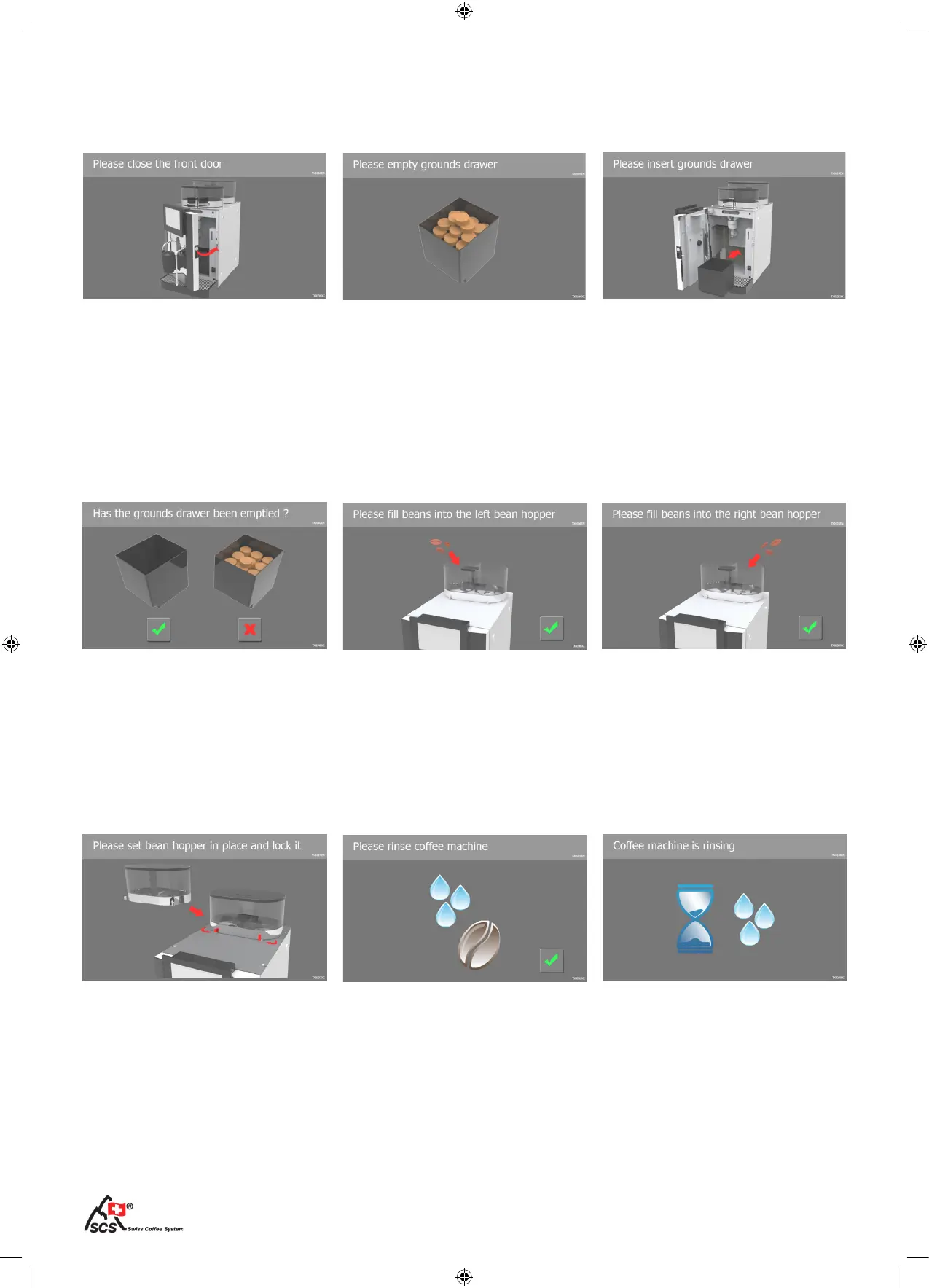
The bean container is not properly
placed. Place the container proper-
ly and close both locks.
The rinsing of the coffee machine
is running. Wait until the process is
completed.
Place the bean hopper The coffee machine is rinsing
Start rinsing by touching the tick
key on the touchscreen. The pro-
cess takes about 30 seconds.
Rinse the coffee machine
System messages II
After inserting the coffee grounds
drawer conrm it.
After lling up of coffee beans con-
rm it.
Conrm the emptying The left bean hopper is empty
After lling up of coffee beans con-
rm it.
The right bean hopper is empty
The front door is not properly clo-
sed. Close the door and the messa-
ge disappear.
Insert the coffee grounds drawer
and close the front door properly.
Close the front door Insert the grounds drawer
The machine displays a message
when the coffee grounds drawer
is full. Open the front door, empty
and clean the drawer.
Empty the coffee grounds drawer
System messages (fullscreen)


 To Next Page