Introducon
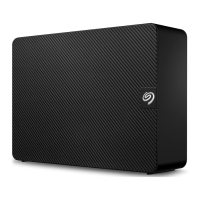
Welcome to the user manual for Seagate Backup Plus Desktop, a hard drive with ample capacity to store all
your important files. Connect your Backup Plus Desktop to a computer that supports USB 3.0 for fast
transfers of all your data.
Review this user manual for instructions on how to manage your Backup Plus Desktop. For common
questions and answers about your drive, please see Frequently asked questions.
You can get the latest tips regarding your product and updated technical information at Seagate customer
support.
Box content
Seagate Backup Plus Desktop
USB 3.0 cable (Micro-B to Type A)
Power cable
Quick Start Guide
Software: Lyve and Seagate Dashboard (available for download)
Minimum system requirements
You can connect your Backup Plus Desktop to a computer that meets the following minimum requirements:
Windows 7 or higher
Mac OS X 10.7 or higher
Hardware requirements
Backup Plus Desktop can be connected to computers with USB 3.0 and USB 2.0 ports. However, you can
reach transfer rates up to 5Gb/s when connected to a USB 3.0 port. Connecting the Backup Plus Desktop to a
computer with USB 2.0 limits performance to USB 2.0 speeds.
Important info: Save your packaging. If you experience problems with your hard drive and want
to exchange it, the hard drive must be returned in its original packaging.











 To Next Page