
 Need help?
Do you have a question about the Seagate FireCuda 520 and is the answer not in the manual?
Lists necessary hardware (M.2 slot, PCIe interface) and OS (Windows 10) for SSD and RGB functionality.
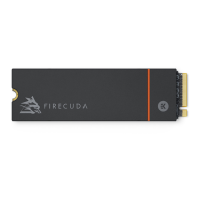
Details the included components: FireCuda 520 SSD with heatsink and optional RGB cable.
Outlines essential steps like unpacking, inspecting, ESD safety, and data backup before installation.
Advises on desktop PC use, heatsink, dimensions, M.2 connector type, and cooling for optimal performance.
Emphasizes updating BIOS, selecting M.2 slot, OS installation decisions, and data transfer planning.
Specifies the need for a screwdriver and M.2 screws (not included) for securing the SSD.
Step-by-step guide for powering down, opening case, removing old drives, accessing BIOS, and locating M.2 slot.
Details connecting the 5V addressable RGB cable to the SSD heatsink and motherboard header correctly.
Advises referring to motherboard manufacturer for software controlling RGB colors and patterns.
Describes SeaTools SSD GUI for drive health monitoring, status checks, and tests.
Introduces DiscWizard for backups, cloning, and secure data erasure.
Provides the URL for downloading firmware and secure erase tools.
Directs users to the support page for internal SSDs.
Guides users to the contact page for online support and services.
Provides the URL for warranty and replacement information.
Offers a link to Seagate's data recovery services.
Directs users to the Seagate partners page for program details.
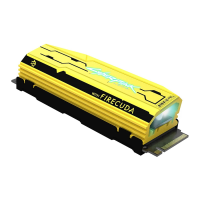
The Seagate FireCuda 520 Cyberpunk 2077 Limited Edition SSD is a high-performance solid-state drive designed for desktop PCs, offering enhanced storage capabilities and a unique aesthetic inspired by the Cyberpunk 2077 universe. This internal SSD is intended to be installed directly onto a motherboard, providing a significant upgrade in data transfer speeds and overall system responsiveness compared to traditional hard disk drives. Its primary function is to serve as a fast storage medium for operating systems, applications, and games, leveraging the PCIe Gen4 x4 interface for optimal performance.
The core function of the FireCuda 520 Cyberpunk 2077 Limited Edition SSD is to provide rapid data storage and retrieval. Utilizing the M.2 (M key) slot and PCIe Gen4 x4 interface, it delivers exceptional read and write speeds, which are crucial for demanding tasks such as gaming, video editing, and large file transfers. The SSD is backward compatible with PCIe Gen3 interfaces, ensuring broader compatibility with various motherboards, though performance will be limited to Gen3 speeds in such configurations. By acting as the primary drive, it can drastically reduce boot times, application loading times, and in-game loading screens, offering a smoother and more efficient computing experience.
A distinctive feature of this limited edition SSD is its integrated heatsink, which is pre-installed to manage thermal performance during intensive operations. This heatsink is crucial for maintaining optimal operating temperatures, preventing thermal throttling, and ensuring consistent high performance over extended periods. The design of the heatsink also incorporates a unique Cyberpunk 2077 aesthetic, making it an attractive component within a PC build.
Beyond its primary storage function, the SSD includes an optional RGB LED lighting feature. This allows users to customize the visual appearance of their PC build, synchronizing the SSD's lighting with other RGB components in their system. The RGB functionality connects to a 5V addressable header on the motherboard, enabling software control over colors and patterns, thus adding a personalized touch to the system's aesthetics.
The FireCuda 520 Cyberpunk 2077 Limited Edition SSD is designed for straightforward integration into desktop PC environments. Before installation, users are advised to ensure their motherboard's BIOS is up to date and to identify an appropriate M.2 PCIe slot. Most modern motherboards offer multiple M.2 slots, and users should select one that provides sufficient space, especially given the SSD's dimensions with the pre-installed heatsink. The installation process involves physically inserting the SSD into the M.2 slot and securing it with a screw. Care must be taken to align the notch on the SSD with the divider in the slot to ensure proper seating.
For users wishing to utilize the RGB lighting, an optional 5V addressable RGB connector cable is provided. This cable attaches to a connector under the heatsink and then to a 5V addressable header on the motherboard. It is critical to connect the power pin (marked with a triangle and identified by a red cable) to the 5V pin 1 on the motherboard header to prevent damage to the RGB connector on the heatsink or the computer's LED function. Once connected, the RGB lighting can be controlled via the motherboard manufacturer's dedicated software, allowing for customization of colors and patterns to match the user's preference or existing system theme.
After physical installation, users will need to install an operating system on the FireCuda 520 SSD if they intend to use it as their primary boot drive. For those migrating from an existing drive, Seagate offers DiscWizard, an integrated software suite that facilitates backing up operating systems, applications, settings, and files, and can also securely destroy confidential data on old drives. This ensures a smooth transition to the new, faster SSD without data loss.
The SSD is primarily intended for desktop PCs, and its design, particularly the heatsink, is optimized for the airflow and space typically found in PC cases. The product's dimensions, including the heatsink, exceed standard M.2 specifications, so users must verify that their system provides adequate clearance for installation. M.2 connectors with a height of H3.2 or above are recommended for SSDs with heatsinks to ensure a proper fit. Optimal performance also benefits from sufficient airflow and cooling within the PC case, which helps the heatsink dissipate heat effectively.
Maintenance for the FireCuda 520 Cyberpunk 2077 Limited Edition SSD primarily revolves around software utilities and general system care. Seagate provides several tools to help users monitor and maintain their SSD's health and performance.
SeaTools™ SSD GUI is a free utility that allows users to monitor the drive's health, status, and perform various tests. This tool helps in proactively identifying potential issues and ensuring the SSD operates optimally. Regular checks with SeaTools can provide insights into the drive's lifespan and performance metrics, allowing users to take informed decisions regarding their storage.
Firmware updates are another aspect of maintenance. Seagate offers firmware downloads that can improve the SSD's performance, stability, and compatibility. Users are encouraged to check for and apply these updates periodically to ensure their drive benefits from the latest enhancements and bug fixes. The installation guide also emphasizes the importance of having an up-to-date computer BIOS before installing the SSD, as this can impact compatibility and performance.
For secure data management, Seagate provides tools for secure erase, which can be crucial when decommissioning the drive or preparing it for resale. This ensures that all data is irrevocably removed, protecting user privacy.
In terms of physical maintenance, the pre-installed heatsink is designed to be a permanent component and should not be removed, as doing so can damage the SSD. The heatsink is integral to the drive's thermal management, and its integrity is vital for sustained performance. Users should ensure their PC case has good airflow to assist the heatsink in its function.
Seagate also offers comprehensive support and services, including online support, warranty support, and data recovery services. In the event of an issue, users can access these resources for assistance. Warranty support covers manufacturing defects, while data recovery services provide an option for retrieving data from a failed drive, offering peace of mind for valuable information. The Seagate Partner Program also provides resources for professionals and businesses working with Seagate products.
Overall, the FireCuda 520 Cyberpunk 2077 Limited Edition SSD is designed for high performance and ease of use, with robust features for both functionality and aesthetic customization, supported by a suite of maintenance tools and services.
 General
| Capacity | 500GB, 1TB, 2TB |
|---|---|
| Interface | PCIe Gen4 x4, NVMe 1.3 |
| Form Factor | M.2 2280 |
| NAND Type | 3D TLC |
| Sequential Read | Up to 5000 MB/s |
| Sequential Write | Up to 4400 MB/s |
| Random Read (4KB) | Up to 760, 000 IOPS |
| Random Write (4KB) | Up to 700, 000 IOPS |
| MTBF | 1.8 million hours |
| Warranty | 5 years |









 To Next Page