
 Need help?
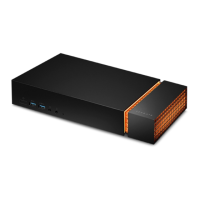
Do you have a question about the Seagate FireCuda Gaming Dock and is the answer not in the manual?
Step-by-step guide on how to connect the device's power supply.
Instructions for connecting the dock to a computer using the Thunderbolt 3 cable.
Initiates the setup process by launching the necessary file on the device.
Important safety and handling guidelines before installing an NVMe SSD.
Step 1: How to safely remove the end cap of the gaming dock.
Step 2: How to remove the internal protective plate.
Step 3: How to remove the screw securing the NVMe SSD bay.
Step 4: Guide on properly inserting the NVMe SSD into the slot.
 General
| Interface | Thunderbolt 3 |
|---|---|
| Compatibility | Windows, macOS, PlayStation 5, Xbox Series X/S |
| Dimensions | 51 mm x 270 mm x 130 mm |
| Weight | 2.6 kg |
| Capacity | 4 TB |
| Ports | USB-C, USB-A, HDMI, Ethernet |
| NVMe Slot | Yes |
| RGB Lighting | Yes |
| Additional Ports | HDMI, Ethernet |
| Cooling | Passive |










 To Next Page
