EasyManua.ls Logo

Seagate FireCuda Gaming Dock - Getting Started; Connect the power cable; Connect the Thunderbolt 3 cable

Seagate FireCuda Gaming Dock
22 pages
Print Icon
To Next Page IconTo Next Page
To Previous Page IconTo Previous Page
Loading...
Geng Started
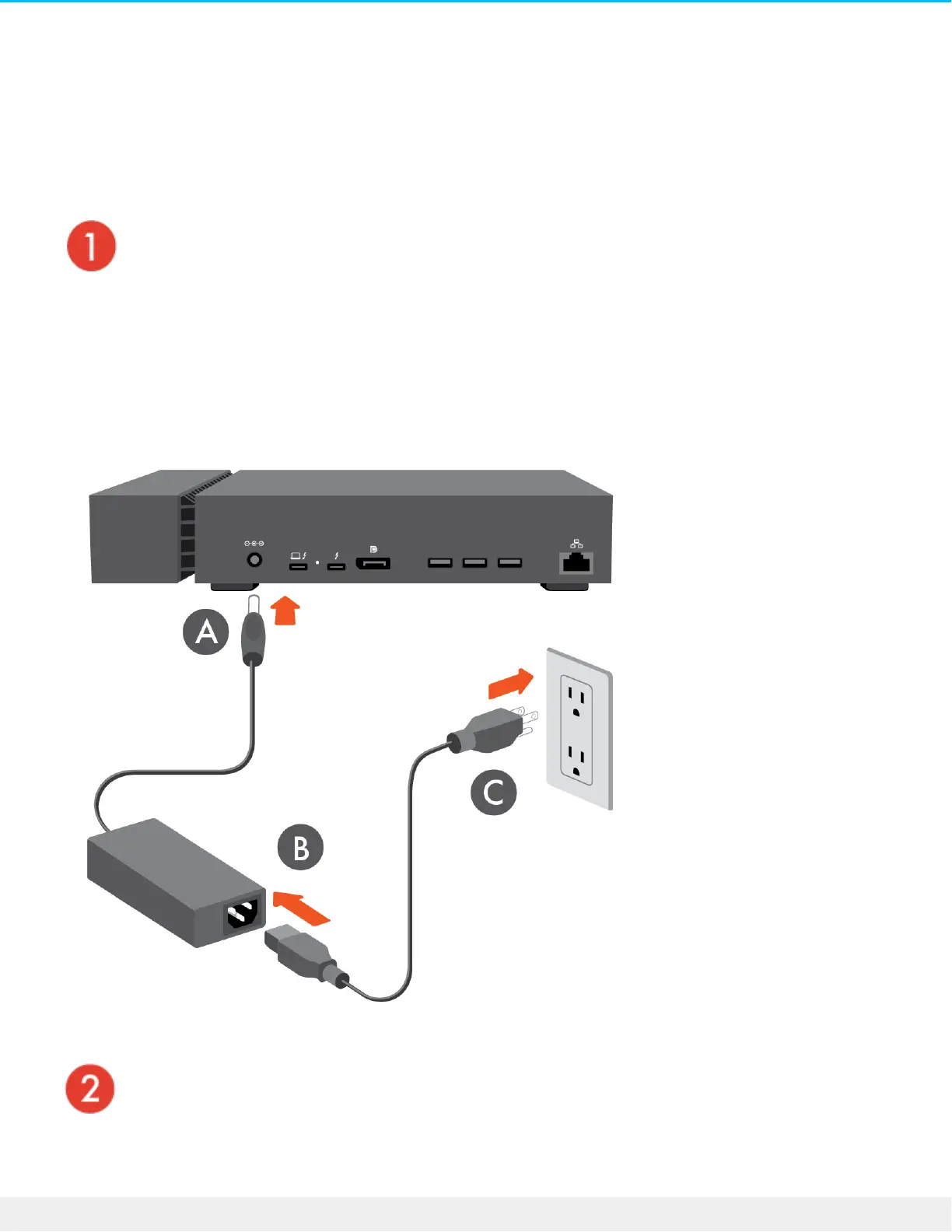
Connect the power cable
Connect the included power supply in the following order:
A. Connect the power supply to FireCuda Gaming Dock's power input.
B. Connect the power cord to the power supply.
C. Connect the power cord to a live power outlet.
Connect the Thunderbolt 3 cable
Connect the included Thunderbolt 3 cable to:

7Seagate FireCuda Gaming Dock
11/8/19

Other manuals for Seagate FireCuda Gaming Dock

Related product manuals