Minimum free disk space
600MB recommended
System overview
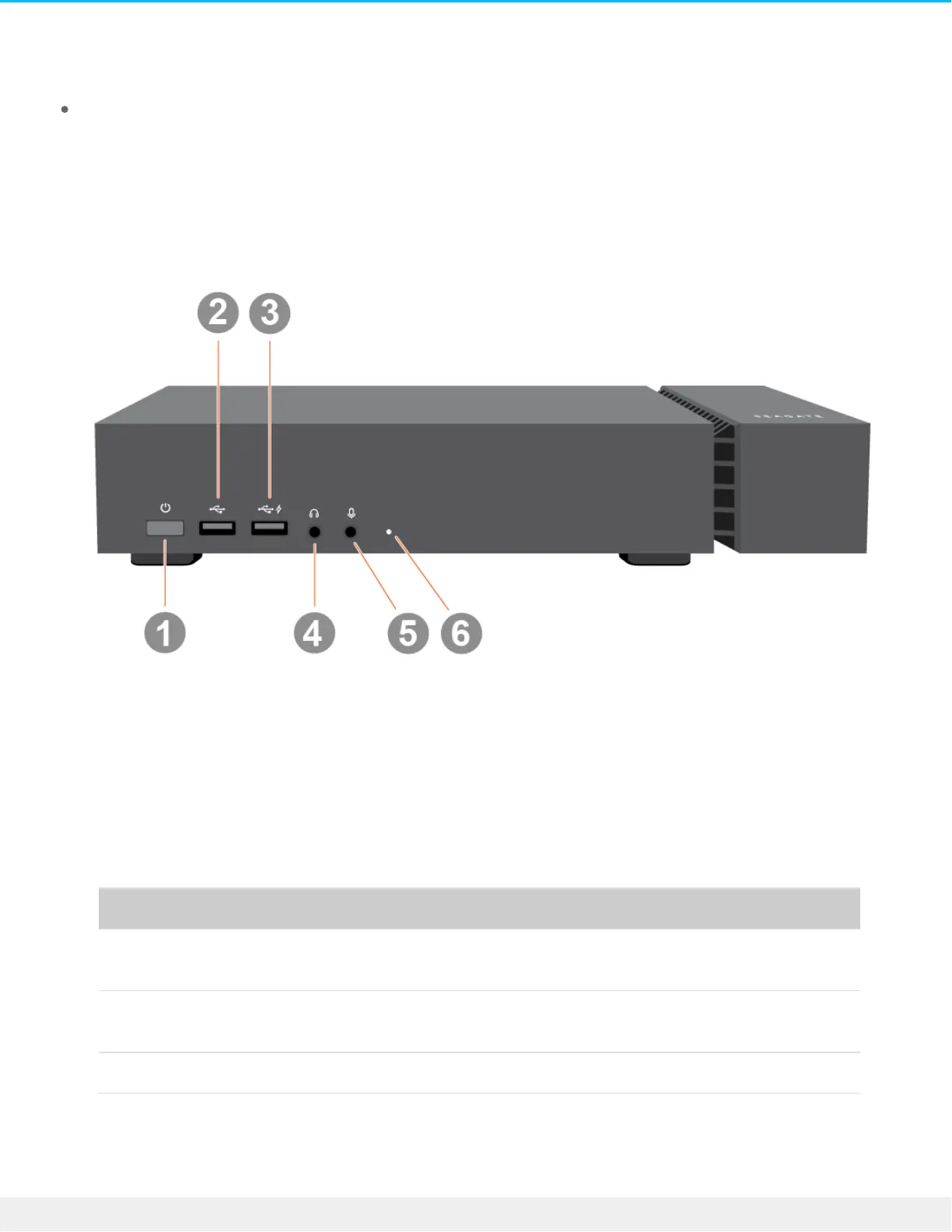
Front view
1. Power button—Powers the device on and off.
2. USB 3.1 (Gen 2) port—USB Type A connector for peripheral devices.
3. Charging USB 3.1 (Gen 2) port—USB Type A connector providing 7.5W/5V/1.5A charge for peripheral
devices.
4. Headset—3.5mm audio-out port.
5. Microphone—3.5mm audio-in/mic port.
6. Status LED— Indicates that the device is powered on and provides status signals.
Color Status
Blue FireCuda Gaming Dock's Host Thunderbolt 3 port is connected to
host computer's Thunderbolt 3 port.
Green FireCuda Gaming Dock's Host Thunderbolt 3 port is connected to
host computer's USB port.
Red (blinking) Temperature warning











 To Next Page