Introducon
Recommendaons
Intended for desktop PCs.
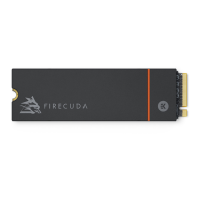
FireCuda 530R SSD's heatsink is pre-installed and should not be removed as it can damage the SSD.
With the heatsink, the product exceeds standard M.2 dimensions. Dimensions of the FireCuda 530R
SSD are 80.85mm (L) x 24.22mm (W) x 11.10mm (H). Verify that your system provides enough space
for installation.
M.2 connectors H3.2 and above are recommended for an SSD with a heatsink.
For optimal performance, provide sufficient airflow and cooling.
Before installaon
Most motherboards have more than one M.2 slot available for SSD drives. Before installing FireCuda
530R SSD:
Determine the appropriate M.2 slot on your motherboard for FireCuda 530R SSD. If another SSD
drive is already installed in the slot, you'll need to remove it during the installation.
Decide whether you want to install your computer operating system on FireCuda 530R SSD and
use it as your primary drive. See your computer or motherboard documentation for details on how
to boot from an M.2 SSD.
If you need to transfer files from another drive to FireCuda 530R SSD, consider how you will
move your data or clone your drive before starting the installation.
For optimal performance, it's recommended you use an M.2 PCIe Gen 4x4 slot. Refer to your
motherboard user manual.
Precauons
Unpack the SSD.
Inspect the SSD for any damages.
For the safety of your SSD, please take the necessary precautions to avoid electrostatic discharge.
Power down and power drain your computer according to the instructions provided in the computer
product documentation.
Back up the data from the existing storage device.
IMPORTANT Make certain your computer's BIOS is up to date before installing FireCuda
530R SSD. See your computer or motherboard documentation for information on how to
access the BIOS.
CAUTION Electrostatic discharge (ESD) can damage the SSD. Make sure that you install
the SSD at an ESD-safe workstation. Ground yourself to protect the device from any static
electricity present in your body.











 To Next Page