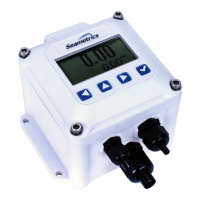
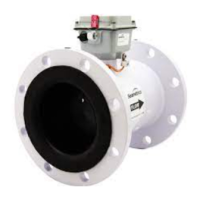
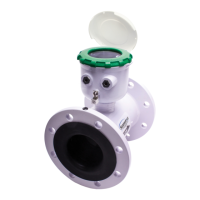
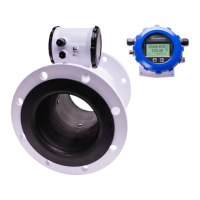
The Seametrics FT430/440/450 are microcontroller-based flow computers designed to interface with pulse output flow sensors. They compute and display flow rate and total, and generate output signals representing flow. These indicators are available in wall and meter mount configurations, with the FT430 and FT440 models also supporting panel mounting.
Function Description:
The FT430 and FT450 models feature one scaled pulse output and one pulse pass-through, while the FT440 has two scaled pulse outputs. These pulse and 4-20mA analog outputs can be used to signal external devices such as metering pumps and water treatment controls. Alternatively, one or more pulse outputs can be configured as alarm outputs. The flow computers can be password protected to prevent unauthorized resetting of the total or changing of configuration settings.
The FT450 is battery-powered, utilizing a replaceable 3.6Vdc Lithium "C" battery with an approximate 5-year life depending on usage. The FT430 can be powered by an external 7-30Vdc DC source or an optional internal AC power supply (available for wall mount only). The FT440 is a "two-wire" or "loop-powered" device, drawing power from the 4-20mA loop circuit itself. An optional internal AC power supply is available for the FT440, offering dual 24 and 12VDC outputs to power both the loop and sensors that require more power than the loop can supply.
Important Technical Specifications:
- Power:
- FT430: 7-30Vdc, 4mA
- FT440: 9-30Vdc, 4mA (4-20mA when loop-powered)
- FT450: Lithium "C", 3.6Vdc, replaceable (~5 years life)
- Display:
- Rate: 5-digit autorange
- Total: 8-digit
- Units:
- Rate Units: Gallons/Second/Minute/Hour/Day, Liter/Second/Minute/Hour/Day, Cubic Feet/Second/Minute/Hour/Day, Cubic Meters/Second/Minute/Hour/Day, Mega Liters/Day, Million Gallons/Day, Fluid Oz/Second/Minute/Hour/Day, Barrels/Second/Minute/Hour/Day.
- Total Units: Gallon, Gallon x 1000, Liters, Mega Liter, Cubic Meter, Acre Feet, Cubic Feet, Cubic Feet x 1000, Million Gallon, Acre Inch, Fluid Ounce, Barrels.
- Outputs:
- Pulse Output 1: Scaled pulse output, high alarm output or low alarm output. Optoisolated on FT430 and FT440. Fixed width of 100ms, max 6.5Hz.
- Pulse Output 2: Pulse pass-through (FT430, FT450), or scaled pulse output, high alarm output or low alarm output (FT440).
- Loop Power Output (FT440 only): 4-20mA Loop.
- Sensus Smart Output: Optional.
- Set P Range: 0.1 - 99999.9 units/pulse.
- Input: 5V pulse or contact closure (FT430, FT440), Micropower GMR Sensor (square wave) (FT450).
- Input Range: 0.75 - 2000Hz (FT430, FT440), 0.75 - 550Hz (FT450).
- K-Factor Range: .001 - 999999.999.
- Flow Alarm Output Range: 0.1 - 99999.9.
- Operating Temperature: -5° to 55° C (23° to 131° F).
- Non-Operating Temperature: -40° to 75° C (-40° to 158° F).
- Environmental: NEMA 4X, IP67.
- Regulatory: CE Mark.
Usage Features:
- K-Factor Programming: The flow computer must be programmed with the K-factor, which represents the number of pulses the meter produces per gallon of flow. The K-factor for Seametrics flow sensors can be found on the model-serial label. For depth-adjustable sensors, a calculator on the Seametrics website can be used.
- Menu Navigation: The device features a user-friendly menu system with left/right keys for navigation and cursor positioning, an up arrow for scrolling through values, and an enter key (check mark) to save entries and move between screens.
- Home Screen: Displays total flow volume and flow rate. Four buttons below the LCD display provide access to menu screens for viewing and changing setup parameters.
- Total Volume Units (T UNIT): Allows selection of units for total volume display.
- Decimal Places (SET D): Configures the number of decimal places displayed in the total volume.
- Pulse Output Configuration (SET P or SET A): Allows viewing and changing the volume of flow totalized per pulse sent out for Pulse Output 1. Units follow the rate display. For the FT440, Pulse Output 2 can also be configured.
- 20mA Output Setting (SET 20 - FT440 ONLY): Used to input the flow rate at which 20mA (max) output is desired.
- Total Reset (RESET): Resets the total flow volume to zero. This feature may not be available if the -64 non-resettable total option is ordered.
- Secondary Menu Functions: Accessible by pressing the up arrow four times while EXIT is highlighted.
- INP (Input Settings): Configures filter (Set F), jitter (Set J), enable REED mode (50Hz maximum pulse input), and enable BURST mode. The filter setting helps with display jumping due to flow conditions. Jitter adds a time delay for start-up conditions. BURST mode is for input pulses delivered in groups or bursts.
- OUTP (Output Settings): Configures alarms, pulse out, and 4-20mA settings. The FT440 has two alarm outputs, while FT430 and FT450 have one. Scaled pulse outputs can be changed to high or low alarms. Hysteresis (% value) can be set for alarm state changes.
- PCODE (Passcode): Allows setting a passcode to access protected features and change settings.
- Protected Features: Accessible via the PCODE tab in the secondary menu.
- Set CD: Enter a user-created numerical passcode.
- Lock: Locks menu functions to prevent unauthorized changes.
- E/D R: Disables or enables the total volume reset function.
- PCNT: Keeps a running tally of the number of times the passcode has been used.
- Power Saving (FT450): To conserve battery life, the display screen goes blank after approximately 3 minutes of non-use. Any button press reactivates the display.
- Cord Grips: Seametrics supplies properly sized cord grips for openings and threads in meters and housings. These must be well sealed onto the housing and cable to prevent moisture ingress.
- EGND (Additional Protection): For protection against voltage spikes (e.g., lightning), the EGND terminal should be wired to a good earth ground. For wall mount units with optional power supplies, a separate green or green/yellow wire from the EGND terminal to the G terminal of the AC input voltage plug is recommended.
Maintenance Features:
- Environmental Protection: When opening an FT unit or meter, ensure the housing is kept clean, dry, fully sealed, and protected from surroundings to prevent damage to electronics from moisture and dirt.
- Gasket Condition: When installing or re-installing any FT or housing cover, ensure the gasket is in good condition, clean, and undamaged. Snugly torque fasteners for a good seal.
- Threaded Openings: All threaded openings in meter housings should be filled with a plug or a cord grip with a cable gland. If a plug is removed, ensure a cord grip with cable gland is installed and the thread is sealed with a thread sealant or O-ring.
- Cable Sealing: Use Seametrics-supplied cables. If other cables are used, ensure they are round and smooth for proper cord grip sealing. Cables that are sealed to the housing but open at the weather end can draw moisture into the housing over time, causing electronic failure.
- Troubleshooting Guide: The manual includes a comprehensive troubleshooting section covering common issues like a blank display, jumping values, missing pixels, incorrect flow rate readings, and pulse output problems. It provides probable causes and suggested actions, such as checking power, disconnecting sensors, replacing batteries, adjusting settings (filter, K-factor, Set P, 4-20mA), rerouting wires, checking sensor manuals, and contacting distributors for return/replacement.
- Totalizer Memory: The totalizer's memory is updated every 15 minutes. If power is lost, the last written value is retained, but any flow between the last write and power loss will not be updated.

 Need help?
 General

 To Next Page