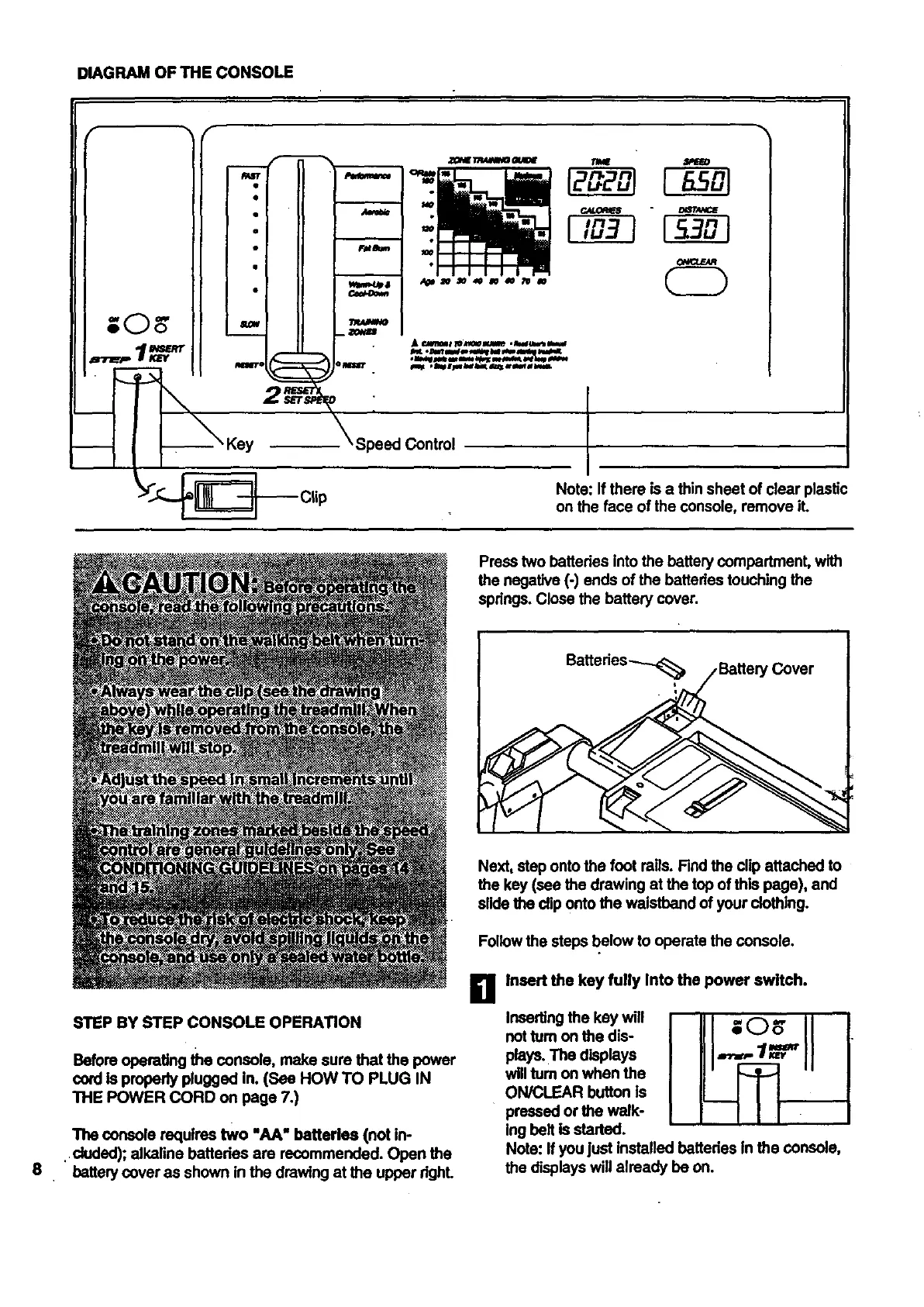
DIAGRAM OF THE CONSOLE
I °
Speed Control
Note: If there is a thin sheet of clear plastic
on the face of the console, remove iL
Press two battedes into the battery compartmenL with
the negative (-) ends of the battados touching the
spdngs. Close the battery cover.
8
STEP BY STEP CONSOLE OPERATION
Before operating the console, make sure that the power
cord Is properly plugged in. (See HOW TO PLUG IN
THE POWER CORD on page 7.)
The console requires two "AA" batteries (not in-
. duded); alkaline bettedes are recommended. Open the
battery cover as shown in the drawing at the upper dghL
Next, step onto the foot roils. Find the clip attached to
the key (see the drawing at the top of this page), and
slidethe clip onto the waistband of your clothing.
Follow the steps below to operate the console.
Ii1 Insert the key fully Into the power switch.
Inserting the key will
not tum on the dis-
plays.The displays
will tum on when the
ON/CLEAR button is
pressed or the walk-
ing belt is started.
Note: If you just installed batteries In the console,
the displays will already be on.





 To Next Page