The essentials
●
R
educing st
or
ed speed during CCS regula-
tion: press button
2
in t
o lower the
speed by 1 km/h (
1 mph). Speed is r
educed
until reaching the new stored speed.
●
Switching off the CCS: Move switch
››› Fig. 53
1
to
. The system is disconnec-
t
ed and the memorised speed is del
eted.
Operation using the third lever
●
Switching on the CCS: move the third lever
to ››› Fig. 54. The system switches on but it
does not control the speed as no speed has
been programmed.
●
Activating the CCS: press the button
››› Fig. 54. It memorises and maintains the
current speed.
●
Temporarily switching off the CCS: move
the lever to ››› Fig. 54 and release it or
press the brake pedal. The cruise control sys-
tem is switched off temporarily.
●
Reactivating the CCS: move the lever to
››› Fig. 54 and release it. The memo-
rised speed is saved and controlled again.
●
Disconnect the CCS: turn the key to posi-
tion ››› Fig. 54. The system is disconnected
and the memorised speed is deleted.
›››
in Cruise control operation on
page 276
››› page 275
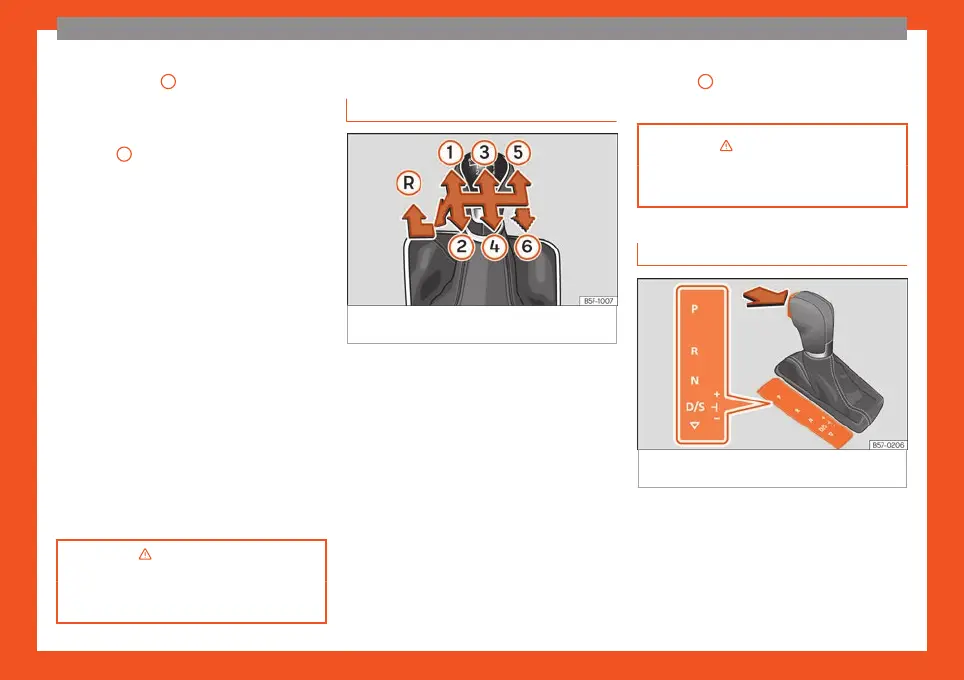
Gearbox lever
Manual gearbo
x
Fig. 55
Gear shift pattern of a 5 or 6-speed
manual gearbo
x.
The position of the gears is indicated on the
gearbo
x l
e
ver ››› Fig. 55.
●
Press the clutch pedal and keep your foot
right down.
●
Move the gearbox lever to the required po-
sition.
●
Release the clutch.
Selecting reverse gear
●
Press the clutch pedal and keep your foot
right down.
●
With the gearbox lever in neutral, push it
downwards, move it to the left as far as it will
go and then forwards to select reverse
››› Fig. 55
R
.
●
Release the clutch.
›››
in Changing gear on page 253
››› page 253
Automatic transmission*
Fig. 56
Automatic transmission: selector lever
positions.
Parking lock
R
e
v
erse gear
Neutral (idling)
Drive (forward)
Tiptronic mode: pull the lever forwards
(+) to go up a gear or backwards (–) to
go down a gear.
P
R
N
D/S
+/–
42



 To Next Page