Lights and visibility
The light distribution of the halogen and full-
LED he
a
dlights
allows the specific “tourist
light” values to be met without the need for
stickers or changes in the settings.
Note
“Tourist light” is only allowed temporarily. If
you are p
lanning a long stay in a country that
drives on the other side, you should take the
vehicle to an Authorised Technical Service to
change the headlights.
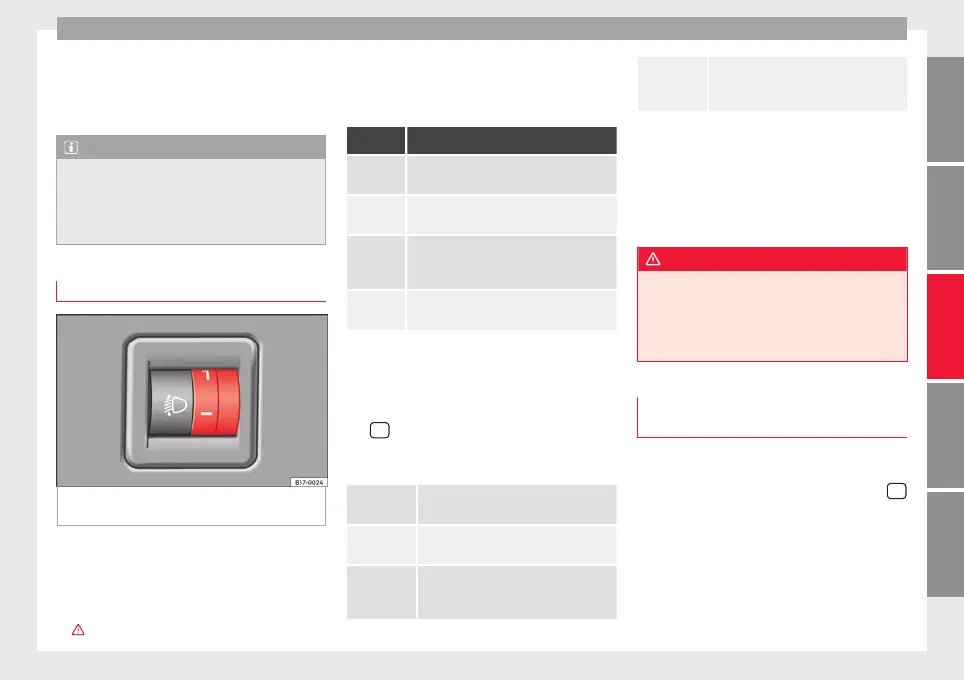
Headlight range control
Fig. 145 Next to the steering wheel: Head-
light
r
an
ge control
The headlight range control ›
›
›
Fig. 145 is
modified according to the value of the head-
light beam and the vehicle load status. This
offers the driver optimum visibility and the
headlights do not dazzle oncoming drivers
›››
.
The headlights can only be adjusted when
the dip
ped be
am i
s switched on.
To reset, turn switch ››› Fig. 145:
Value Vehicle load status
a)
Two front occupants, luggage compart-
ment empty
All seats occupied, luggage compartment
empty
All seats occupied, luggage compartment
full. With trailer and minimum drawbar
load.
Driver only, luggage compartment full With
trailer and maximum drawbar load.
a)
If the vehicle load does not correspond to those shown in the
table, it is possible to select intermediary positions.
OR:
Using the Easy Connect system, by means of
the
button and the function button SET-
TINGS > Lights > Headlight height
adjustment
›
›
›
page 33).
Setting 0
Two front occupants, luggage compart-
ment empty
Setting 1
All seats occupied, luggage compart-
ment empty
Setting 2
All seats occupied, luggage compart-
ment full. With trailer and minimum
drawbar load.
Setting 3
Driver only, luggage compartment full
Driving with trailer and minimum draw-
bar load.
Dynamic headlight range control
The contro
l is not mounted in vehicles with
dynamic headlight range control. The head-
light range is automatically adjusted accord-
ing to the vehicle load status when they are
switched on.
WARNING
Heavy objects in the vehicle may mean that
the headlight
s dazzle and distract other driv-
ers. This could result in a serious accident.
●
Adjust the light beam to the vehicle load
status so that it does not blind other drivers.
Lighting of the instrument panel,
s
c
r
eens and controls
Depending on the model, the lighting of the
in
s
trument
panel and controls can be adjus-
ted in the Easy Connect system, using the
button and the SETTINGS f
u
nction b
utton
›››
page 33.
With the ignition on and without light activa-
tion, the instrument panel lighting remains
activated in daytime light conditions. The
lighting is reduced as the exterior light di-
minishes. In some cases, e.g. when driving
»
151
Technical dataAdviceOperationEmergenciesSafety



 To Next Page