Operation
through a tunnel without the
f
u
nction
active, the instrument panel lighting may
even switch off. The objective of this function
is to provide the driver with a visual indica-
tion that he or she should activate the dip-
ped beam.
Interior and reading lights
1)
Read the additional information carefully
›››
page 31
Glove compartment and luggage compart-
ment lighting*
When opening and closing the glove com-
partment on the front passenger side and the
rear lid, the respective light will automatically
switch on and off.
Footwell lighting*
The lights in the footwell area below the dash
(driver and front passenger sides) will switch
on when the doors are opened and will de-
crease in intensity while driving. The intensity
of these lights can be adjusted using the ra-
dio menu (see Easy Connect > Light
Settings > Interior lighting
›››
page 33).
Ambient light*
The ambient light lights up the area of the
centre console, the footwell area and, de-
pending on the version, the front door pan-
els.
The ambient lighting in the door panels may
change colour. The brightness and colour of
these lights can be adjusted using the radio
menu (see Easy Connect > Light Set-
tings > Interior lighting
›››
page 33).
Note
The reading lights switch off when the vehi-
cle i
s locked using a key or after several mi-
nutes if the key is removed from the ignition.
This prevents the battery from discharging.
Visibility
S
u
n
visors
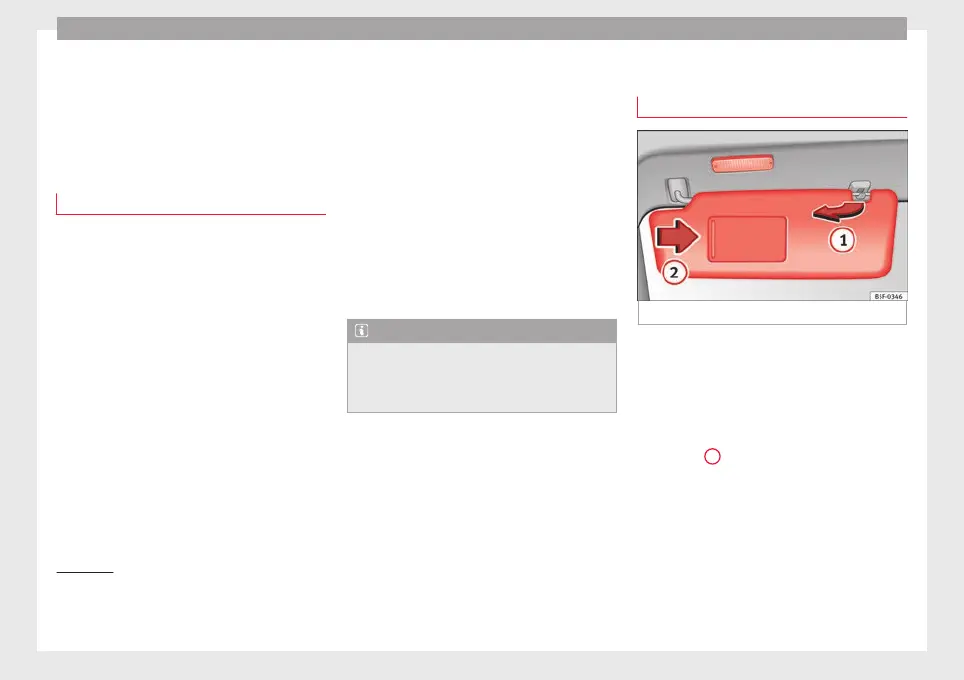
Fig. 146 Sun visor
Options for adjusting driver and front pas-
sen
g
er s
un visors:
●
Lower the sun visor towards the wind-
screen.
●
The sun visor can be pulled out of its
mounting and turned towards the door
››› Fig. 146
1
.
●
Swing the sun visor towards the door, lon-
git
udin
al
ly backwards.
1)
Depending on the level of equipment fitted in the
vehicl
e, LEDs can be used for the following interior
lights: front courtesy light, rear courtesy light, foot-
well light, sun blind and glove compartment light.
152



 To Next Page