Operation
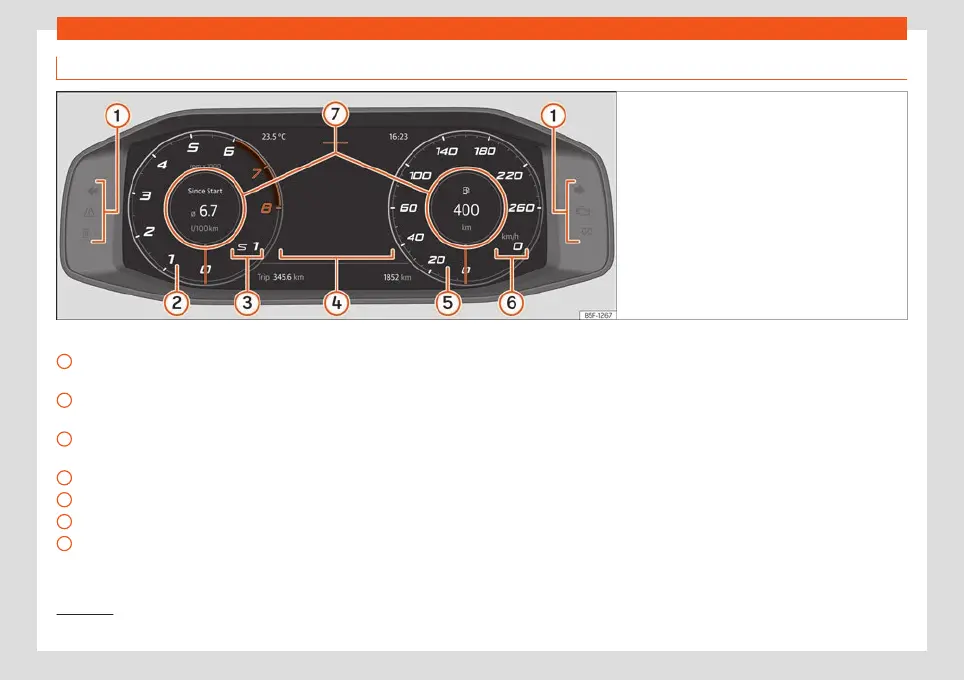
Digital dashboard (SEAT Digital Cockpit)
Fig. 55 SEAT Digital Cockpit on the instrument
panel (classic view).
Details of the instruments:
Contr
ol and w
arning l
amps
›››
page 80
Revolution counter. Revolutions per mi-
nute the engine is running
›››
page 74.
Gear engaged or position of the selec-
tor lever currently selected
Screen display
›››
page 65
Speedometer
Digital speed display
Information Profile
›››
page 64.
1
2
3
4
5
6
7
The Digital SEAT Cockpit is an instrument
panel digit
al with monochr
ome scr
een in col-
our high resolution. It has a 4 views accessi-
ble using the button of the multifunction
steering wheel. By selecting different infor-
mation profiles, indications other than the
classic circular instruments can be displayed,
such as navigation data, multimedia informa-
tion or travel data.
The 4 views are:
●
Classic
●
Assistance systems
●
Navigation*
●
Night
All views will display information on the
screen about audio, phone, travel data, vehi-
cle status, navigation
1)
and driving aids
1)
.
Information profiles
Using the buttons / on the multifunction
steering wheel you can navigate through the
different information of the SEAT Digital
Cockpit.
Information on the vehicle status, travel data
and assistants will be displayed on the left
side.
1)
Depending on the version.
64



 To Next Page