Wiring
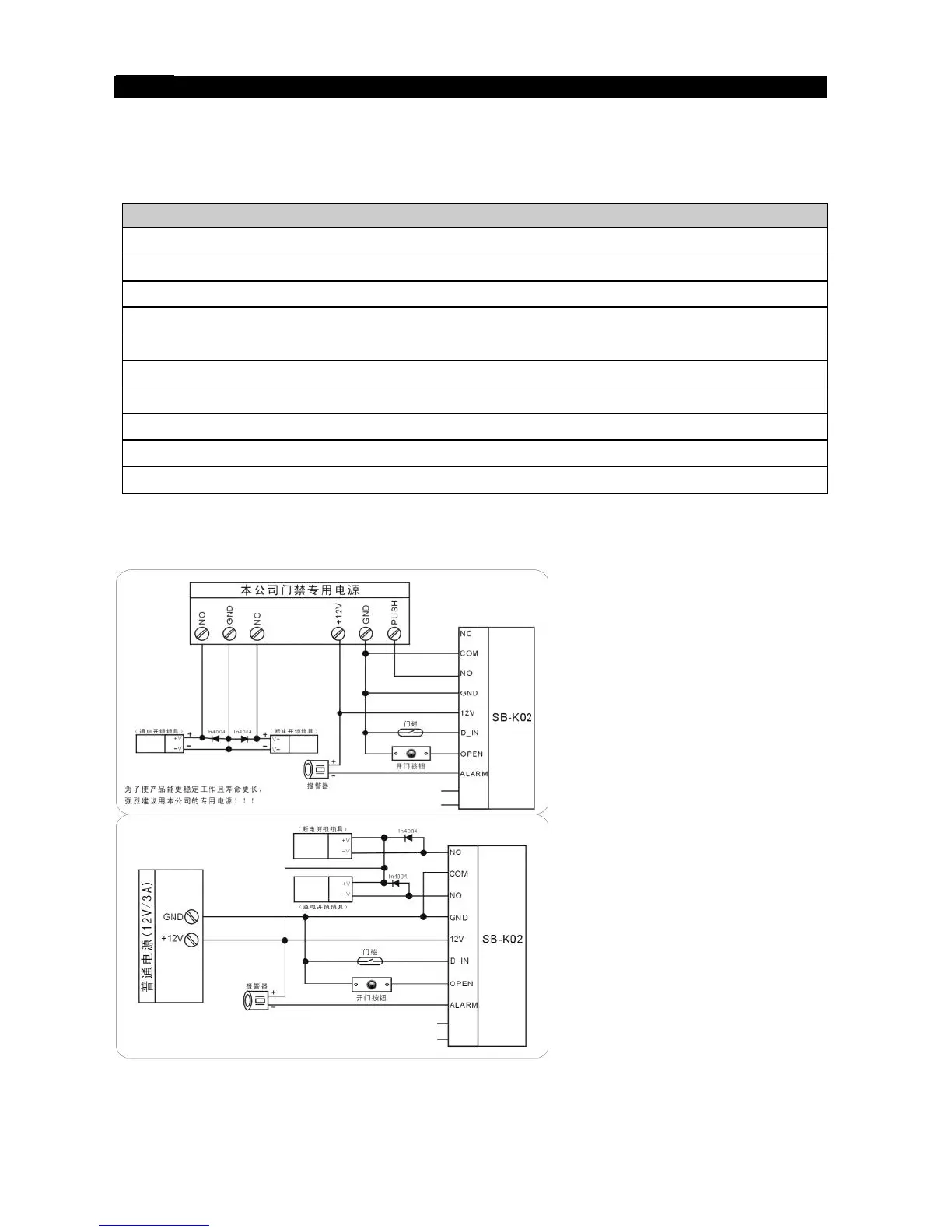
1. Unplug the cable harness and connect the necessary cables, (See Figure 5).
2. Tape any wires that are unused.
3. Plug the cable harness , (See Figure 5)
4. Attach the front cover, (See Figure 3).
Terminal Wire Connector 1 Function
10 Green Invalid
9 White Invalid
8 ALARM Grey Alarm output
7 OPEN Yellow To Door Remote Control Button Then Negative
6 D_IN Brown To Door Contact Then To Door In
5 12V Red (+) 12Vdc Positive Regulated Power Input
4 GND Black (-) Negative Regulated Power Input
3 NO Blue Door Strike Relay N/O
2 COM Purple Door Strike Relay Com
1 NC Orange Door Strike Relay N/C
DO NOT PLUG ADAPTOR OUR TRANSFORMER INTO MAINS UNTIL ALL WIRING HAS
BEEN COMPLETED AND THE FRONT COVER SECURED.
Figure 5


 To Next Page