Starting up the device • 75
17-10-07-653-100_01-2020B
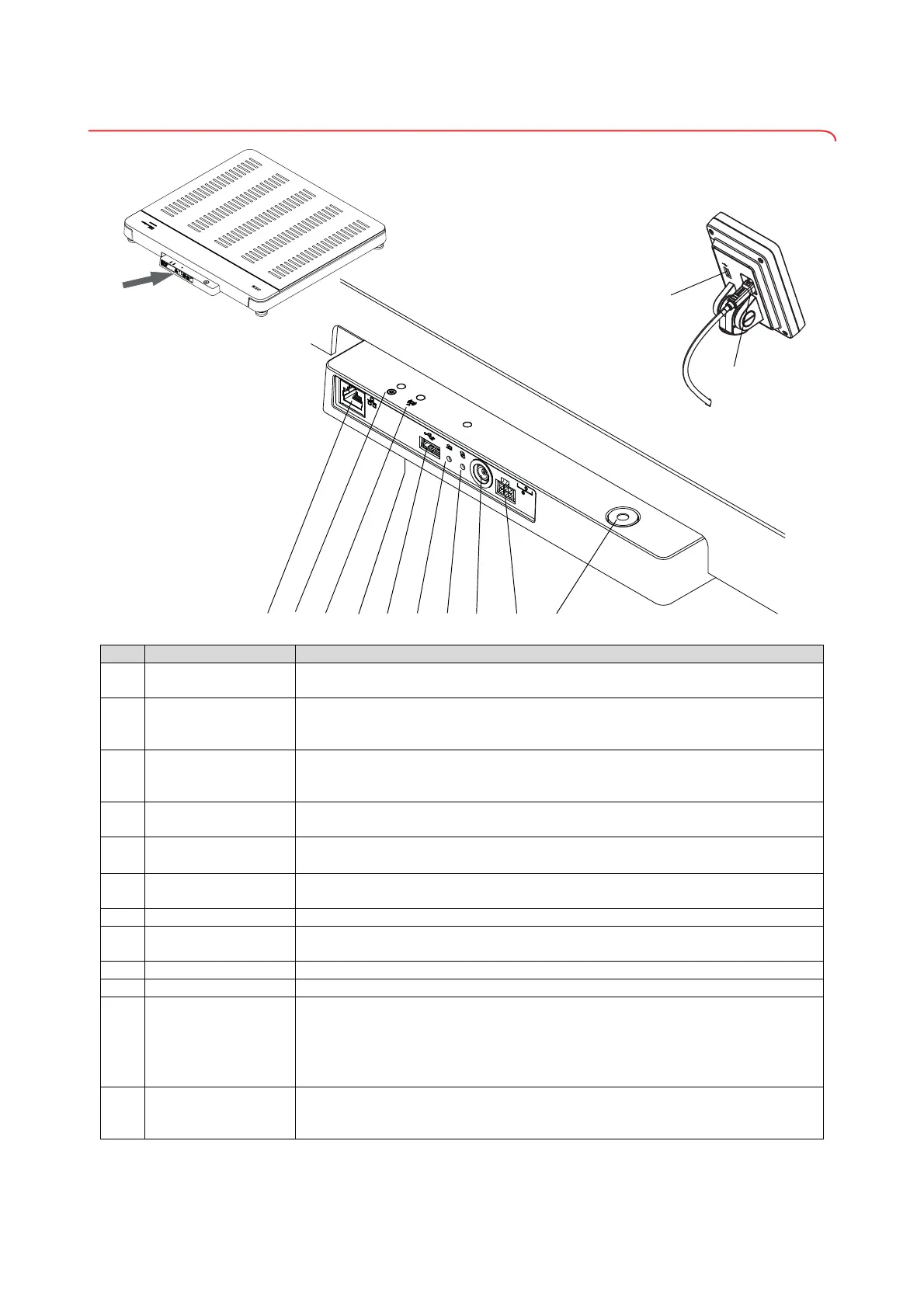
5.2 Interfaces
Item Device component Function
1
LAN interface
Used to connect the device to the EMR System in your institution (alternative to WiFi
connection,
seca connect 103 software required).
2
Power LED
• Illuminated in green: Device is ready for use
• Illuminated in red: Device is defective
• Flashes green: Device is active as access point
3
Network LED
• Flashes green: Network connection is being established
• Illuminated in green: Network connection is established
• Illuminated in red: Network connection is interrupted
4
WiFi module (internal)
Used to connect the device to the EMR System in your institution (alternative to LAN
connection,
seca connect 103 software required).
5
USB interface, weighing
platform
Used to connect a barcode scanner ➔ Optional accessories and spare parts,
page 111
6
Reset key
• Press and hold (approx. 8 seconds): Reset settings
• Press briefly (approx. 1 second): Activate/deactivate access point function
7
WPS button Establish WiFi connection via WPS
8
Power supply
connection
Used to connect the plug-in power supply unit
9
Display socket • seca 651/650: Used to connect the multifunctional display
10
Spirit level Indicates whether the device is horizontal
11
USB interface, multi-
functional display
• Used to connect a barcode scanner ➔ Optional accessories and spare parts,
page 111
• Recommended if the multifunctional display is mounted directly on the device;
accessory required: Scanner holder
seca 463 ➔ Optional accessories and spare
parts, page 111
12
Display interface
• Used to supply the multifunctional display with power
• Used for data transmission between the multifunctional display and the device
electronics



 To Next Page