Operation • 83
17-10-07-653-100_01-2020B
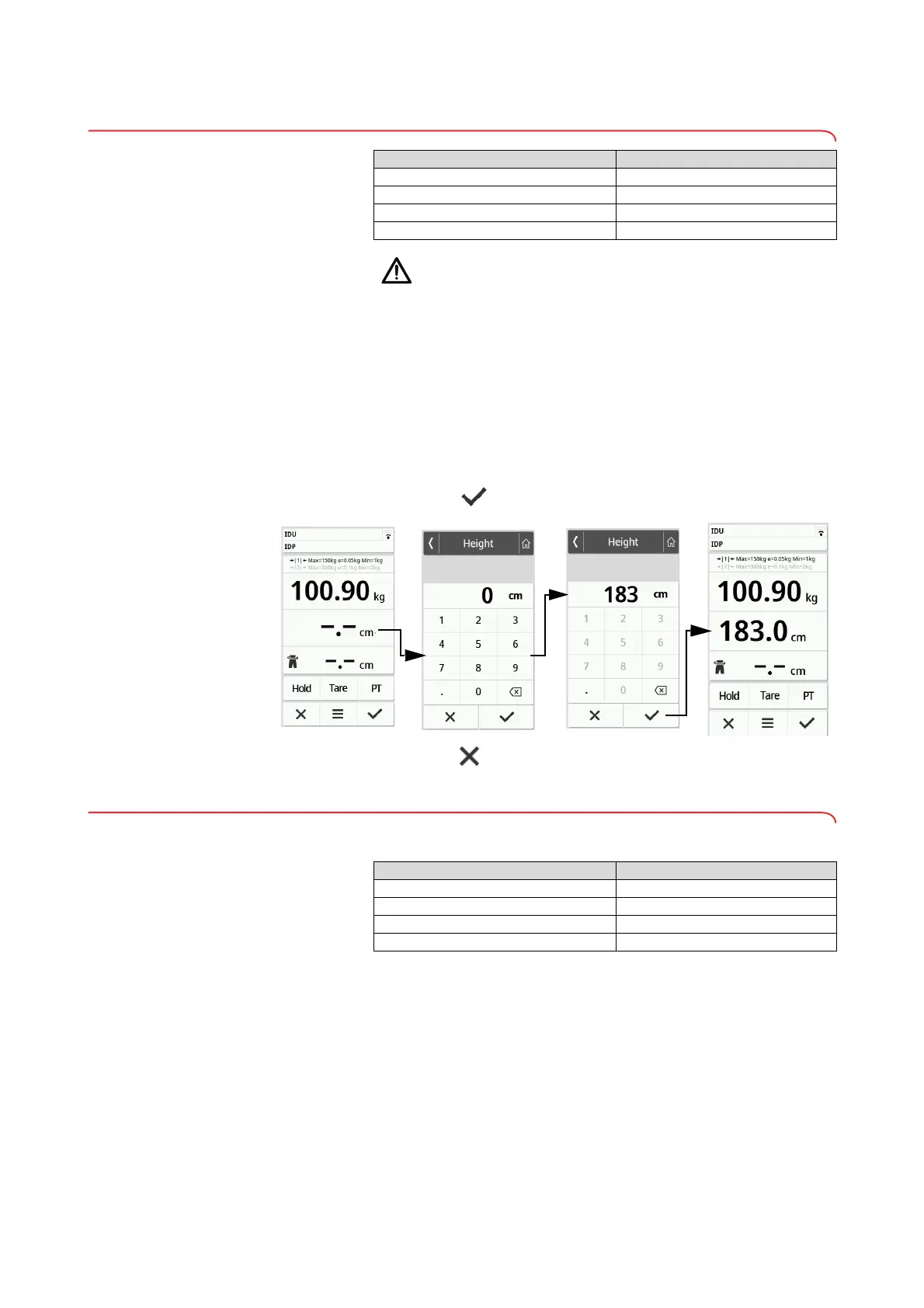
6.3 Entering the height manually
CAUTION!
Patient hazard
In order to avoid misinterpretations, measuring results for medical use
must be displayed and used in SI units (weight: Kilograms/grams,
length: Meters/centimeters) only. Some devices offer the ability to dis-
play measuring results in other units. This is only an additional func-
tion.
► Use the results exclusively in SI units.
► The use of measuring results in non-SI units is the sole responsibility
of the user.
1. Press the Height field.
2. Enter the height.
3. Press the key to confirm your entry.
4. Press the key to clear your entry.
6.4 Using extended weighing functions
Taring additional weight (tare)
Use the Tare function to prevent an additional weight (e.g. a towel) from
affecting the patient’s weight value.
NOTICE!
Incorrect measurement as a result of force shunt
If an additional weight, e.g. a large towel, touches the surface on
which the scale is stood, the weight will not be measured correctly.
► Make sure that additional weights are only placed on the scale's
weighing platform.
Device mode Function available
Basic •
Advanced •
Expert •
Service •
Device mode Function available
Basic –
Advanced •
Expert •
Service •



 To Next Page